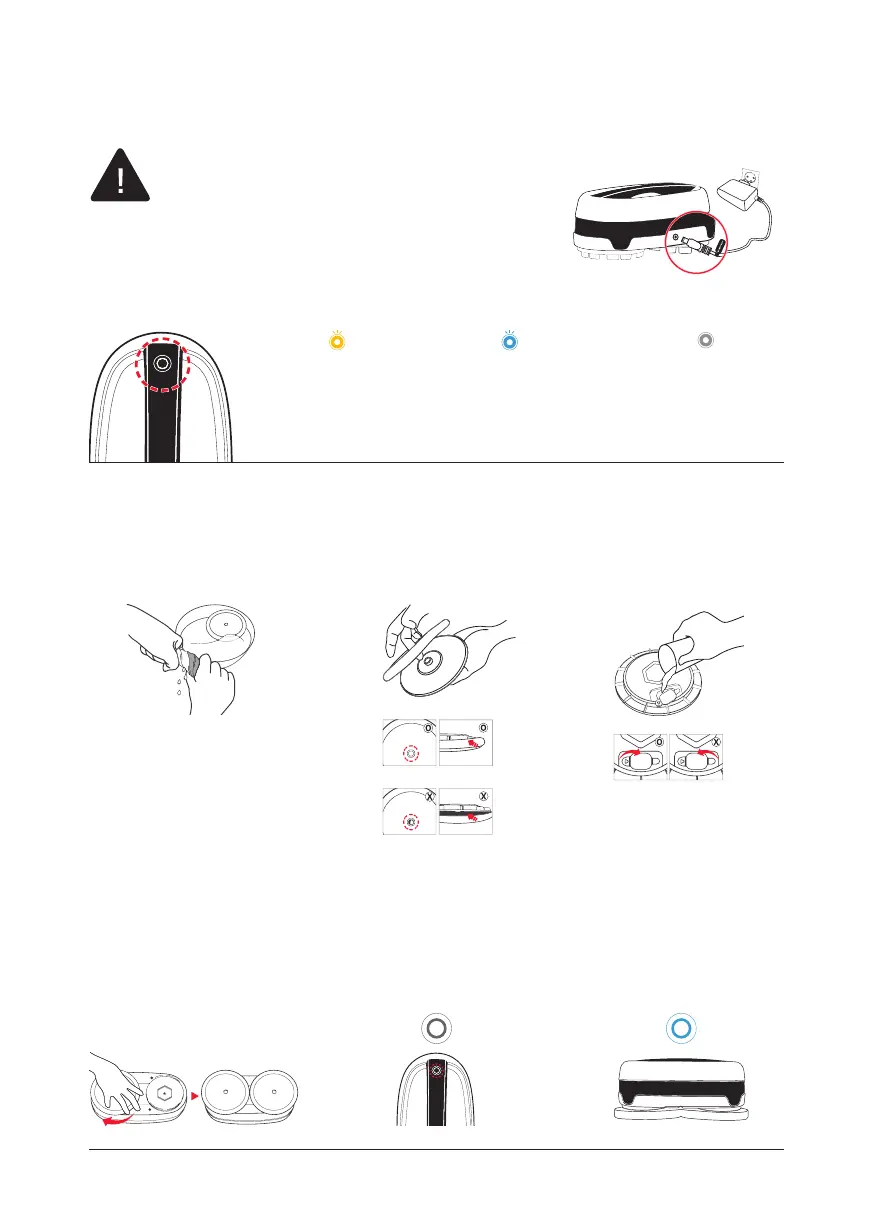
How to use and charge
• Please charge the product fully before the rst
operation.
• When charging the battery, the button on the
main unit and the remote control does not work.
• Do not use any other power adapter other than
the adapter which came with the unit.
LED is OFF
Full Battery
Blue LED Blinks
Medium Battery Level
Yellow LED Blinks
Low Battery Level
1
Wet the mops throughly in water
and apply them in the main
unit after wringing them out.
3
Open the rubber cap of the
water supply mop kit and ll
the water into the water tank.
2
Attach the mop pads to t the
joint parts to the holes of the
water supply mop kit.
4
Close the rubber caps and
attach the reservoirs under
the Everybot Edge. Press the
attachment while you rotate it
until a clear click is heard.
6
Press the operation button on
the main unit or play button of
a remote control to startthe
machine.
5
Press the operation button
more than 2sec. to turn on the
main unit.
Correct
Wrong
Correct
Wrong
15


 To Next Page