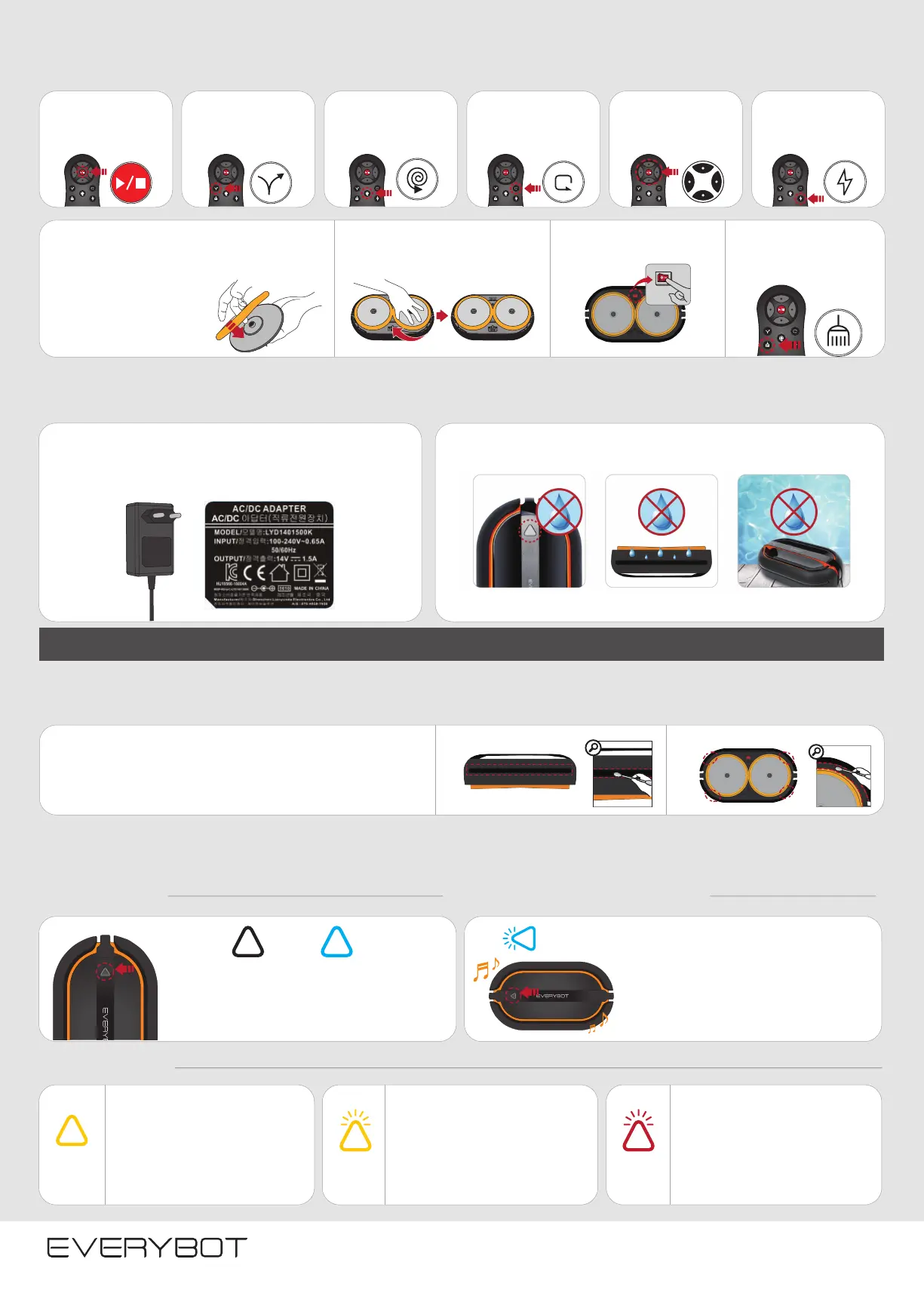
Users can select different cleaning modes by using the remote control depending on the floor conditions.
① Attach the microfiber mop to
fit the joint parts well to the
holes of the water supply
mop kit.
② Attach the water supply mop
kit into the bottom of the main unit.
③ Turn on the power switch
on the bottom of the main
unit.
④ Start ‘dry cleaning mode’
by pushing the button of
the remote control.
Select Cleaning Mode
Precautions When Using the Product
Cleaning Sensors
This is Not a Malfunction. Please Check the Following.
LED Lamp is Off
Check LED Lamp
Alarms Sounds During Cleaning
Auto Cleaning
Dry Mop
Cleaning Mode
As a basic cleaning mode, cleans
the entire space efficiently.
Y Curve Cleaning
Thoroughly cleans with Y curve
patterns as if wiping floor
by hands.
Focus Cleaning
Intensively cleans the
surrounding area relative to the
main unit current location.
Corner Cleaning Mode
Cleans the corner to repeat turn
180° along the walls.
Manual Cleaning Mode
Clean to move the main unit
where user wants to go by using
the remote control.
Turbo Mode
Clean the whole space faster by
the increased motor speed.
· Before charging the product, please check to see if you are using
the proper adapter which came with the unit.
※If connected with a non authorized adapter, the product may be damaged.
※Do not wet the mop.
· If water gets inside the main unit, it will become damaged.
※If the water gets inside the main unit, do not use it and contact the customer center.
· If there is dust or the foreign substance in sensors, gently wipe them
by a cotton swab or dry cloth.
· If sensors are contaminated severely, wipe them by slightly wet
cotton swab.
※Do not clean sensors by water, benzene or alcohol.
· If the main unit does not work for 5 minute on
switching on the power, the LED lamp is turn off.
· If pushing the button of the main unit or the remote
control, the robot cleaner starts cleaning.
· The battery is low so that the product
does not work.
· Please charge the battery
· When the battery is charging, the button
of the main unit or remote control does
not work.
· Check whether the front or rear bumper is
pushed.
· Check if there is any foreign substance in
the cliff detection sensors in the bottom of
the main unit.
· Check if there is any foreign substance in
the obstacle detection sensors in the front
of bumper.
· Check whether connecting the authorized
adapter.
· Start the robot cleaner again after turning
on/off the system power switch
· If the same symptom is repeated, please
turn off the system power switch and
contact the customer center.
· After 50 minute cleaning, the main unit
sounds the alarm to change mops and fill
water in the water supply mop kit.
· For the better cleaning, please start the
cleaning again after changing new mops and
filling water in the water supply mop kit.
Artificially disassembling the product may result in damage. | If there is a problem with operation, please contact customer service center. | The warranty period of the battery is one year.
Obstacle Detection Sensor
LED Off LED On
Blue LED
Blinks
Yellow LED
On
Yellow LED
Blinks
Cliff Detection Sensor
Red LED
Blinks
Be careful not to get water
inside the operating button.
Do not turn the main unit upside
down when there is water in the
water supply mop kit.
Do not put the robot cleaner in
the humid places (toilet, veranda
in rainy day)
Customer Service Center: info@myelicto.com


 To Previous Page
 Loading...