CPU Voltage: this monitors the current VCore of the CPU. This will vary on its own,
however in override mode it can be set to a stac value. CPU voltage is read in
millivolts, so 1000mv is 1.0 volts.
System temp: This is the temp of the PCH (chipset) on the motherboard. This will
typically be lower than the CPU temp.
Memory clock: This is the frequency your system RAM is running at. The default
speed is 2666MHz
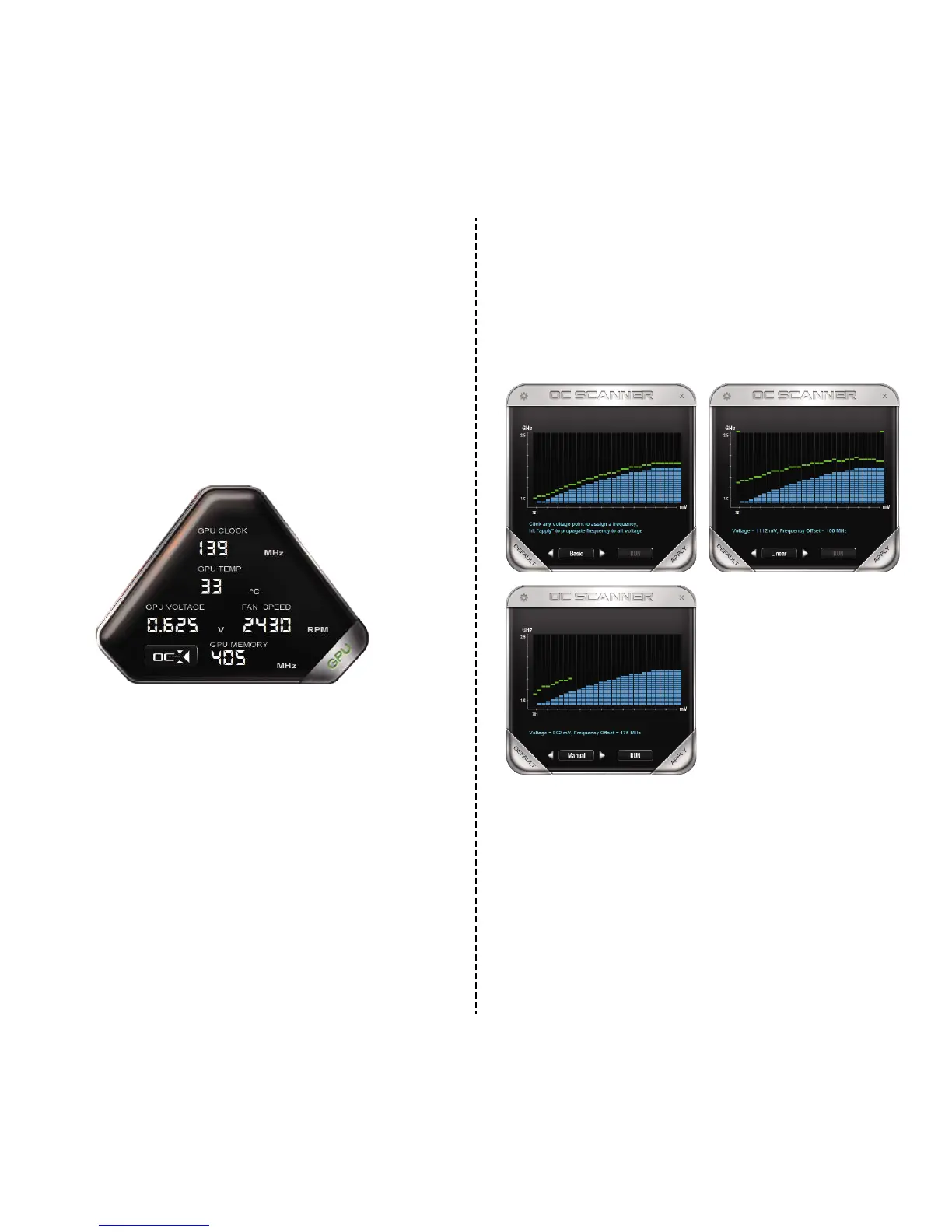
Click on the OC buon in the lower le to bring up the new overclocking tool, which is
able to provide an auto tune. This funcons much like the desktop version of the 10
series and Precision XOC. With full support for Basic, Linear, and Manual curves.
GPU Dashboard:
GPU Clock: Current speed of the core clock for the GPU. This will vary based off of
load and temperature.
GPU Temp: Current GPU temperature, this will vary but will typically between 25
℃
and 35
℃
at idle depending on ambient temps, and has a maximum safe limit of
86
℃
under heavy load.
GPU Voltage: Current voltage of the GPU, this will vary based on load as well as
any overclocks applied.
Fan RPM: This is the speed at which the cooling fan runs. This will vary based off of
temperature of internal components, the fan curve is set from the factory.
GPU Memory: This is the current frequency the memory is running at. This will
vary based on load. Also it is NORMAL that the memory clock will be displayed
at half the actual speed, as this is part of the funcon of DDR RAM.
98


 To Next Page