Function introduction
Function introduction
4
8
3
2
4
5
7
3
8
2
3
4
5
3
7
4
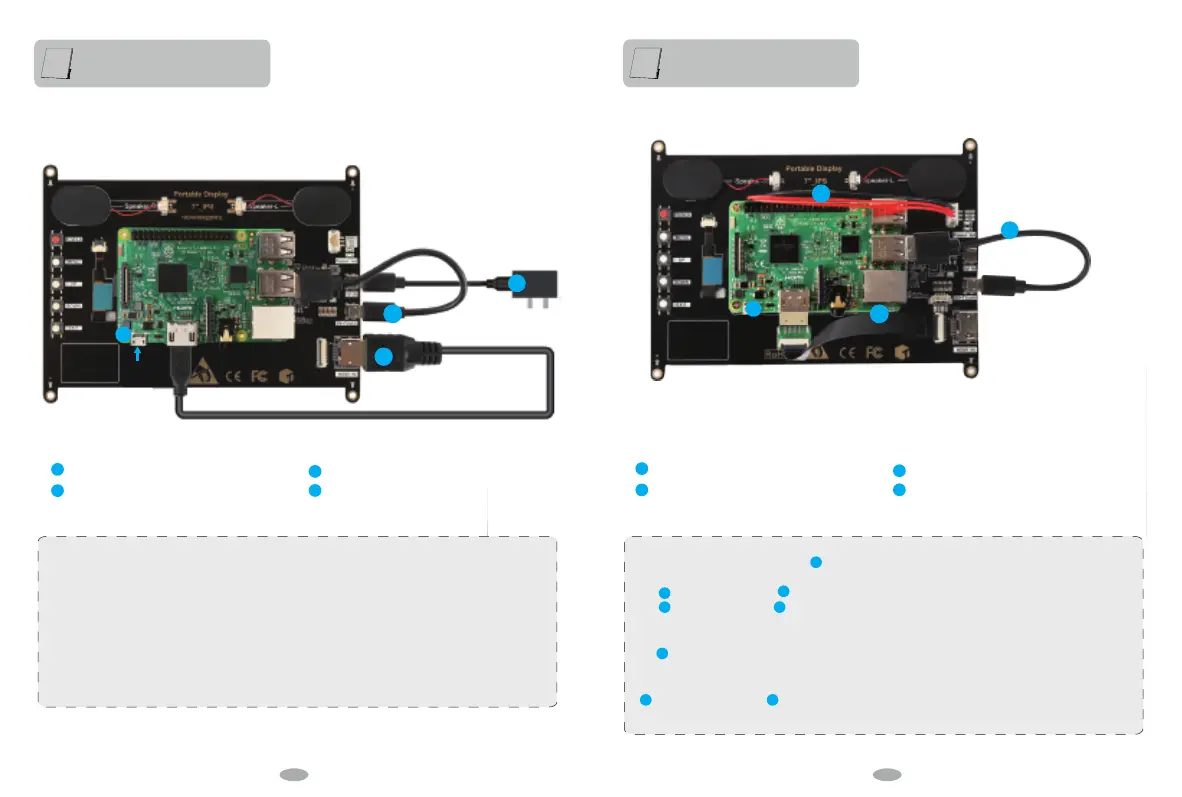
Connect to Pi3 B+(Connect with original product accessories)
Connect to Pi3 B+(Connect with gift accessories)
Standard HDMI cable
microUSB cable (For Power)
microUSB cable (For Touch)
Power your Pi3 B+ separately
If there is no touch function, please refer to the picture to check whether the touch cable is connected
correctly. You can change the connection with other computer equipment to verify whether there is a
problem with the touch interface.
Please note that one end of the touch cable needs to be connected to the monitor and the other end to
the computer equipment, host computer, Raspberry Pi and other HDMI devices.
When the monitor is connected to a game device or the monitor's touch end is connected to a power
source, socket, or other power supply device, it cannot be touched.
3 pin power cable (gift)
microUSB cable (For Touch)
FPC cable for Pi3 B+ (gift)
Power your Pi3 B+ separately
7
7
7
7
1
1
5
5
If there is no display, check whether (black FPC cable) is connected reversely. You can change the
connection with other computer equipment to verify whether there is a problem with the touch interface.
The (black FPC cable) and (micro HDMI cable) cannot be used at the same time. If you connect
with (black FPC cable), the (micro HDMI cable) on the Raspberry Pi display must be removed,
otherwise there will be no display.
The (3 pin power cable) on the Raspberry Pi display must not be inserted incorrectly, otherwise it will
damage the Raspberry Pi motherboard, please connect carefully.
Please note:
(3 pin power cable) and (black FPC cable) are free gifts for you, they are not the original
accessories of the product. You can choose to use it or not, thank you.
10 11


 To Next Page