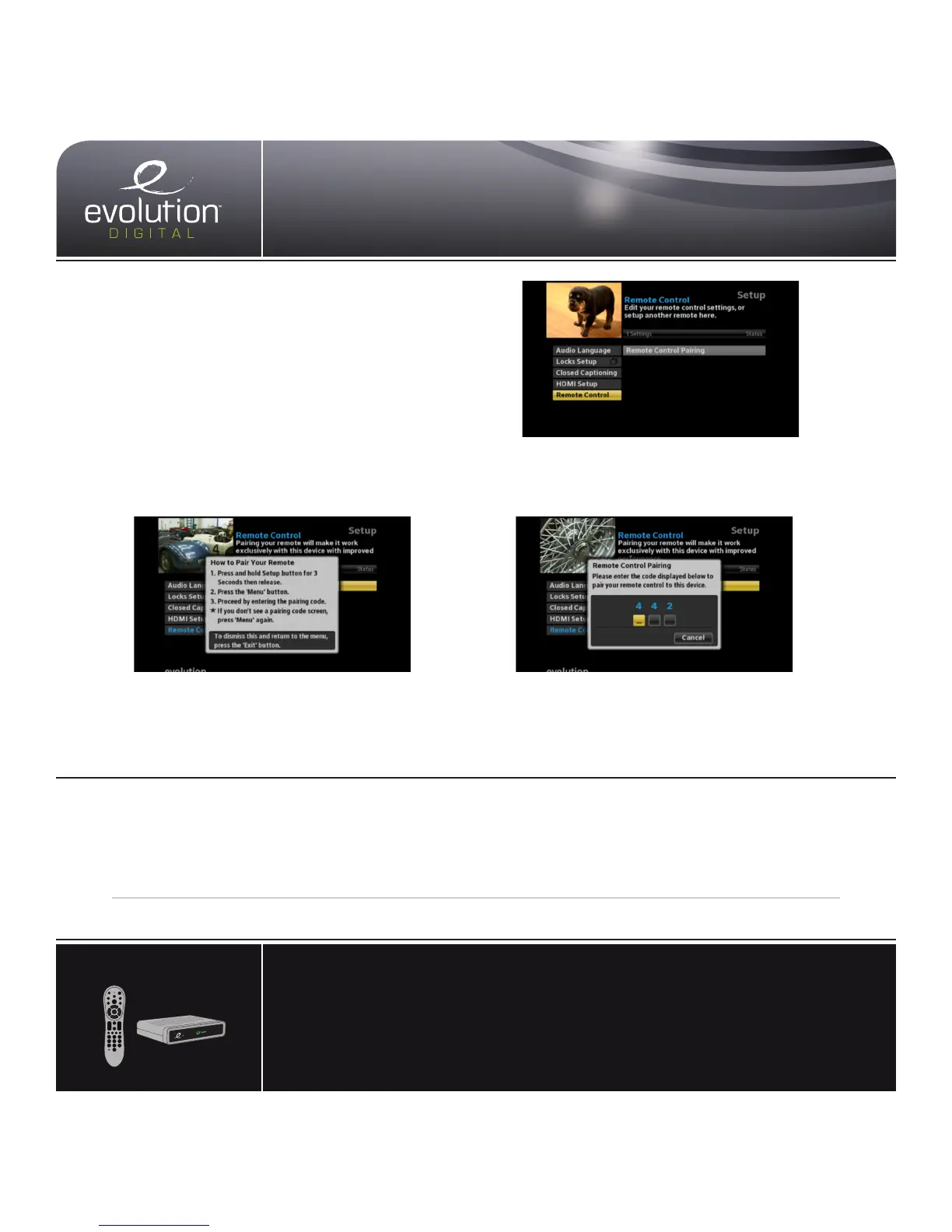
3. Press and hold Setup button until the
LED Indicator turns green.
4. Press the Menu button.
Please allow a few seconds for the menu to display
5. Proceed by entering the pairing code
displayed in blue on the pairing code
pop-up screen.
Note: If you don’t see a pairing code screen, repeat steps 1 and 2.
To force remote control to send volume
control commands to the TV
1. Press and hold Setup button until the
LED Indicator turns green.
2. Press the volume up button
To force remote control to send volume
control commands to the HD STB
1. Press and hold Setup button until the
LED Indicator turns green.
2. Press the volume down button
Pair your remote control with your HD STB
to install it out of sight
Your remote control can be paired directly with your HD STB,
allowing you to place the device out of sight (in an entertain-
ment center or behind your TV, for example). Once your
remoteispairedtoaspecicHDSTB,itwillnotcontrolany
other set-top box in your home.
Note: Refer to the Remote Control Programming and Operating instructions, provided with your remote control, to program your remote to work on your TV and
for more detailed information regarding pairing your remote.
HD uDTA Remote Pairing
REMOVE REMOTE CONTROL PAIRING
Ifyouwouldliketouseyourremotecontrolforadifferentset-topbox,youmustrstun-pair
the remote control from the current device. Follow the steps below to remove the pairing.
1 Press and hold the Setup button until the LED Indicator turns green.
2 Enter 9-8-7 on the remote control.
3 The LED Indicator will blink green twice. the same.
RESET REMOTE PAIRING
TV
Menu
Exit
Last
Pg
Pg
Info
VOL
CH
1. Press the Menu button.
2. Select Remote Control and then select
Remote Control Pairing.


 To Next Page