- Select to name DLNA DMR.
- Select to change the language of the mini keyboard.
- Set the scan mode of media library.
- Follow the on-screen information to format your HDD.
- Here you can open the BDMV navigation menu during BDMV folder or BD ISO playback. And BD-J is not supported.
- Restore to factory defaults.
2.1.2 Changing Audio Settings
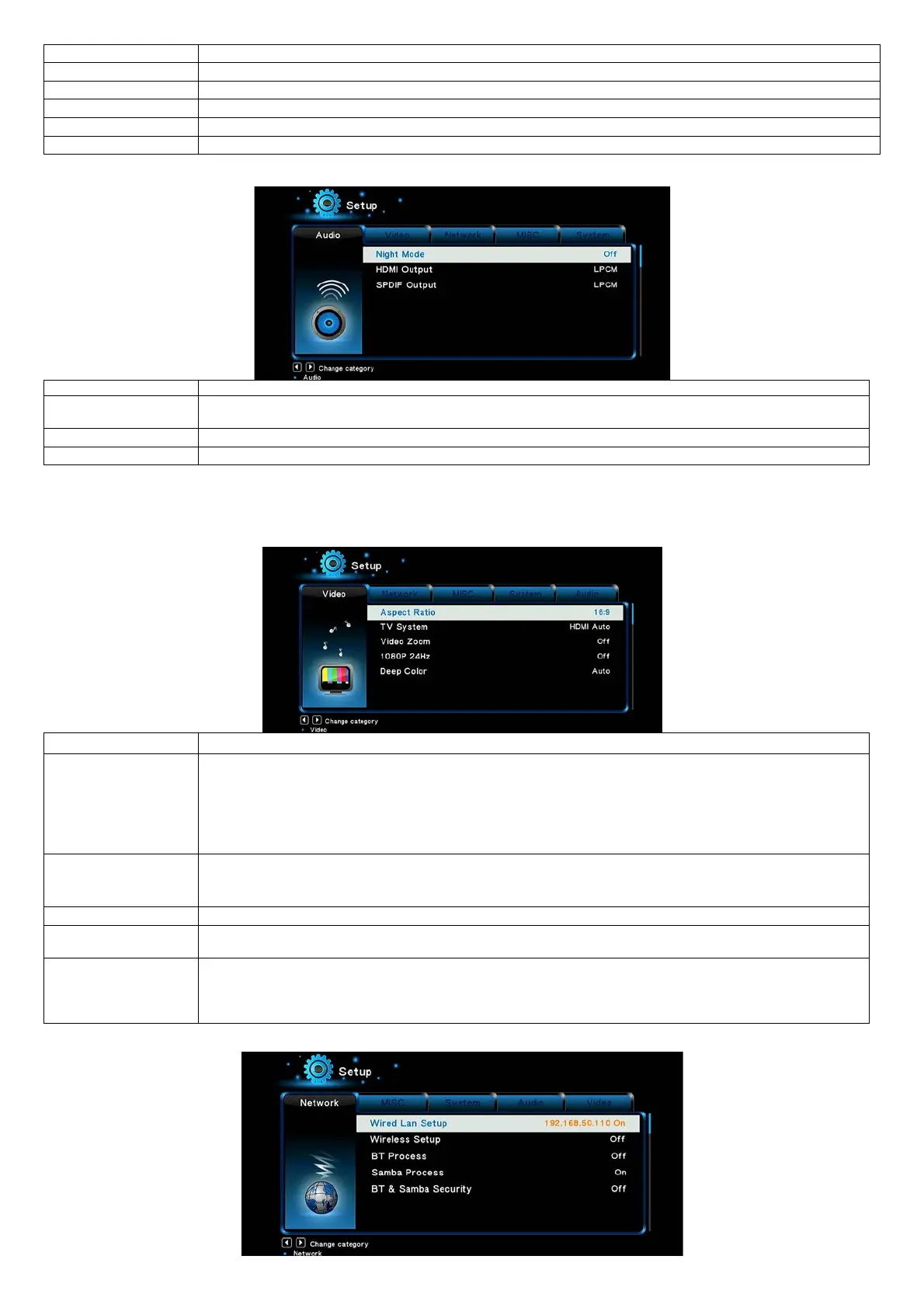
- Choose among Off / On / Comfort. If the option is turned on, the audio output volume will be decreased to make
- Choose among LPCM, LPCM Multi-Ch and RAW.
- Choose among LPCM, RAW.
Note: In raw mode, Dolby TrueHD, Dolby Digital Plus , Dolby Digital, DTS sound can be by passed to the HDMI TV or Digital amplifier.
Due to the bandwidth requirement, Dolby TrueHD and Dolby Digital Plus sound only can be by passed though HDMI cable, also the TV system must up to
720p or above.
2.1.3 Changing Video Settings
- Pan Scan 4:3: Display a wide picture on the entire screen and cuts off the redundant portions. Select when a
standard 4:3 TV is connected.
- Letter Box 4:3: Display a wide picture with two black borders on the top and bottom of 4:3 screen. Select when
a standard 4:3 TV is connected.
- 16:9: Compress the image to convert the whole image. Select when a 16:9 TV is connected.
- 16:10: Select when a 16:10 TV is connected.
- Select to adjust TV Type and video output resolution. This setting depends on your regional location. Include:
NTSC – United States, Canada, Japan, Mexico, the Philippines, South Korea, and Taiwan.
PAL – Europe, Greenland, parts of Africa and South America, the Mideast, China, India, Australia, and Indonesia.
- Choose this option to enable or disable 1080P 24HZ support. A TV set with 1080P 24HZ (24P) mode is needed.
- Help to perform more detailed level of color depth, make continuous color change smoother. You can get more
vivid color effects. A TV set with deep color support is needed.
- Adjust the video output size according to the size of TV screen. Press Left/Right button to adjust the width of the
screen, and Up/Down button to adjust the height of the screen.
- In Casablanca, this option is used to adjust the video image size during video playback. Press Zoom button to fit
the screen size you have set.
2.1.4 Change Network Settings


 To Next Page