EasyManua.ls Logo

Evolveo MultiMedia Box A4 - Page 18

Evolveo MultiMedia Box A4
Print Icon
To Next Page IconTo Next Page
To Previous Page IconTo Previous Page
Loading...
18
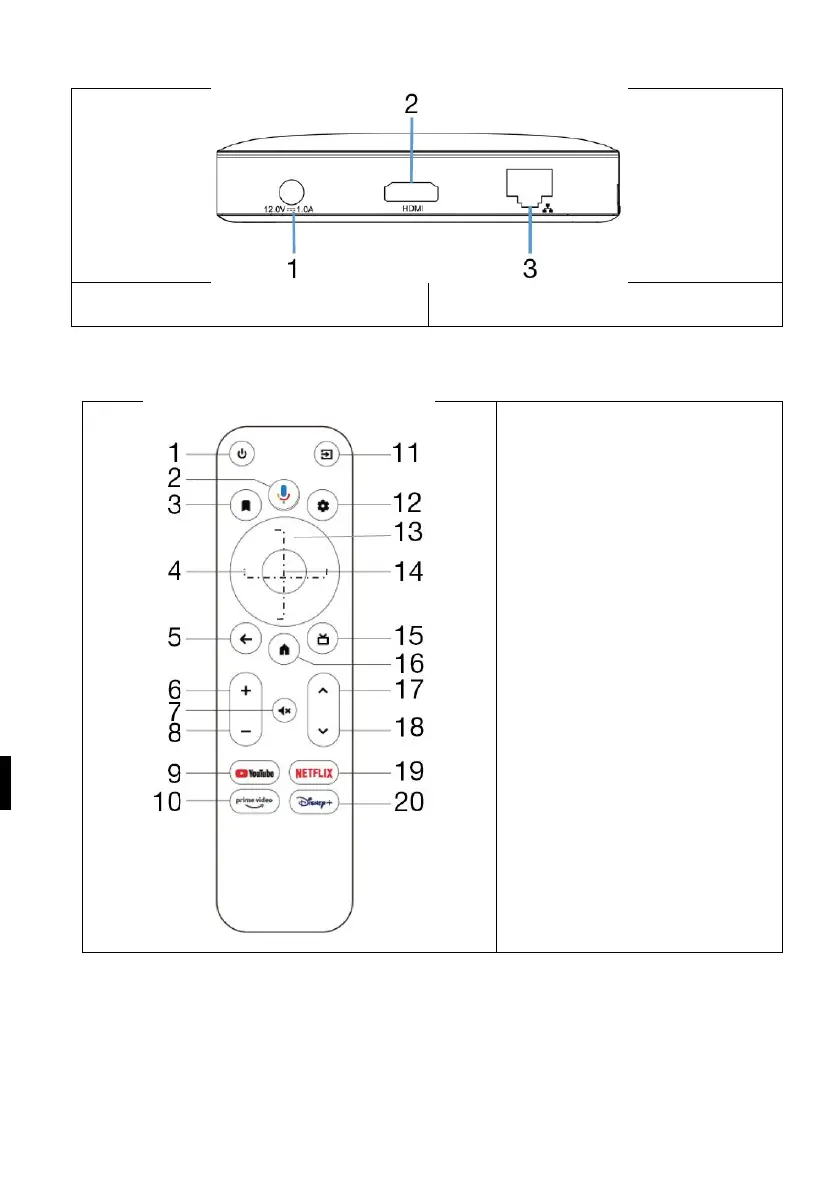
Rear panel
1) DC input
2) HDMI output
3) Ethernet
Remote control
1) On/Off
2) Google Assistant
3) Watchlist
4) Directional keys
left / right
5) Back
6) Volume up
7) Ztlumit
8) Volume reduction
9) Open YouTube
10) Open Prime Video
11) Vstup
12) Settings
13) Directional keys
up / down
14) Enter /Confirm /OK
15) Opening the EPG
16) Home button
17) Program up
18) The downward
programme
19) Open Netflix
20) Open Disney+
System wiring
Follow the pictures and instructions below to connect to the TV, power supply, network and other
devices. Remark: Before connecting, switch to all connected devices (for example, this device and
the TV source)
Connecting to TV:
Plug the HDMI/AV cable into the HDMI/AV port on the Android TV Box and TV.