8 Access control system operation and
maintenance
8.1 Updating locking components
As a rule, you can update any locking component, regardless of its association with the
access control system to exchange data between AirKey Online Administration and locking
components.
You can update with smartphones or optionally available coding stations. Updates with the
smartphone merely require the installed AirKey app and registration in any access control
system.
The following tasks are completed upon updating locking components:
• Time reset.
• Event log data and battery status read out.
• Maintenance tasks (blacklist, authorisation in other access control systems, etc.)
updated.
• Component details read out.
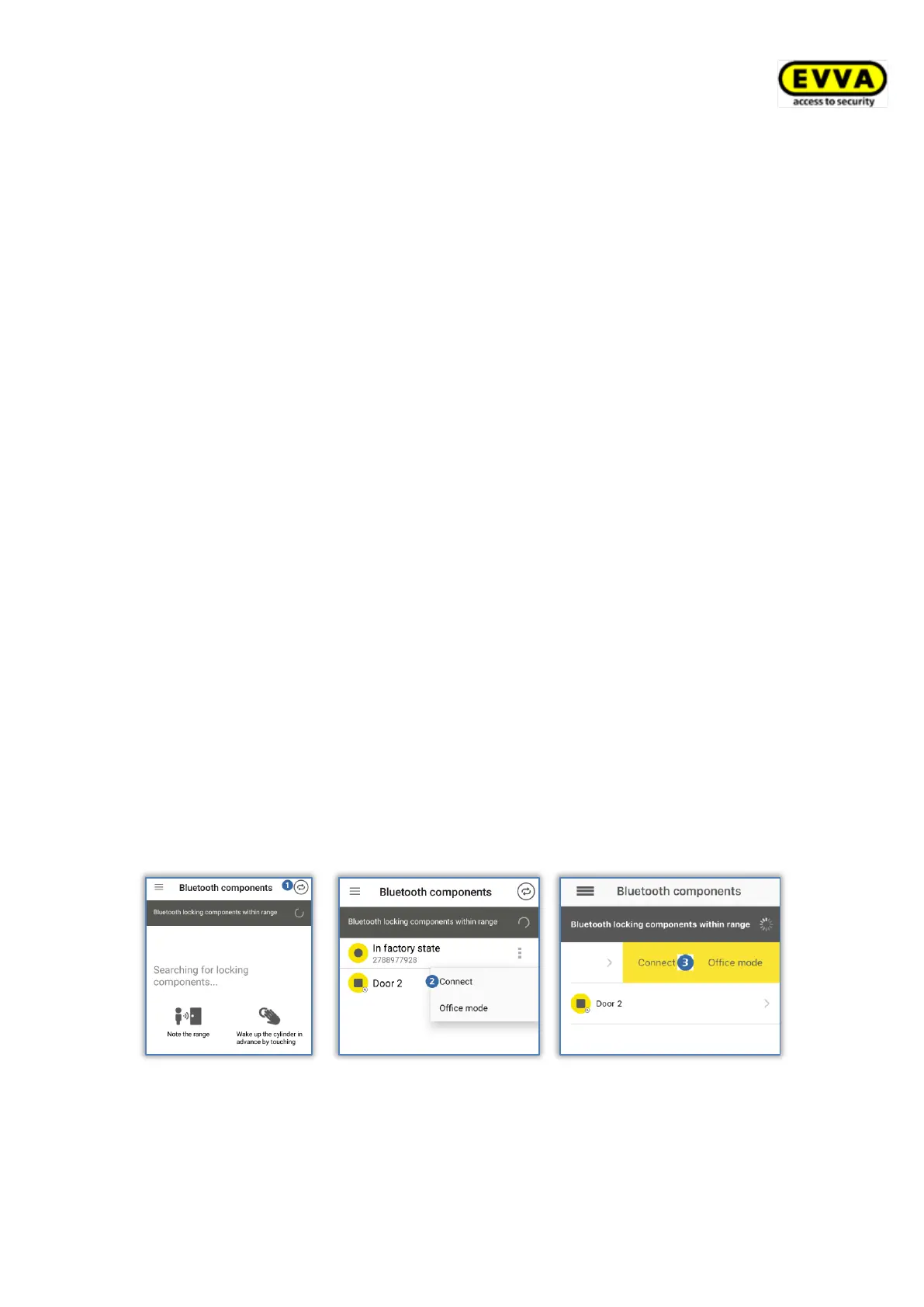
Follow the on-screen instructions to update a locking component with the smartphone:
> Establishing a connection using NFC (for Android smartphones): Tap the Connect to
component icon .
> Establishing a connection using Bluetooth (for Android smartphones): Tap the
context menu of the locking component to which you would like to establish a
connection (⋮) and then select Connect .
> Establishing a connection using Bluetooth (for iPhones): Swipe the component
designation of the locking component to which you would like to establish a
connection and then select Connect .
Figure 258: AirKey app – connecting to component (Android NFC / Android Bluetooth / iPhone)
> Follow the instructions.



 To Next Page
 Loading...