The Four-eyes principle for the event log viewing function allows you to view the
locking component and media event log only if a second system administrator confirm the
viewing. This protects personal data even better from being viewed.
To activate the Four-eyes principle for the event log viewing at least
two system administrators must be available.
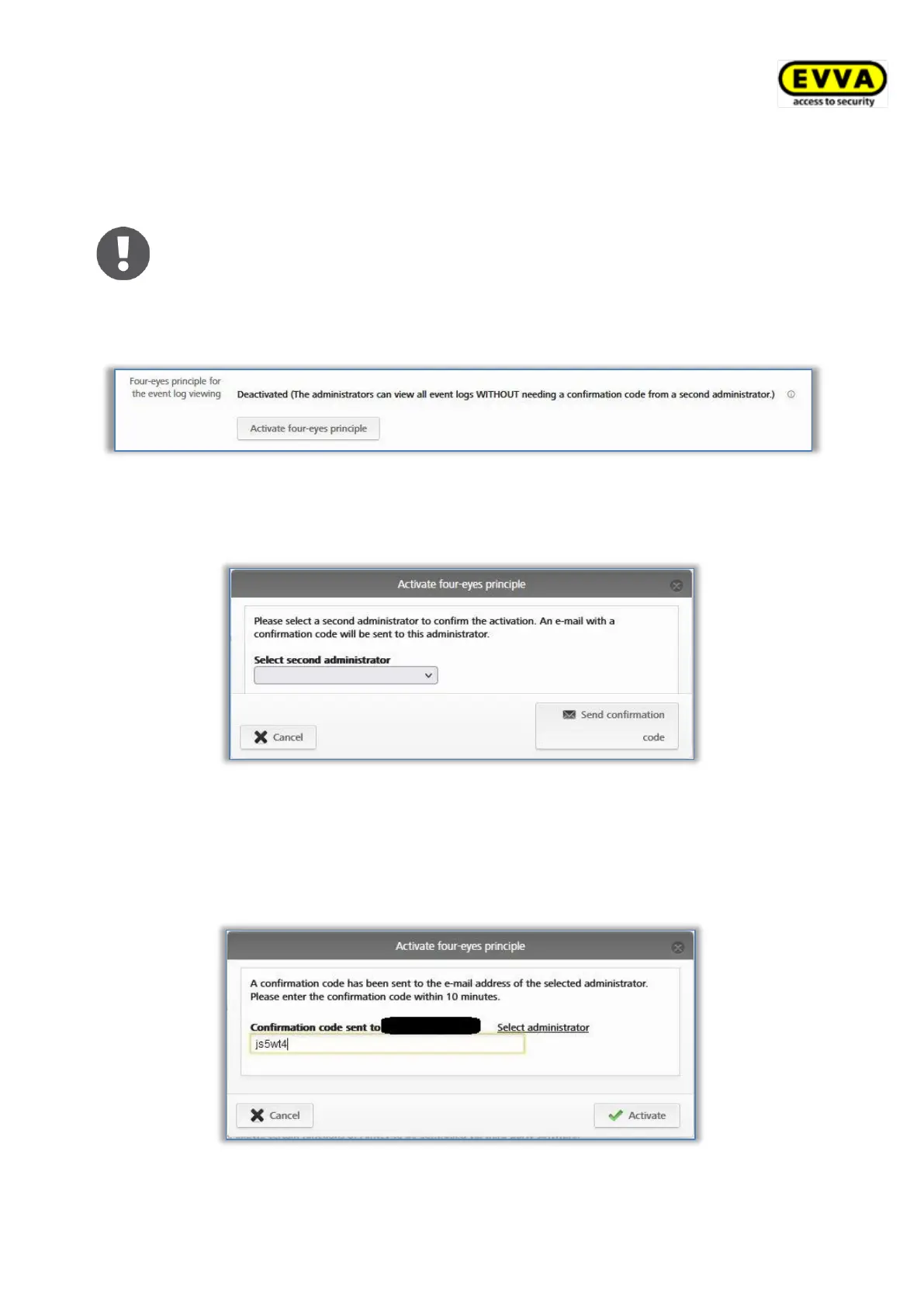
To activate the Four-eyes principle for the event log viewing, please follow these steps:
> Click on Four-eyes principle for the event log viewing.
Figure 121: Activating four-eyes principle
> Select a second system administrator from the list to whom a confirmation code
should be sent by e-mail and click Send confirmation code.
Figure 122: Activating four-eyes principle – selecting second administrator
> An e-mail with a confirmation code will then be sent to the selected system
administrator.
> This confirmation code must be entered in the AirKey Online Administration within
10 minutes and confirmed with Activate.
Figure 123: Activating four-eyes principle – entering confirmation code


 To Next Page
 Loading...