EW7015 R1 Dual Docking Station USB 3.0 for
harddisk SATA 2.5” and 3.5”
Table of contents
1.0 Introduction ........................................................................................................... 2
1.1 Functions and features ...................................................................................... 2
1.2 Packing contents ............................................................................................... 3
2.0 Connecting a hard disk .......................................................................................... 3
3.0 Connecting the EW7015 to your computer ............................................................ 3
4.0 Using the EW7015 ................................................................................................. 4
4.1 Preparing the hard disk using Windows XP/Vista ............................................... 4
4.2 Preparing the hard disk using Windows 7/8 ....................................................... 5
5.0 OTB software ........................................................................................................ 5
5.1 Installing the OTB software ................................................................................ 5
5.2 Using the OTB software ..................................................................................... 5
5.2.1 Using the backup button of the EW7015. ........................................................ 6
5.2.2 Making a backup with the PC Clone EX software ........................................... 6
5.2.3 Restore a backup ........................................................................................... 6
6.0 Clone Function ...................................................................................................... 7
7.0 Frequently Asked Questions and other related information .................................... 8
8.0 Service and support ............................................................................................... 8
9.0 Warning and points of attention ............................................................................. 9
10.0 Warranty conditions ........................................................................................... 10
1.0 Introduction
Congratulations with the purchase of this high-quality Ewent product! This product
has undergone extensive testing by Ewent’s technical experts. Should you
experience any problems with this product, you are covered by a five-year Ewent
warranty. Please keep this manual and the receipt in a safe place.
Register your product now on www.ewent-online.com/ and receive product updates!
1.1 Functions and features
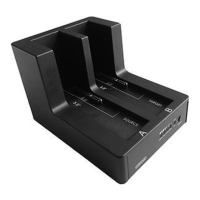
The EW7015 Docking Station offers you a quick and easy way to connect a 2.5’’
and/or 3.5’’ SATA hard disk without having to open the cover of your computer. The
EW7015 is equipped with a USB 3.0 port. Thanks to this connection, it is very easy to
save and exchange your data. The EW7015 features a smart one-touch backup
button which allows you to make a backup of your data.


 To Next Page