4
Functions of Buttons
ON/OFF: Press to turn the unit on and
off.
DEAL/START/BET: Press to start a
game, deal the cards or place a bet.
Press to confirm your card selection
during the showdown.
NEW GAME/REVIEW: Press and hold
until “NEW GAME” is displayed to
start a new game. Press to go into the
review function.
LIMIT/FOLD: Press to step through the
available limits. Press during the game
to fold.
AMOUNT/CHECK/CALL: Press to step
through the amount the players start
with. In REVIEW, press to check the
amount a player has left. During the
game, press to check or call. Press to
automatically select your five best
cards.
RAISE/POT: In REVIEW, press to
check the amount in the pot. Press dur-
ing the game to raise.
1-7: Players press their numbers to
display their hole cards. In REVIEW,
press a player's number to reveal his
remaining chips. Also, press to select
the cards to hold for your hand.
MUTE
: Press repeatedly to change the
volume or turn the sound on and off.
RESET: If Texas Hold ‘Em locks up
or malfunctions, use a ballpoint pen to
press
RESET. Also press RESET after
inserting new batteries.
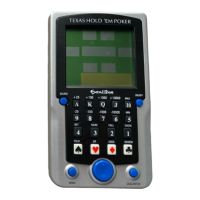
Layout of Texas Hold ‘Em
LCD
DISPLAY
NUMBER
KEYS
RESET
ON/OFF
AMOUNT/
C
HECK/CALL
RAISE/POT
NEW
GAME/REVIEW
LIMIT/FOLD
MUTE
DEAL/START/BET




 To Next Page