EXCEL DRYER, INC 1.800.255.9235 EXCELDRYER.COM ADMIN@EXCELDRYER.COM
357 CHESTNUT STREET, EAST LONGMEADOW, MA 01028
3/2018
3
READ AND SAVE THESE INSTRUCTIONS
WARNING: TO REDUCE THE RISK OF FIRE, ELECTRIC SHOCK OR INJURY TO
PERSONS, OBSERVE THE FOLLOWING:
A. Use this unit only in the manner intended by the manufacturer.
B. Before servicing or cleaning unit, switch power off at service panel and lock the
service disconnecting means to prevent power from being switched on accidentally.
When the service disconnecting means cannot be locked, securely fasten a
prominent warning device, such as a tag, to the service panel.
CLEANING / MAINTENANCE
OUTSIDE: GentlywashCover(includingairinlet
holes) using a soft cloth or sponge and
a mild soap or detergent with lukewarm
water to loosen dirt and grime.
INSIDE: Excelrecommendsinspectingtheinside
of the dryer and cleaning as required at
leastonceperyear,orifperformance
diminishes.Heavierusage,oran
environmentthatcontainsexcessivelint,
dustorotherparticles,requiresmore
frequentcleaning.Lintontheairinlet,the
Pre-Filter,orotherinternalpartsofdryer
willreduceefciencyandshortenthelife
of the working parts.
TO CLEAN: Shutoffpowertodryeratservice
connection.UsestheTamper-Proof
Wrenchsuppliedandremovethe
Tamper-ProofBoltonbottomofcover
liftingupwardstoremovecoverfrom
base plate. Gently clean all parts using
asmall,softbrush.UnclipthePre-Filter,
rinsewithwateranddry.Re-install.
TROUBLESHOOTING
Dryer does not turn on
1.Checkpowertotheunitandconnections.Verifydryeris
receivingvoltageatTerminalBlock.
2. CheckREDserviceLEDlightforthefollowing:
Light is ON–PlacehandsunderSensor.Iflightstayson,
thenreplaceSensor.Iflightgoesoff,checktomakesure
wiringiscorrect.IfOK,checkwireconnectingtoMotor.
IfbothareOK,replaceMotor.
Light is OFF–Checkforloose,disconnectedorimproper
wiring(SeewiringschematicinsidedryerCover),orreplace
ControlAssembly.
Light is FLASHING–SeeerrorcodesinCODEchart.
SENSOR RANGE ADJUSTMENT: If dryer will not turn on,
stays on, or stops working, it may be mounted too close to
a counter or object and has gone into lockout. If relocating
appliance is not possible, adjust the range of the Sensor.
Turn off power to dryer then turn the range adjustment on
the Control Assembly counterclockwise towards L (-) low to
decrease Sensor range.
Dryer does not shut off
1. May be mounted too close to a counter or object (adjust
Sensor range).
2. Checkforloose,disconnectedorimproperwiring(Referto
wiringschematicafxedtoblowerhousing).
3. ReplaceControlAssembly.
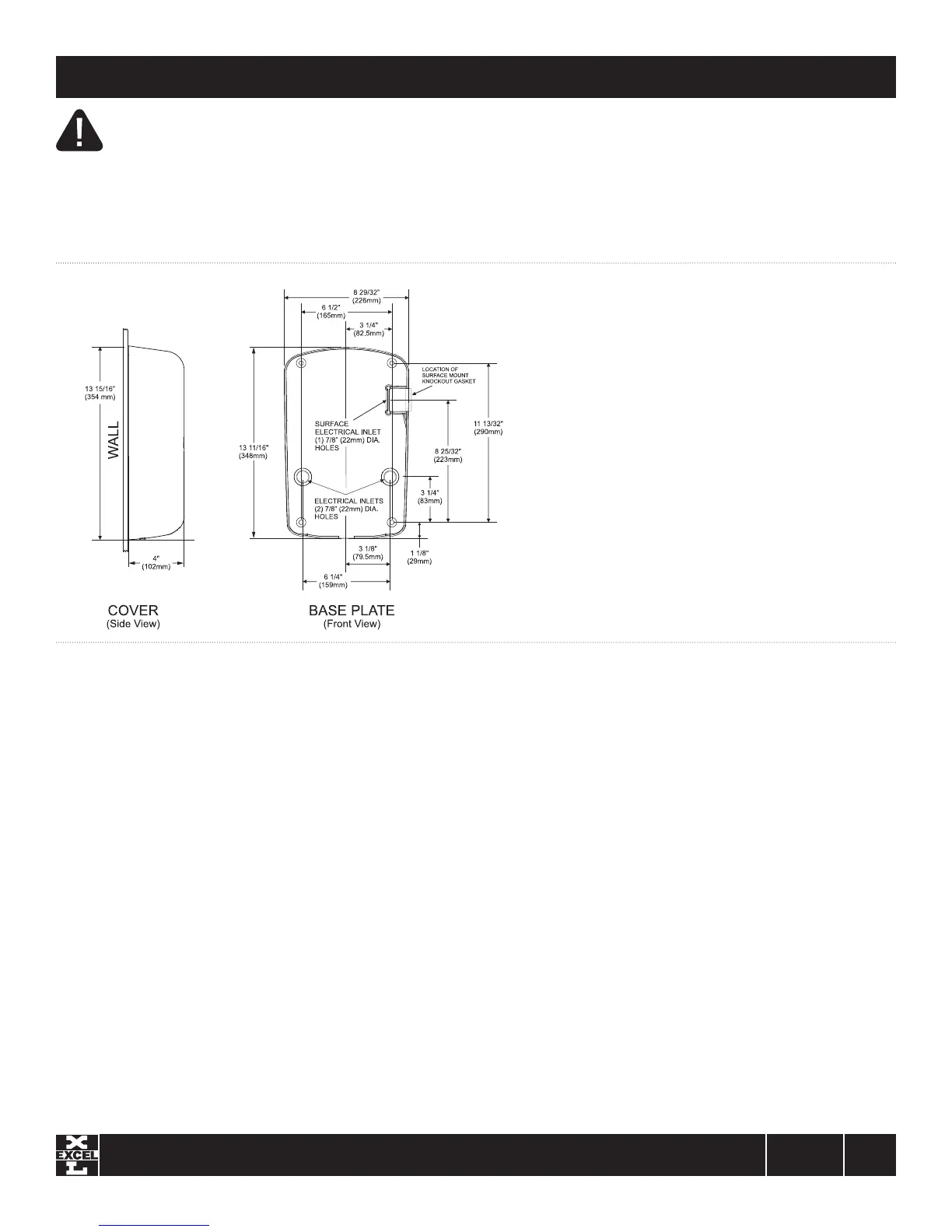
MOUNTING DETAILS
Dryer does not always turn on, or turns on by itself
1. May be mounted too close to counter or object (adjust
Sensor range).
2. CheckforforeignmaterialonOpticalSensornexttoAirOutlet.
3. CheckforloosewiresonControlAssembly.
4. ReplaceControlAssembly.
Dryer heats up but no air comes out
1. CheckwireconnectiontoMotor.
2. ReplaceMotor.
Dryer blows only cold air
1. Checkheatsettingoncontrol.
2. CheckforlooseconnectionstoHeatingElement.
3. ReplaceHeatingElement.
Dryer has a loss of air volume
1. Checkmotorspeedsettingoncontrol.
2. CheckforslowrunningMotororburningsmell.
Ifso,replaceMotor.
3. CheckPre-Filterforlintbuildup.Cleanbyremoving
Pre-FilterandrinseinwarmwaterthendryPre-Filter
before reinstalling.


 To Next Page
 Loading...