12
13)PAR/Parallel LED (BLUE)
This illuminates in parallel mode.
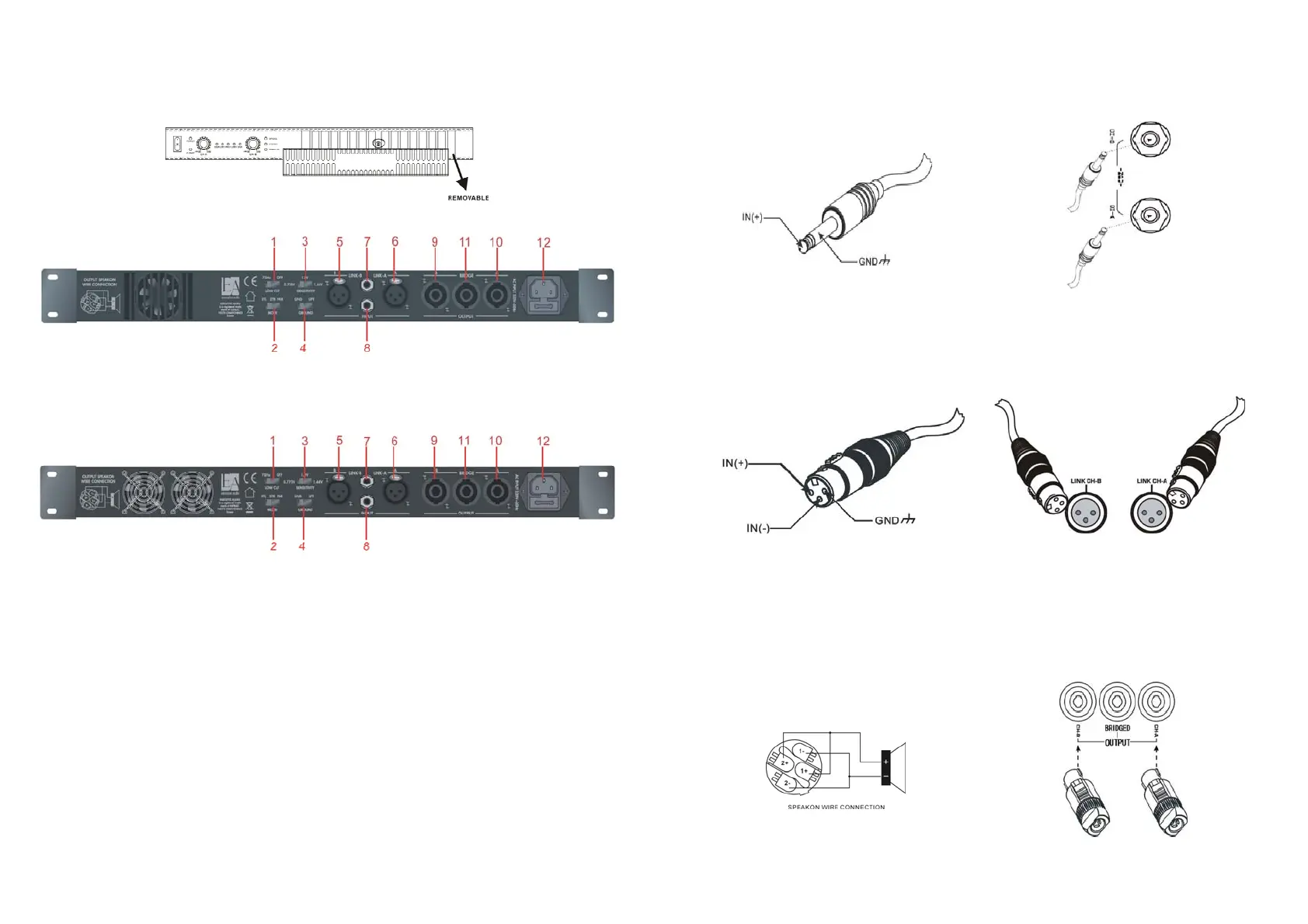
14)Ventilation slot panel
The panel is removable for cleaning the filter foam.
No tool is required to remove the panel.
5. Rear panel
z ALPHA 01
z ALPHA 02
z ALPHA 03
z ALPHA 04
1) LOW CUT FUCTION
75Hz-24Db/Oct Low cut function (optional)
2) Mode Switch
The amplifier is shipped in “Stereo “mode. You can select between Stereo, Bridge, or Parallel mode.
3) INPUT SENSITICITY SELECTOR
For selecting the desired (0.775V, 1.0V or 1.44V) input sensitivity.
4) GROUND OR LIFT SELECTOR
In some cases nasty hum noises can occur due to ground loops in your setup. Set the Ground/ Lift switch to the
position “Lift” breaks the ground loop between the amplifier and the chassis ground of various other components
in your setup. As a result, the hum noises will disappear.
5/6) INPUT XLR (CHA &CHB) SOCKETS
Connecting the input signal here use Male XLR.
7/8) INPUT PHONE (CHA &CHB) SOCKETS
Connecting the input signal here use the phone plug---1/4(6.3)Stereo phones JACK.
9/10) OUTPUT (CHA &CHB) SOCKET
Use a standard SPEAKON connector.
11) SPEAKON OUTPUT FOR BRIDGE MODE
13
12) POWER IEC CONNECTION
6. Connections (Signal input)
1)Unbalanced wiring:
Fig. 1- Signal input using a 1/4” mono Jack
CHA & CHB signal input:
Use a mono jack- Tip = signal
Sleeve= ground
Fig.(1)
For balanced wiring, you can also use a 1/4” Stereo Jack.
2)
CHA & CHB Input/link XLR(female)
Using a standard XLR (female) for connecting another amplifier in daisy chain.
Pin1: Ground / Pin2: Signal + / Pin3: Signal –
Fig. (2)
Note
:
Incorrect connection will result in malfunction. Make sure the connection is correct before operation.
7. Connections (Signal output)
1)Stereo Mode
Fig.3- Signal output using Speakon connector
CHA & CHB signal output:
1+、2+ Signal output (+) connect to speaker (+)
1-、2- Signal output (-) connect to speaker (-)
Fig.(3)


 To Next Page