Step 2
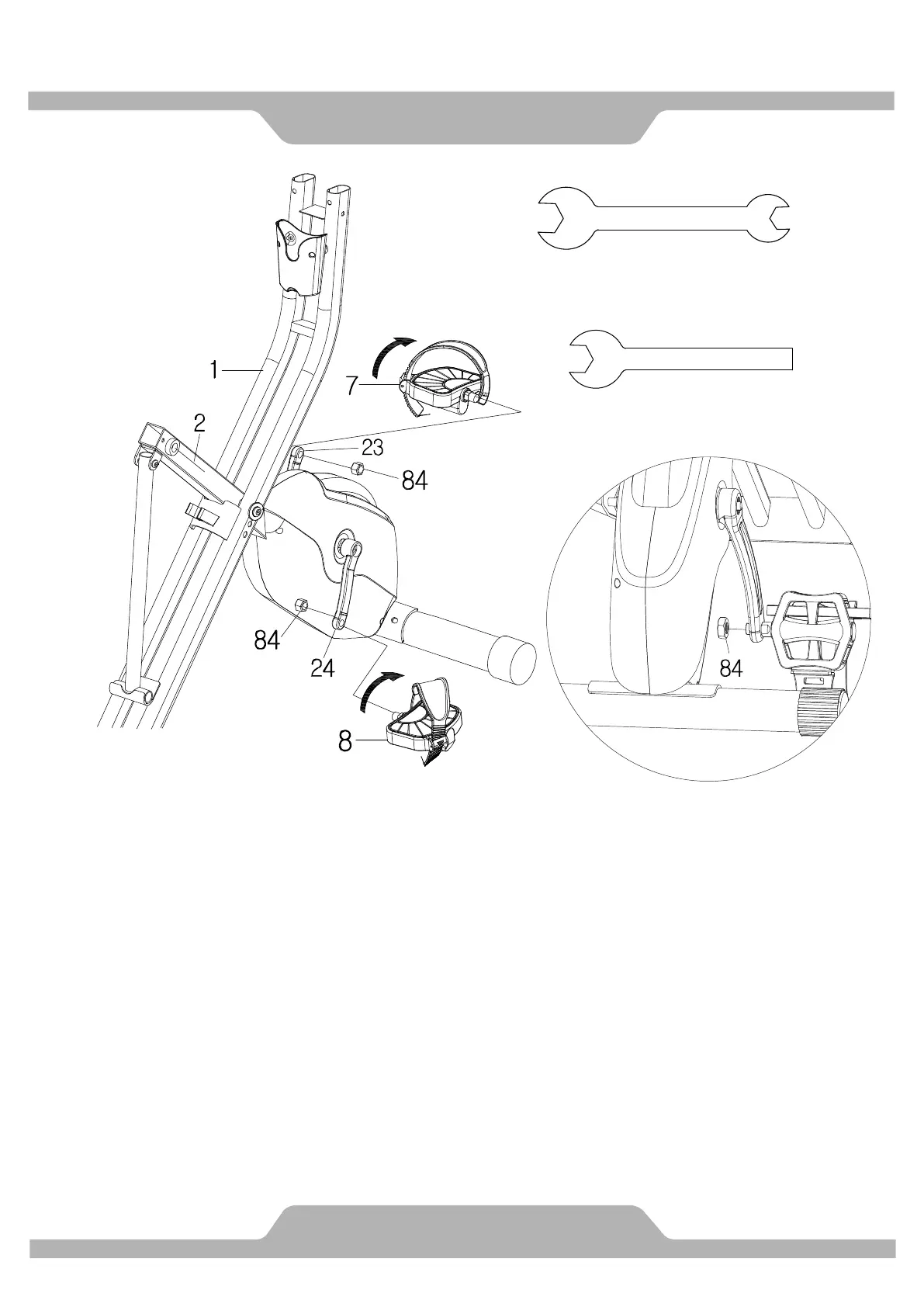
Loosen Nylon Nuts (84) from Left and Right Pedal (7) &(8) first.
The Cranks, Pedals, Pedal Shafts and Pedal Straps are marked “R” for
Right and “L” for Left.
Insert the pedal shaft of Left Pedal (7) into threaded hole in the Left Crank (23).
Turn the pedal shaft by hand in the counter-clockwise direction until snug.
Note: DO NOT turn the pedal shaft in the clockwise direction, doing so will
strip the threads.
Tighten the pedal shaft of Left Pedal (7) with the Wrench 13-15 mm provided,
then tighten Nylon Nut (84) with the Wrench 19mm provided.
Insert pedal shaft of Right Pedal (8) into threaded hole in Right Crank (24).
Turn the pedal shaft by hand in the clockwise direction until snug.
Tighten pedal shaft of Right Pedal (8) with the Wrench provided, then tighten
Nylon Nut (84) with the Wrench 19mm provided.
1PC


 To Next Page