English
1
2
3
4
5
7
6
8
2-3h
3 s
Bluetooth
Devices
exibel Andesite
3 s
ON
5 s
OFF
Ver. 20231025
Wireless earphones
Art.no 39-2655-1/2 Model Andesite
Please read theentire instruction manual before using theproduct
and then save it for future reference. We reserve theright for any
errors in text or images and any necessary changes made to
technical data. In theevent of technical problems or other queries,
please contact our Customer Services.
Safety
• Never subject theheadphones to high
temperatures, dust, heavy vibration, impacts,
water or moisture.
• Check your local regulations regarding mobile
phone use in combination with driving.
• Shut off both theheadphones and mobile
phone in areas where you are requested to
do so, such as hospitals, aircraft or explosive
environments.
• Protect your hearing. Listening on high
volume for prolonged periods can lead to
permanent hearing loss. Set the volume to a
low level before using the product.
• Never leave the product charging for
extended periods when it is not in use.
Discontinue charging during thunderstorms.
• Never attempt to tamper with or modify the
product in any way.
• Don’t let children play with the product.
1. [ M ] Equlizer mode/
Voice assistant
2. [ + ] Next track,
increase volume
3. [ − ] Previous track,
decrease volume
4. [ ] On/off, play/pause,
pairing
5. 3.5 mm connection
for anexternal audio
source
On − to use the earphones with a new external device
Follow theinstructions in theBluetooth connection section.
Bluetooth connection
Buttons and functions
6. Pairing status indicator
7. USB C port for theincluded charger cable
8. Battery charge status indicator
Charging
Hold [ ] for approximately
3 seconds. Theearphones will
automatically connect
Off
Hold [ ] for approximately
5 seconds.
1. Hold [ ] for approximately 2 seconds. Release [ ] when
theLED indicator (6) flashes red/blue.
2. Activate Bluetooth mode on thedevice that you want to
connect theearphones to.
3. Theearphones will appear on your device as
exibel Andesite. Select it to pair with thedevice.
4. Start playback on your external Bluetooth device.
Set thevolume level on theexternal device or on thevolume
controls on theearphones.
5. Playback can be controlled from your external Bluetooth
device or thebuttons on theearphones in accordance with
theButtons and functions section.
Note:
• Theearphones will automatically connect to thelast
connected device if they are on and Bluetooth is activated on
thelast connected device.
• Pairing mode willautomatically turn off after 5 minutes if no
pairing has been made.
• If you receive acall while listening to music via Bluetooth,
playback will be stopped automatically. Once thecall ends,
music playback will automatically be resumed (if your phone
settings supports this).
Charge thebattery for 3 hours before using theearphones for
thefirst time.
1. Connect theincluded charger lead to theearphones’
charging port and to acomputer or other USB charger.
2. TheLED indicator (8) shines red when charging is in progress.
3. The LED indicator shines blue once thebattery is fully charged.
Operating instructions
On/off button
On − use with a previously paired external device

 Need help?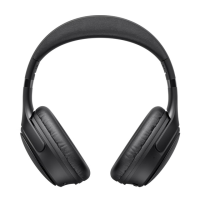

 To Next Page
 General