6
English
DAB auto scan
1. To activate auto scan, first press [ MENU ] to enter themenu. “Full scan” will appear
on thedisplay.
2. Press [ TUNE/ENTER ] to confirm. Thedisplay will now show “Scanning”.
3. All thestations that have been found will be saved automatically.
4. To listen to asaved station, press [ TUNE/ENTER ] and then scroll up or
down to thedesired station using [ VOLUME/SELECT ]. Confirm by pressing
[ TUNE/ENTER ].
DAB manual scan
1. To activate manual scan, first press [ MENU ] to enter themenu.
2. Turn the [ VOLUME/SELECT ] control to select Full scan, then press [ TUNE/ENTER ] to
confirm. Thedisplay will show “5A to 13F” and their respective frequencies.
3. To listen to one of thesaved stations, press [ TUNE/ENTER ] and scroll to
thedesired station. Confirm by pressing [ TUNE/ENTER ].
DAB display mode
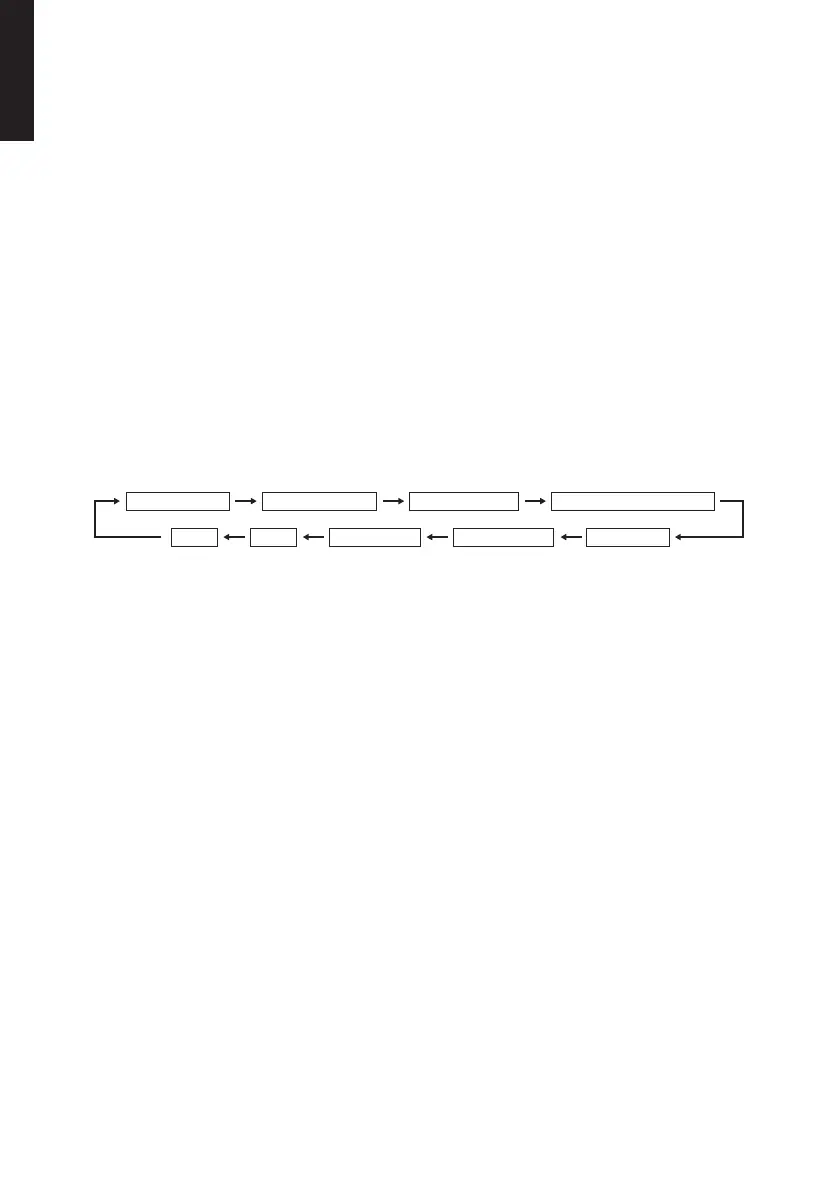
Signal Strength Programme Type Ensemble name Channel number/frequency
TimeDate Power status Audio Bit Rate Signal error
Pressing [ INFO ] causes thefollowing information to appear on thedisplay.
• Signal Strength: Signal strength
• Programme Type: Thetype of programme being broadcast
• Ensemble name: Acollection of stations on thesame frequency
• Channel number/frequency: Frequency of thepresent station
• Signal error: Signal reception
• Audio Bit Rate: Theaudio bit rate being received
• Power status: Battery level
• Time/Date: Time and date (updated automatically)


 To Next Page