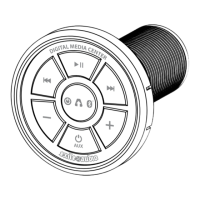
EXMC1 Owner’s Manual
Bluetooth® Digital Media Center
REMOTE IN CONNECTION
Connect the Blue wire (Remote in) to the remote wire from a head unit or other
device that controls ON/OFF for the system. When the EXMC1 is used in this
method the ON/OFF button is bypassed and will not function. The unit will be
turned ON/OFF via the head unit or other controller.
REMOTE OUT CONNECTION
Connect the Blue with white Stripe (Remote out) wire to an amplier remote
in to turn the amplier ON/OFF via the EXMC1. When you press the Power/
Aux button for 3 seconds the EXMC1 will turn ON or OFF and also power the
amplier ON or OFF.
Note: When using the Remote in connection the Remote out feature goes into
pass through mode. If an amplier is connected to the remote out wire it will
turn ON/OFF via the Remote in connection
TURNING THE EXMC1 ON/OFF
1. Connect the red wire (Power +12v Constant) and black wire
(Ground -12v) to power and ground securely.
2. Press and hold the Power/Aux button for 3 seconds until you see
the Red LED indicator on the front of the unit light up (ON)
or turn o (OFF).
AUX INPUT / OUTPUT
• Connect Aux input with any media player using a standard
3.5mm stereo jack.
• Double tap the Power/Aux Button rapidly to switch between the
Bluetooth® source and the AUX input source. When the EXMC1
is switched to the AUX input the yellow LED on the front of the
device stays on.


 To Next Page
 Loading...