4
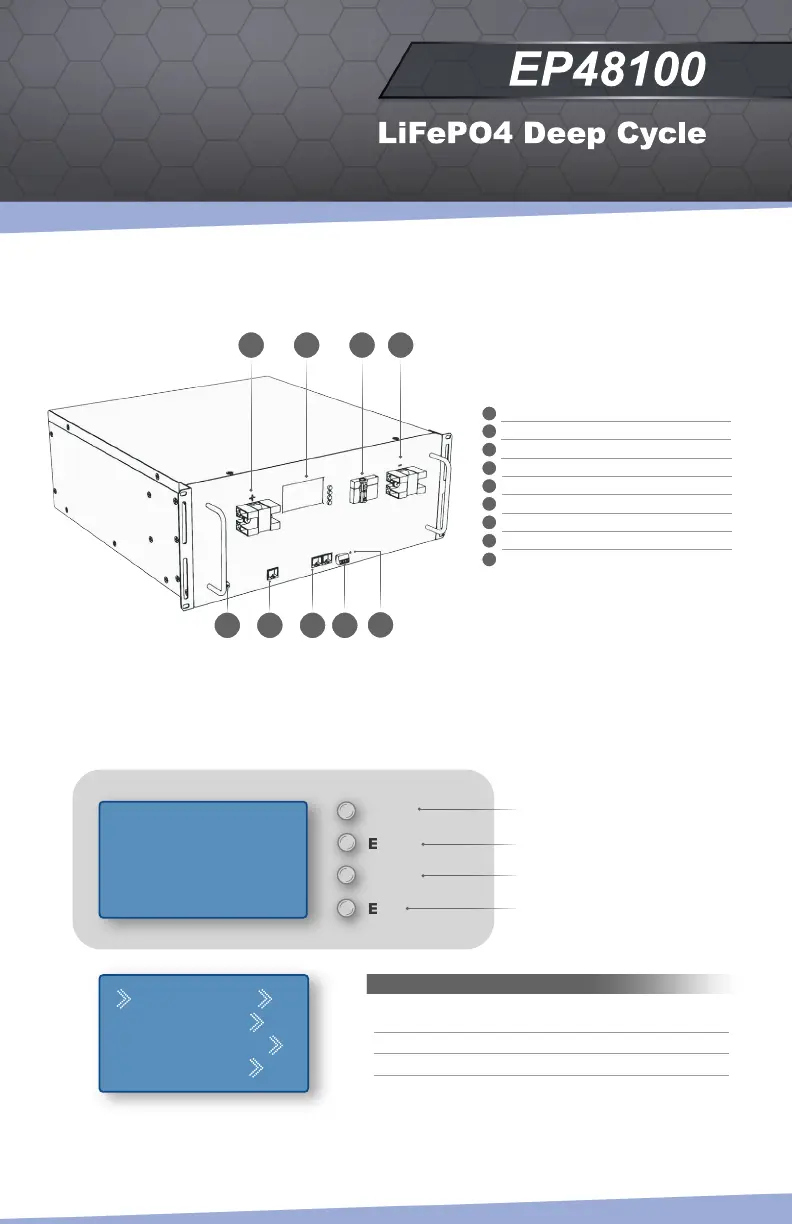
Monitor your battery health and status by using the different menus which allow you to monitor and view the
status of each internal cell as well as all 14 different protections. Navigate using the MENU, ENTER, DOWN,
and ESC buttons located on the right side of the display.
For detailed information, reference page numbers are provided in parentheses (p.xx).
Smart BMS Display
Components
G
H
F
CBA D
Analogue Information
Battery Management System
Parameter Settings
System Settings
I
E
Positive Terminal
Smart BMS Display (p.4-7)
DC Breaker ON/OFF
Negative Terminal
Ground Terminal
RS-485 Port for Inverter Communication
RS-485 Port for PC and Battery
Intercommunication Dry Contact
Reset Button
A
B
C
D
E
F
G
H
I
Analog Info
--BMS Status
--Para Setting
--Sys Setting
Main Menu
MENU
ENTER
DOWN
ESC
Welcome To Use
Smart BMS
-----------------
Press MENU Key
Menu Button for Main Menu Access
Enter Button to Select Menu
Down Button to Navigate
Escape Button for Previous Window


 To Next Page