Instrument control buttons
v
Instrument control buttons
The
KT-9
has two control buttons on either side and a
removable push-pin button on the sensor face. The side control
buttons are referred to as the
RIGHT
or
LEFT
buttons when you
are looking at the display screen with the sensor facing
upwards.
One of the features of the
KT-9
allows you to re-assign the
functions of the buttons depending upon whether you prefer
to hold the instrument in your right or left hand. All the
operations will be described from the point of view of right-
handed use. However, the following special icons will show
when a function is available in the re-mapped modes.
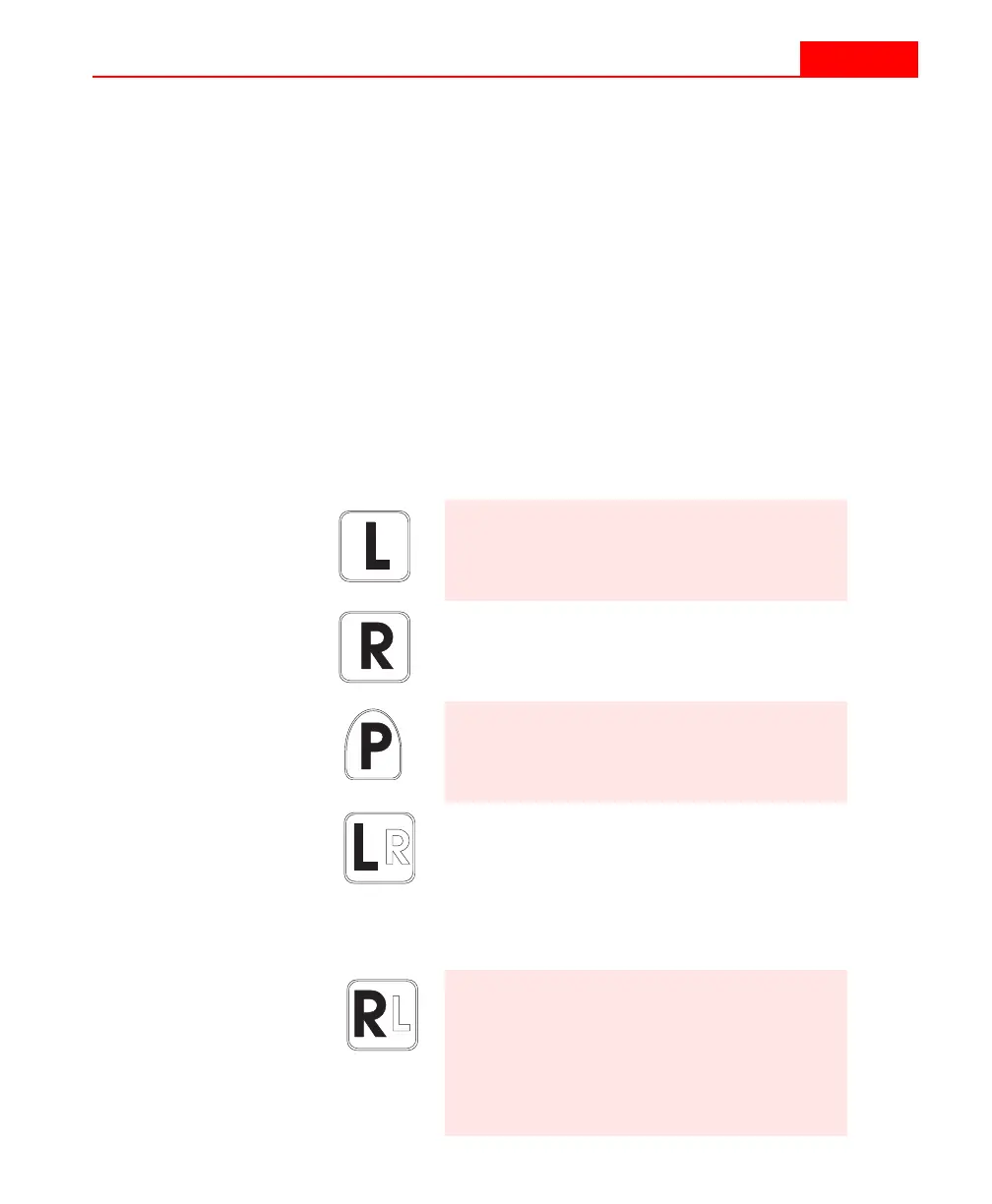
Symbol Meaning
Indicates the physical
LEFT
button at all
times.
Indicates the physical
RIGHT
button at
all times.
Indicates the removable
PIN
on the
sensor face.
Indicates the
LEFT
button when the
KT-9
is in the right-hand mode (solid
character). Alternatively, this button
can be re-mapped to be the
RIGHT
button in the left-hand mode (outline
character).
Indicates the
RIGHT
button when the
KT-9
is in the right-hand mode (solid
character). Alternatively, this button
can be re-mapped to be the
LEFT
button in the left-hand mode (outline
character).
Instrument control buttons
v
Instrument control buttons
The
KT-9
has two control buttons on either side and a
removable push-pin button on the sensor face. The side control
buttons are referred to as the
RIGHT
or
LEFT
buttons when you
are looking at the display screen with the sensor facing
upwards.
One of the features of the
KT-9
allows you to re-assign the
functions of the buttons depending upon whether you prefer
to hold the instrument in your right or left hand. All the
operations will be described from the point of view of right-
handed use. However, the following special icons will show
when a function is available in the re-mapped modes.
Symbol Meaning
Indicates the physical
LEFT
button at all
times.
Indicates the physical
RIGHT
button at
all times.
Indicates the removable
PIN
on the
sensor face.
Indicates the
LEFT
button when the
KT-9
is in the right-hand mode (solid
character). Alternatively, this button
can be re-mapped to be the
RIGHT
button in the left-hand mode (outline
character).
Indicates the
RIGHT
button when the
KT-9
is in the right-hand mode (solid
character). Alternatively, this button
can be re-mapped to be the
LEFT
button in the left-hand mode (outline
character).



 To Next Page