EasyManua.ls Logo

Explore Scientific WSH4005 - Button Operations; Standard Mode Operations; Setting Mode Operations; LCD Display Layout

Explore Scientific WSH4005
44 pages
Print Icon
To Next Page IconTo Next Page
To Previous Page IconTo Previous Page
Loading...
BUTTON
MODE
SNZ/LIGHT
Standard
mode
PRESS
Turn on backlight.
SNOOZE when
alarm is ringing.
HOLD
Time
setting
mode
PRESS
_______
HOLD
_______
Alarm
setting
mode
PRESS
_______
HOLD
_______
UP DOWN CH SET MAX/MIN
_______
Clear present
channel
Check
alarm
time
Enter into
setting
mode
Confirm
setting
C
F
Select
or
Check max. and min.
temperature
Clear all memory
when display max.
and min. data
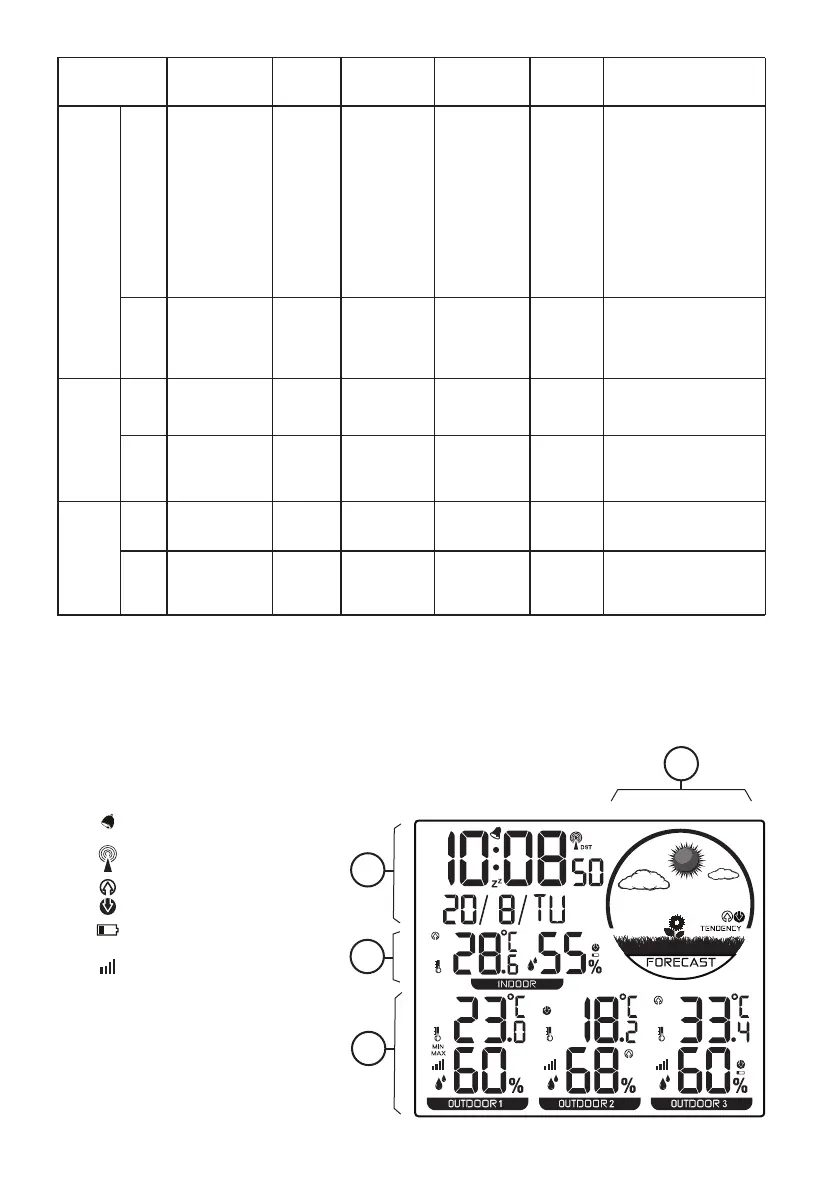
LCD DISPLAY
1. Weather Forecast display
2. Time/Alarm and Calendar display
3. Indoor Temperature and Humidity display
4. Outdoor Temperature and Humidity display
[ ] Alarm
[ ] RCC signal indicator
[ ] Trend indicator
[ ] Low battery indicator
[ ] RF Indicator
4
_______
Decrease
Quick
Decrease
Decrease
Quick
Decrease
Initiate or exit
RCC receiving
Increase
Quick Increase
Increase
Quick Increase
_______
_______
_______
_______
_______
_______
Confirm
setting
_______
_______
_______
_______
1
2
3
4
_______
_______

Related product manuals