13
OPERATION MANUAL
Index
1. Start up or returning to the vessel
2. No OLAS transmitter Warning
3. Tracking a new OLAS transmitter
4. Tracking a previously tracked OLAS transmitter
5. Tracking an OLAS transmitter using the OLAS mobile app
6. Checking logged OLAS transmitters (without the OLAS mobile app)
7. Checking logged OLAS transmitters (with the OLAS mobile app)
8. OLAS Mobile app features (basic)
9. Pause Tracking
10. Switching OFF the OLAS N2K
11. Stop tracking an OLAS transmitter (without the OLAS mobile app)
12. Stop tracking an OLAS transmitter (with the OLAS mobile app)
13. Low battery alert
14. Default recovery mode
15. Operating without an OLAS transmitter
16. OLAS Mobile app features (advanced)
a. Detection Time
b. Alert Delay
c. Solo Mode
d. Overboard recovery aids
17. OLAS Smart Lock
18. NMEA 2000 integration
19. OLAS CONNECT Integration
20. Limitations
1. START UP OR RETURNING TO THE VESSEL
2. NO OLAS TRANSMITTER WARNING
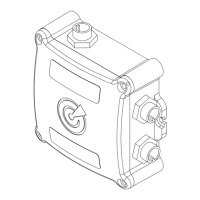
• Switch the vessel’s batteries ON, powering the NMEA 2000 network or if the NMEA 2000 network is
already powered press the OLAS N2K control switch once.
• The OLAS N2K will beep once to indicate switching ON.
• If there are no OLAS transmitters in range the OLAS N2K hub will beep every minute and the control
switch will ash red/green.
• After the rst minute it will beep eight times. Thereafter every minute the number of beeps will
increase by two until the OLAS N2K is beeping continuously.
• To move to tracking state an OLAS transmitter needs to be switched on and moved into range.
• If an OLAS transmitter is not present the warning beeps can be silenced by pressing the control
switch for two seconds. The OLAS N2K will still alert if a MOB alert is manually activated either via
NMEA 2000 or the OLAS CONNECT MOB button. If connected, the OLAS mobile app will also alert.
• The OLAS N2K control switch will continue to ash red and green to indicate that it is not tracking an
OLAS transmitter.
EXPUG31.indd 13EXPUG31.indd 13 15/05/2023 12:1815/05/2023 12:18


 To Next Page
 Loading...