Need help?
Do you have a question about the Exterity AvediaPlayer r9200 and is the answer not in the manual?
Details how the AvediaPlayer receivers are powered, including PoE and external power options.
Explains essential network requirements, including multicast and IGMP for optimal receiver performance.
Explains the various mechanisms for configuring and managing the AvediaPlayer receivers.
Covers the methods for powering the receiver, including Power over Ethernet (PoE) and external power supplies.
Guides the user on connecting the AvediaPlayer receiver to the network infrastructure via Ethernet.
Explains how to assign an IP address to the receiver, either via DHCP or static configuration.
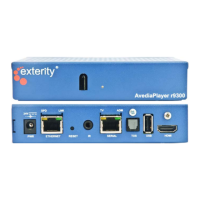
Details all the connectors and ports located on the rear of the AvediaPlayer receivers.
The Exterity AvediaPlayer r92xx series receivers are network devices designed to display IP network-delivered MPEG transport streams on a television or display. These receivers support streams from Exterity TVgateways, Encoders, and AvediaServers, as well as certain third-party streaming products. The r92xx series is available in three models: r9200, r9210, and r9220, each offering a slightly different set of features to suit various installation requirements.
The primary function of the AvediaPlayer r92xx series receivers is to act as a client device in an IPTV system, receiving and decoding video and audio streams over an IP network for display on a connected screen. All models provide HDMI v1.3a output for video (720p, 1080i, and 1080p at 50Hz, 59.94Hz, or 60Hz) and audio (8 channel PCM or Bitstream), as well as TOS (2 channel PCM or Bitstream) audio output. The r9210 model extends these capabilities with additional analogue video and audio outputs, including HD component, SD composite, SD S-Video, SD RGBS, and analogue stereo outputs. The r9220 model further enhances network connectivity by incorporating an internal Ethernet switch, providing three additional LAN connections and supporting VLANs.
The receivers are capable of playing video streams in MPEG-4 Part 10 (H.264/AVC), MPEG-4 Part 2 Simple Profile, and MPEG-2 formats. Audio decoding supports MPEG-1 layer II audio, AC3/EAC3, and AAC/HE-AAC. Stream playback can be over UDP or RTP transport, supporting multicast, unicast, and HTTP streams. On-demand streams using RTSP are also supported.
Channel discovery is typically achieved by listening for SAP announcements from Exterity streaming products and other third-party equipment. Alternatively, an XML channel list hosted on a web server can be used for channel learning.
The AvediaPlayer receivers offer flexible control and configuration options. User control is primarily through an Infra Red (IR) or tethered remote control handset, allowing for channel selection, volume adjustment, and navigation within a web browser interface. An IR extender cable can be connected to the rear panel if the front panel IR window is obscured, ensuring continuous remote control functionality. The remote control buttons are configurable, allowing administrators to customize or disable specific functions, such as the HOME button, to tailor the user experience to a particular installation's needs.
The devices are PoE (Power over Ethernet) enabled, allowing them to be powered directly through the network interface using any 802.3af PoE compliant LAN switch or mid-span device. If PoE is not available, an external power supply can be used.
For network connectivity, the receivers connect via an Ethernet port. The r9200 and r9210 models have a single Ethernet port, while the r9220 has an internal switch with four Ethernet ports (Ethernet 1 for PoE and network connection, and Ethernet 2, 3, 4 for connecting other network devices like PCs or IP phones). The r9220 also supports 802.1q VLANs on its switch ports, providing enhanced network segmentation capabilities.
The receivers can be configured with an IP address either automatically via a DHCP server or manually with a static IP address. Initial static IP configuration can be done through the serial Admin Interface, or via the Web Management Interface once an IP address has been assigned by DHCP.
Physical installation is made versatile with various mounting kits available. These kits enable secure attachment of the receiver to a television, display, wall, or under a desk or shelf. All models include a Kensington® Lock slot for physical security.
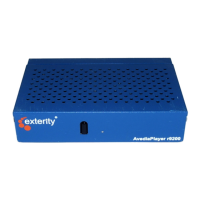
The front panel features an IR window and a Status LED. The LED provides visual feedback on the receiver's status, such as during start-up, IP address acquisition, and in response to remote control commands. The LED behavior is configurable, allowing for customization of its indications.
Device administration and maintenance can be performed through several interfaces:
The rear panel includes a recessed Reset button, which serves multiple maintenance functions. A brief press reboots the receiver. Holding the button for specific durations can set the serial port to TV serial control mode, set it to admin control mode, or reset the device to factory default settings (which also sets the serial port to admin control mode).
The AvediaPlayer receivers are designed with no user-serviceable parts inside. All servicing, adjustment, maintenance, or repair must be performed by service-trained personnel to prevent electric shock or fire hazards. The devices require adequate ventilation, and all ventilation holes must remain unblocked, with at least 5cm clearance from any materials. They are designed for operation within a temperature range of 0°C-40°C and a relative humidity of 5-95%.
For developers, the Receiver Development Kit (RDK) is available, offering a platform for creating customized solutions using third-party applications. The RDK allows control of the Exterity receiver through a JavaScript API, telnet control interface, and SNMP interface. The JavaScript API provides extensive control and a mechanism for sending customized JavaScript events to the integrated browser, including functions for changing channels, controlling volume, and video fast forwarding.
The devices are robustly built, but users are advised to protect the power cord from being walked on or pinched. In case of lightning storms or prolonged disuse, the apparatus should be unplugged. Any damage to the power supply cord or plug, or exposure to liquids or moisture, necessitates servicing by qualified personnel.
 General
| Model | AvediaPlayer r9200 |
|---|---|
| Category | Receiver |
| Resolution Support | Up to 1080p |
| Power Supply | 12V DC |
| Ethernet | 10/100/1000 Mbps |
| Weight | 1.2 kg |
| Video Output | HDMI, Composite |
| Audio Output | HDMI |
| Network Interface | Ethernet |
| Supported Protocols | HTTP, RTP, RTSP, UDP, IGMP |
| Video Decoding | H.264, MPEG-2 |
| Audio Decoding | AAC, MP3 |
| USB | USB 2.0 |
| Management | Web-based, SNMP |


 To Next Page