DTP HDMI 230 Tx/Rx Transmitter and Receiver • Installation and Operation 4
Connections
Transmitter Connections
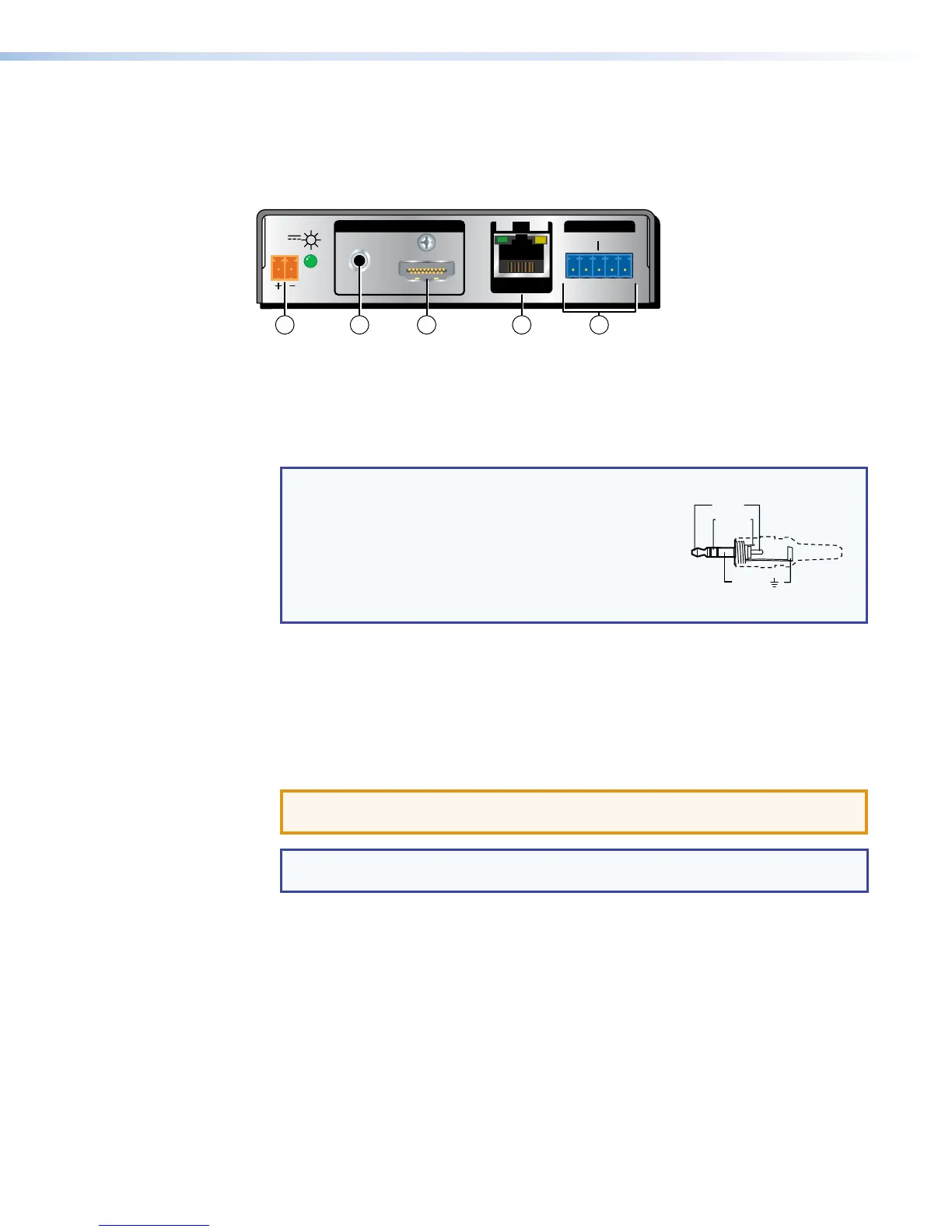
DTP HDMI 230 Tx Rear Panel
POWER
12V
0.7A MAX
AUDIO
SIG LINK
DTP OUT
INPUTS OVER DTP
RS-232
IR
Tx Rx Tx RxG
3
5 2 41
Figure 2. DTP HDMI 230 Tx Connectors
a HDMI input connector — Connect an HDMI cable between this port and the HDMI
output port (or DVI port, with an appropriate adapter) of the digital video source.
b Audio input connector — If desired, plug an analog audio input into the transmitter
via this stereo mini jack connector.
NOTE: The analog audio input on this connector is in addition to the digital audio
that may be embedded in the HDMI input. See the
figure at right to identify the connector tip, ring,
and sleeve when you are making connections for
the transmitter from existing audio cables. A mono
audio connector consists of the tip and sleeve. A
stereo audio connector consists of the tip, ring,
and sleeve.
Sleeve ( )
Ring (
-
)
Tip (+)
3.5 mm Stereo Plug Connector
(balanced)
c RS-232 and IR connector — Connect a serial RS-232 signal, a modulated IR signal,
or both to this 3.5 mm, 5-pole captive screw connector for bidirectional RS-232 and
IR communication. See RS-232 and IR connector wiring on page 10 to wire the
connector.
d DTP Output RJ-45 connector — Connect one end of a TP cable to this RJ-45
female connector on the transmitter. Ensure the opposite end of this cable is connected
to the receiver DTP Input RJ-45 connector (see item f on the next page).
ATTENTION: Do not connect this device to a computer data or
telecommunications network.
NOTE: See TP cable termination on page 7 to properly wire the RJ-45
connectors and for detailed NOTES.
Signal LED — This LED lights when the unit is receiving a TMDS clock signal on the
HDMI input (transmitter) or any valid signal on the DTP In connector (receiver).
Link LED — This LED lights when a valid link is established between the units on the
DTP input and output cable.



 To Next Page