5
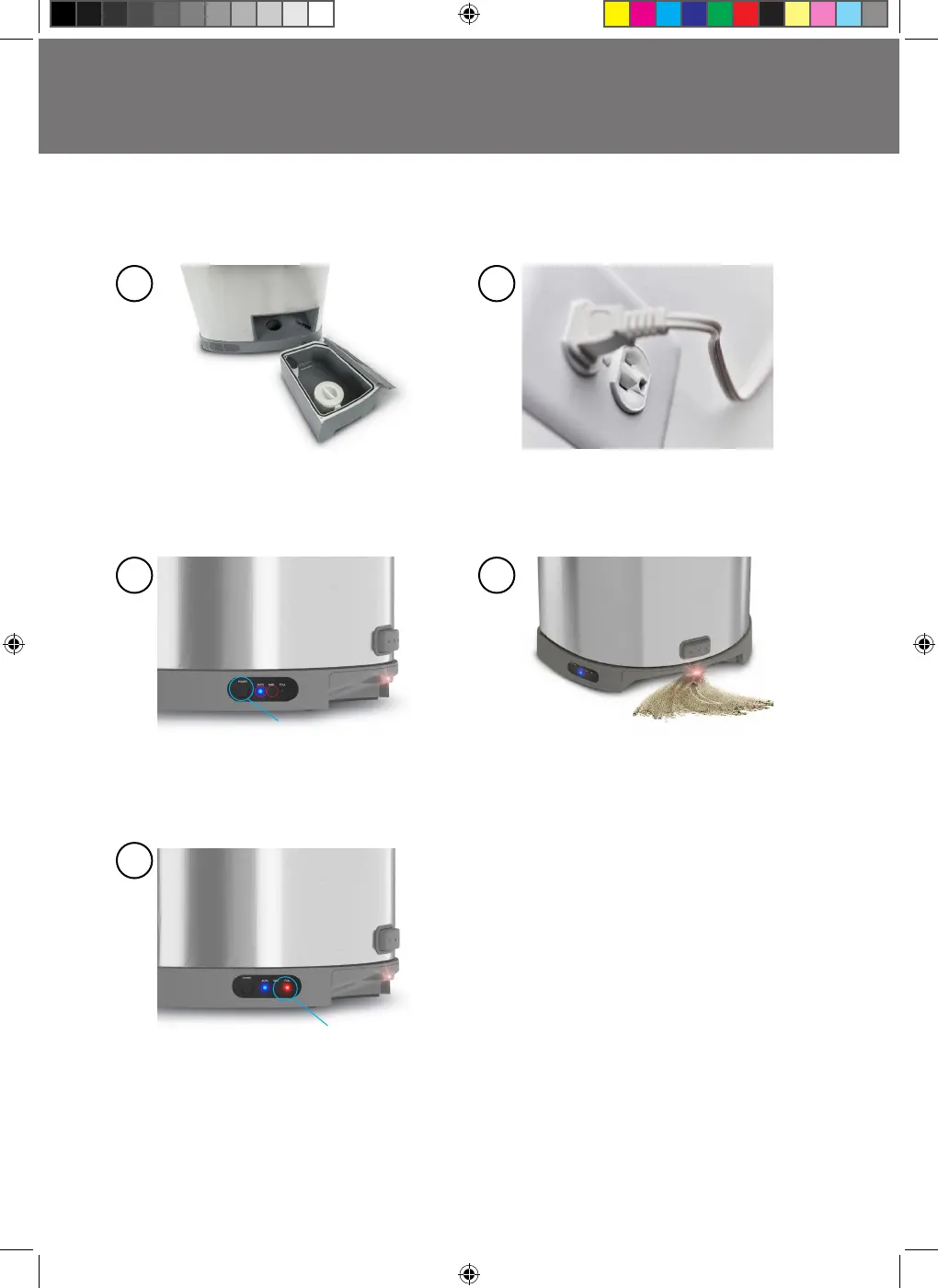
Open the Canister and ensure the
Pre-Motor Filter is aligned properly and
in place. Then, re-insert the Canister.
EyeVac+ will not operate if the canister
is not inserted properly.
Canister FULL
Press the Vacuum Power button (locat-
ed on the bottom of the unit) to turn
ON. EyeVac+ will be in Auto mode. Press
the Vacuum Power button again to
select Manual mode
When ready, simply sweep debris towards
the Inlet. If in Auto mode the Vacuum
Sensors will detect the sweeping motion.
If in Manual mode simply tap the Manual
Activation button and the Vacuum will
activate.
As debris accumulates, the Canister will
need to be emptied. The Canister full
indicator illuminates Red to let you know
when its time to empty the Canister.
Plug in your EyeVac+
in the desired location.
Press Power button
to indicate either Manual or Auto modes
1
3
5
4
2
Canister full
EyeVac Plus.indd 5EyeVac Plus.indd 5 4/1/21 2:57 PM4/1/21 2:57 PM


 To Next Page