3
PLEASE REGISTER TO ACTIVATE YOUR PRODUCT’S WARRANTY.
IteMs RequIRed foR staRtup:
• 10-AACellAlkalineBatteries (Sold separately)
• 1-SDHCStorageCard(upto32GB) (Sold separately)
NOTE:Eyecon™TrailCameras can accept SD cards up to 32GB, but testing shows
that maximum performance is obtained at 16GB.
• 1-ExternalSDmemorycardreader for viewing photos/videos.
(Sold separately)
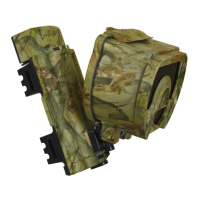
• optIonal:1Model ECA100Extenda-Liferechargeablelithiumbattery
pack. (Sold separately)
note: The CRossfIRe “Patent Pending” design has a dual power supply.
The camera will operate using 10-AA sizealkalinebatteries or the eCa100
Extenda-Life battery pack, or a combination of both. If both alkaline and
the Extenda-lifepack are used together, the camera will run on the external
Extenda-lifepack until depleted and then automatically switch to the internal
alkalineAAbatteries. It will always run on the external pack rst when both
battery sources are installed in the camera.
To see which battery source the camera is using, look at the batteryindicator. If
there is an l on the Right Side of the batteryindicator this means the camera
is running on the ECA100Extenda-LifeLithiumpack. If a C has replaced the l
this means the camera has switched over to the internal alkalineAAbatteries
and you should remove the Extenda-Lifepack for recharging.


 To Next Page