USB Video Grabber
Notice:
1. You maybe have to buy some 3.5” video and audio cables (Male) if the video and audio cables of device are
not long enough. And you maybe have to buy an S-Video (miniDIN 4PIN) cable.
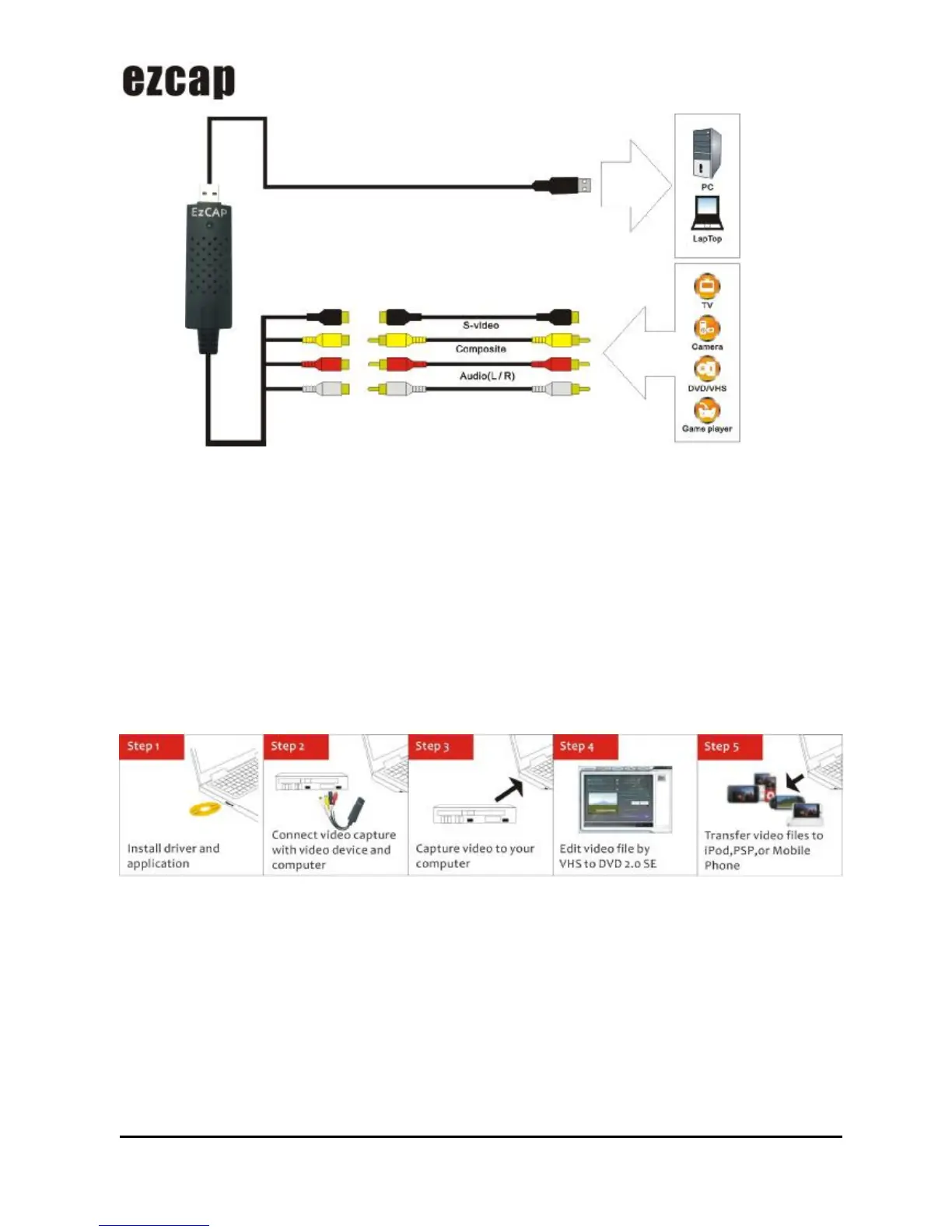
2. The below devices can be used as analog video sources:
PS2, PS3, WⅡ, X360, XBOX, and all the device has chromatism output.
Quick Installation Chart
Please read the all installation guide clearly.
Please install the device hardware and software following below chart if you’re very busy and want to use the
device soon.
Video capture:
Step 1: Insert the CD-ROM to install the drivers and application software.
Step 2: Connect USB Video Grabber with analog video source.
Step 3: Connect USB Video Grabber with computer.
Step 4: Capture video programs into your computer with VHS to DVD 2.0 SE, and edit them.
Hardware Installation
Note: If you have any antivirus software enabled, please disable it during the installation of the software.


 To Next Page