11
Power On
When the electric bike is switched on, the display will boot, lighting all the LED lights for 2 seconds before entering normal operation.
Basic Operation
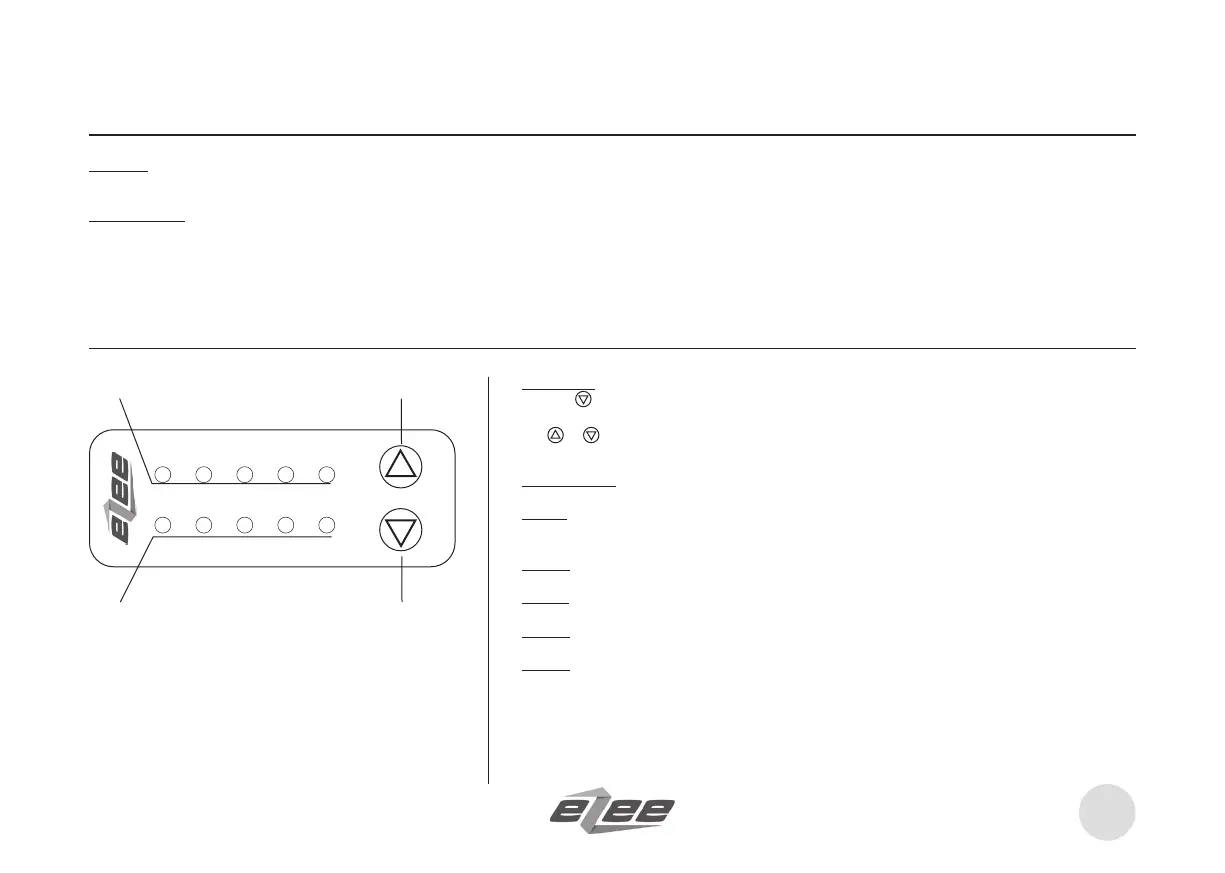
Power level in blue LED shows the level of electric assistance in pedelec or power assist mode.
There are 5 levels of assistance and power o when all the blue LED lights are o.
At least one blue LED must be on to have any power on (e.g. activating the throttle)
Display console
b. Power Assist Level / Mode Selection Indicator (5 Blue)
c. “Up” button
d. “Down” button
Battery
Power
c. a.
d. b.
Setup Menu
Hold the
button for 5 seconds to enter setup menu.
Use
or button to select the appropriate settings. In menu setup, hold the ‘Down’ button for about 3
seconds to save.
Mode Selection
Mode 1: (Default) Pedelec / EBike (US): Power Led Bar shows the assist power level. When throttling, it
switches to EBike mode.
Mode 2: Pedelec (EU): Power Led Bar shows the assist power level. Throttling will be in 6km EBike mode.
Mode 3: Option for BB torque sensor with proportional 5 power levels.
Mode 4: Pedelec: Responds to throttle / assist level. Power LED Bar shows the current (amps) level.
Mode 5: EBike (Cruise): Responds to throttle (from gauge). Power LED Bar shows the current (amps) level.
‘Up’ button set cruise. EBrakes deactive cruise.
The bike will come set up with the mode according to your country legal requirement. Any changes are
made may aect the legal status of your bike.


 To Next Page