4
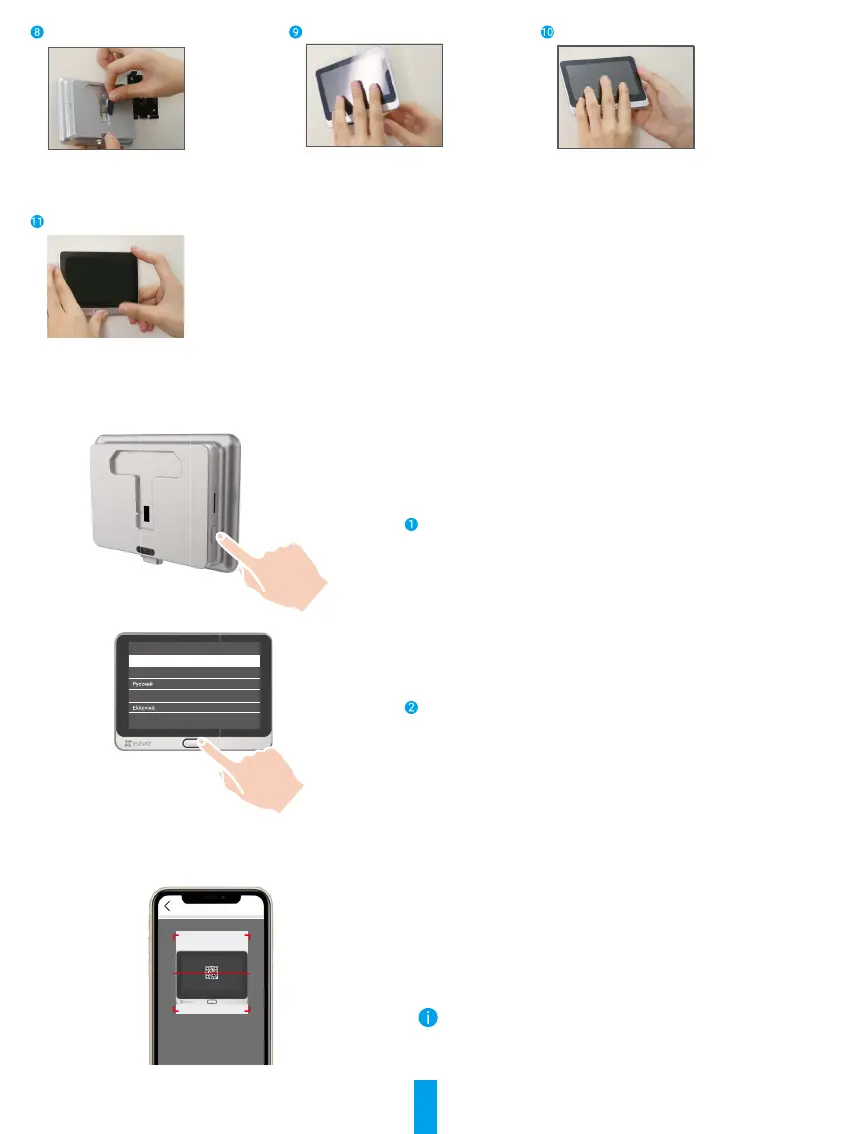
Connect the panel with the camera's
wire.
Put the panel into the mounting
base.
Hold the dismantle button until the
panel is well buckled.
Installation complete.
Power on
Hold the power button for 3 seconds to power on the panel.
Language Choose
简体中文
Magyar
English
Tap the Home button below to next stop,
tap the Power button left to confirm
Tap the Home button to choose your language and press
the Power button to conrm.
Add to EZVIZ App
- Log in the EZVIZ app.
- On the Home screen, tap “+” on the upper-right corner to go to
the scan QR code page.
- Scan the QR code.
- Follow the EZVIZ app wizard to nish Wi-Fi conguration.
If you failed to get the QR code or want to recongure Wi-Fi,
please hold the Home button for 5 seconds to reset and repeat
the steps above.



 To Next Page