3
Installation
1. Install the Micro SD Card (Optional)
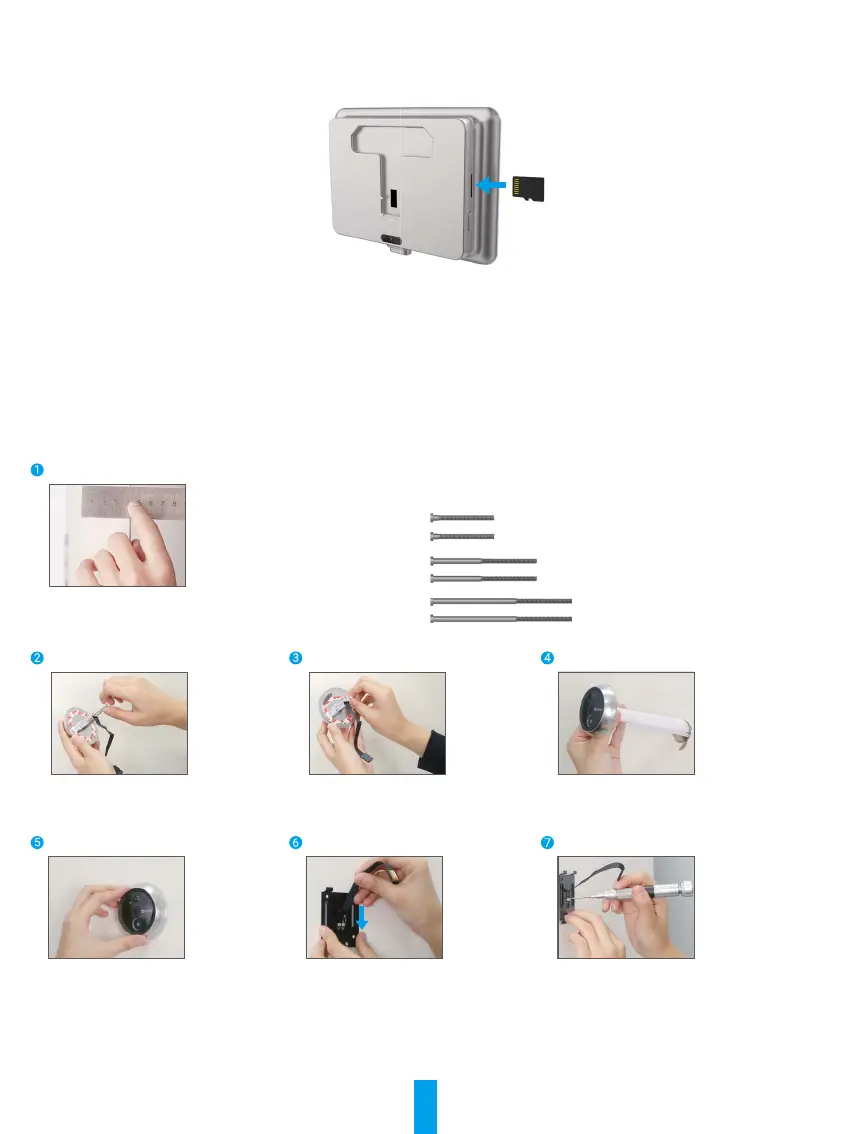
- Insert the micro SD card (sold separately) into the card slot as shown in the gure below.
- In the EZVIZ app, tap the Storage Status in the Device Settings interface to check the SD card status.
- If the memory card status displays as Uninitialized, tap to initialize it. The status will then change to Normal and it can
store videos.
2. Install the peephole
If you already have a peephole, install the device in the same place. If not, please drill a hole of diameter about 16.5mm (no
more than 45mm) and about 145cm distance from the ground to have a good viewing effect.
Measure the door's thickness and select the appropriate screws.
Thickness Screw
35 to 60mm
60 to 85mm
85 to 105mm
Turn the screws into the back of
camera.
Tear off the release paper. Pass screws and wire through the
door. You can roll up the paper to help.
Adjust camera's position and push
it close to the door gently.
Pass screws and wire through the
mounting base.
Adjust the mounting base's position
and tighten the screw.



 To Next Page