2
Get the EZVIZ app
1. Connect your mobile phone to Wi-Fi using your 2.4GHz network.
2. Search for “EZVIZ” in App Store or Google Play
TM
.
3. Download and install the EZVIZ app.
4. Launch the app, and register an EZVIZ user account.
Installation
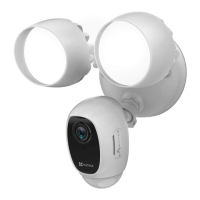
• Installation height affects motion detection, security light camera recommended installation height: 3 m (10 feet) above the ground.
• Camera recommended setting angle: 22 degree as shown below.
22°
Step 1
Shut off the electricity at the breaker that controls security light's circuit.
• If you don’t know where your breaker is or how to turn off power to your oodlight circuit, consult with a licensed electrician.
• Keep the breaker off at any time during the installation process.
Step 2
Install Micro SD Card (Optional).
1. Remove the cover on the side of the camera.
2. Insert a micro SD card (sold separately) into the slot until a click.
3. Place the cover back on.
After installing the micro SD card, you should initialize the card in the EZVIZ app before using it. For detailed operation, refer to page 5:
Initialize
Micro SD Card
.

 To Next Page
 Loading...