1
Step 1 Installing the Battery
1
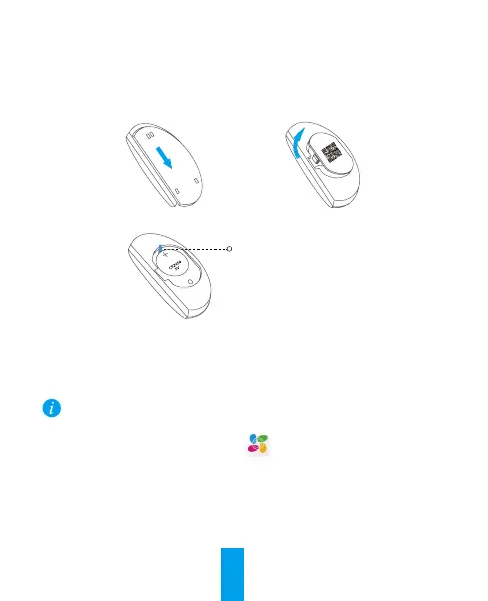
Slide the rear cover off from T2 and then open the battery cover, as shown below.
2
Pull out the insulation sheet from the battery slot.
Insulation Sheet
3
Replace the battery cover and the rear cover, and then finish the battery installation.
Step 2 Adding T2 to Internet Alarm Hub
T2 should be used cooperating with an Internet Alarm Hub (such as A1, should be
purchased separately).
• Option 1 (Recommended) Adding by EZVIZ App
1. Installing the EZVIZ App
- Connect your mobile phone to Wi-Fi.
- Download and install the EZVIZ app by searching “EZVIZ” in App Store (iOS version)
and Google Play
TM
(Android version).
- Start the app and register for an EZVIZ user account.
Operations


 To Next Page