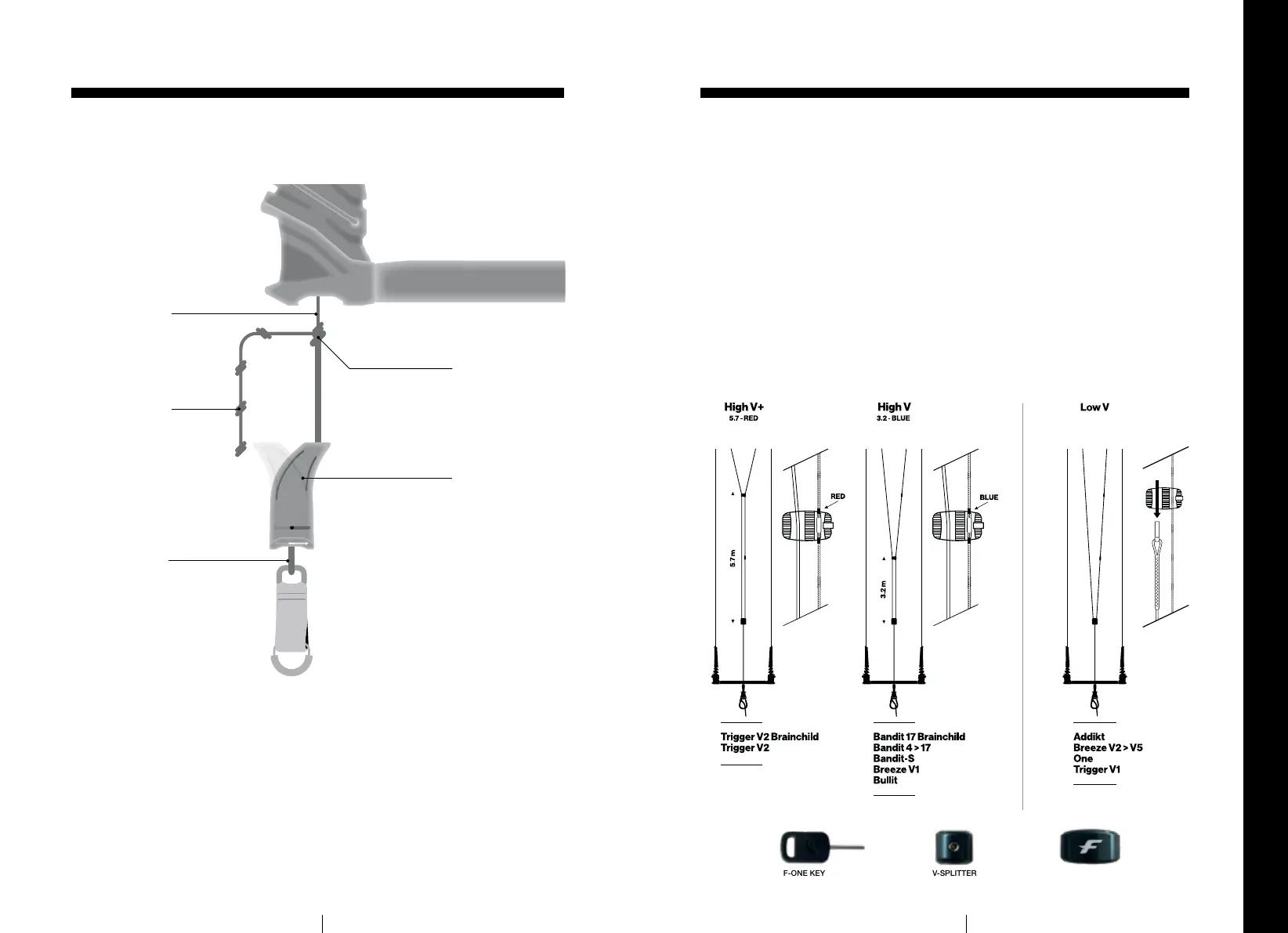
The length of the back lines can be adjusted in order to:
• Lengthen or shorten the backlines compared to the front lines and thereby
adjust the power of the kite.
• Compensate for a length differential between the left and right back lines.
A succession of holding knots are located at the bottom of the Leader
Lines to adjust the length of the backlines. To do so, follow the procedure:
• Pull out the bar end insert as explained on page 18.
• Undo the Lark’s head knot attaching the insert line to a holding knot.
at the bottom of the Leader Line.
• Attach the insert line onto another holding knot higher up or lower down,
using a Lark’s head knot.
• Fit the bar end insert back into its housing.
ADJUST LINE LENGTH
Leader Line
Holding Knots
Insert line
Lark’s Head Knot
Bar End Insert
FRONT LINES TUNING - HIGH V / LOW V
• To get the HIGH V+ setting, make sure that
the front lines are both running through the V
SPLITTER and that it is correctly screwed at
the red mark (5.7m).
• To get the HIGH V setting, make sure that
the front lines are both running through the V
SPLITTER and that it is correctly screwed at
the blue mark (3.2m).
• To get the LOW V setting, take the
free-running line out of the V SPLITTER.
If you wish, the V SPLITTER can be taken off
completely from the front lines.
The 4 Lines F-ONE LINX BAR offers three tuning possibilities for the front
lines.
Our new V-splitter makes it easy to adjust the height of the V between our three settings — low
V, high V, high V+. It comes with a small hex key to tighten the screw and easily set the part at
the desired height.
Remember to regularly check the wear of your lines, particularly at the V-splitter level, and
replace your lines if they show signs of wear.
24
25
F-ONE KEY V-SPLITTER
(SIDE)
V-SPLITTER
(FRONT)


 To Next Page