
EasyManua.ls Logo

FAAC XP15B - User Manual

FAAC XP15B
6 pages
Print Icon
To Next Page IconTo Next Page
Loading...
XP15B
XP15B

Questions and Answers

  • N
    Nathan SantanaAug 5, 2025
    What to do if FAAC XP15B Fencing & Gates are not moving and/or not closing and DL1 LED is off?
    • J
      Jennifer BrownAug 5, 2025
      If your FAAC Fencing & Gates system isn't moving and/or closing, and the DL1 LED is off, it could be due to photocells not being aligned. Ensure the photocells are properly aligned. Alternatively, transmitter trouble might be the reason, so replacing the photocells could solve the issue.
  • E
    Emily HarperAug 15, 2025
    What to do if FAAC XP15B are not moving and DL2 LED is flashing?
    • M
      Megan MilesAug 15, 2025
      If your FAAC Fencing & Gates system isn't moving and the DL2 LED is flashing, it indicates an operating fault of the BUS. To resolve this: * Check the dip-switches on the receiver and transmitter. * Check the BUS connections. * Replace the photocells.
  • C
    Charles GonzalezAug 25, 2025
    What to do if FAAC XP15B Fencing & Gates are not moving and DL2 LED is off?
    • L
      Lauren RiveraAug 26, 2025
      If your FAAC Fencing & Gates system isn't moving and the DL2 LED is off, it could be because the photocell is disconnected or not operating. Try the following: * Check the dip-switches on the receiver and transmitter. * Replace the photocells.

Summary

Description and Technical Specifications

Photocell XP15 B Functionality

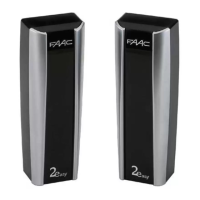
Describes the XP15B photocell's connection to BUS 2 Easy, its composition, and function as a safety device.

Technical Data Table

Presents key technical specifications including power supply, absorption, capacity, protection class, and operating temperature.

Dimensions and Installation

Product Dimensions

Details the physical dimensions of the XP15B photocell, illustrated with a diagram.

Installation Methods

Outlines two installation types: on-wall with embedded or external pipe, and provides installation preparation steps.

Electrical Connections and Start-Up

Wiring the Photocell

Explains how to make electrical connections on terminal boards of receiver and transmitter using grommets.

Setting Addresses

Details how the DS1 dip-switch determines the unique address for each photocell pair.

Powering Up and Alignment Check

Guides on powering up the control unit and verifying photocell alignment using DL1 and DL2 LEDs.

Troubleshooting

Common Photocell Issues

Provides a table to identify and solve common conditions like gate not moving or LEDs flashing/off.

FAAC XP15B Specifications

General IconGeneral
BrandFAAC
ModelXP15B
CategoryFencing & Gates
LanguageEnglish