15
unit mains connector; c) Connect the power plug to the mains socket.
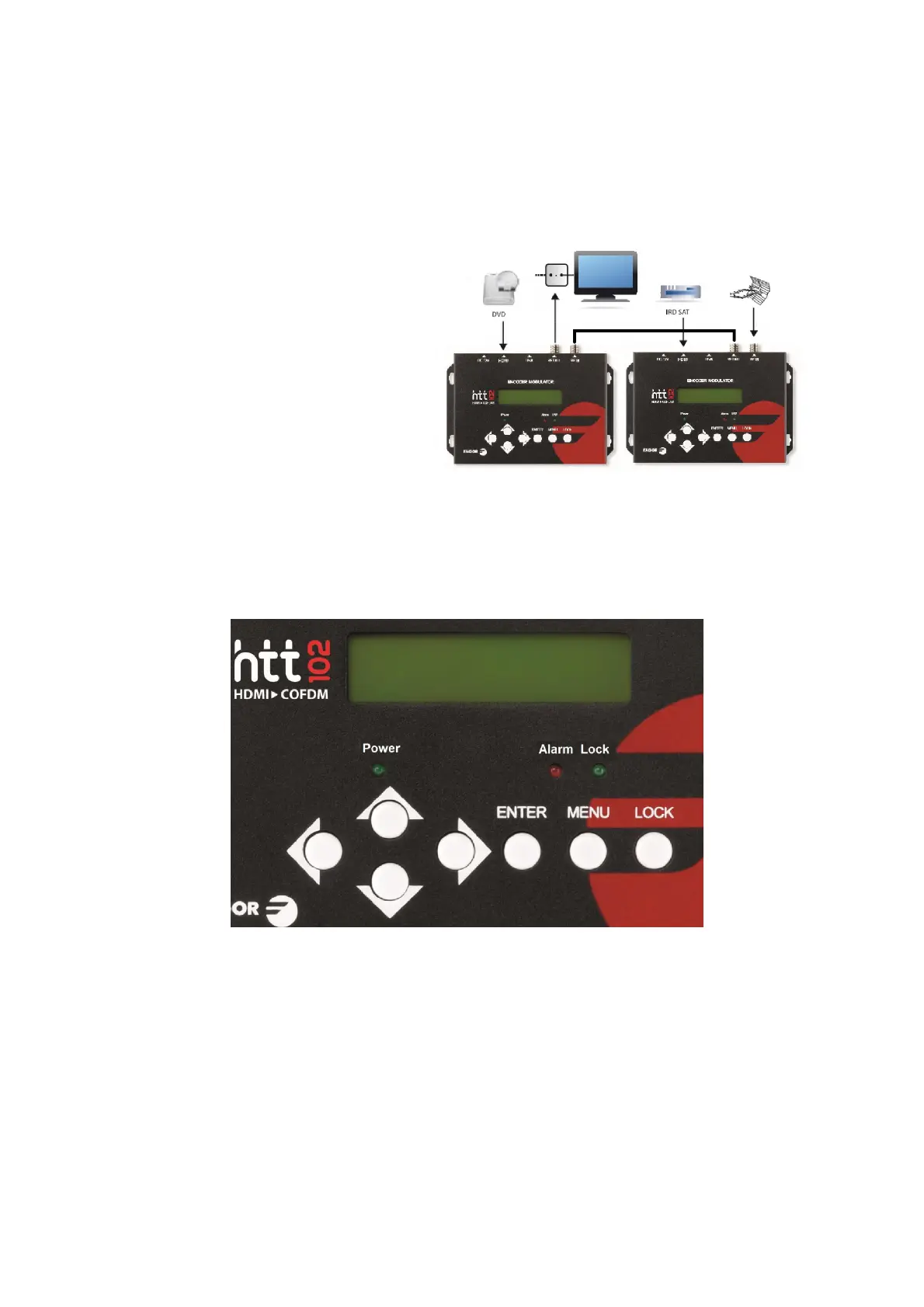
Cascade Installation
HTT Home unit has 1 TV signal to RF output encoded as DVB-T Digital TV signal.
Several HTT Home units can be
cascaded in order to increase the
capacity. To cascade 2 or more units,
connect the RF output of the
preceding unit to the TV input
(loop-through) of the next unit (see
right illustration).
3. Operation
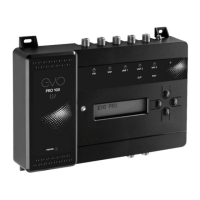
HTT HOME is controlled and managed through the key board and LCD display.
LCD Display – It presents the selected menu and the parameter settings. The backlight in the
display is on when the power is applied.
LED – These lights indicate the working status
Power: It lights on when the power supply is connected.
Alarm: It lights on when there is error, such as the signal source loss.
Lock: It lights on when the signal source connected and goes off when the signal lose.
Left/Right/Up/Down buttons – Use these buttons to turn the screen pages, shift the target
items by moving the triangle, or change the parameter settings in the program mode.
Enter – Use this button to enter a submenu or save a new setting after adjustment; press it to
start adjusting the value of certain items when the corresponding underline flash with Up and


 To Next Page