2
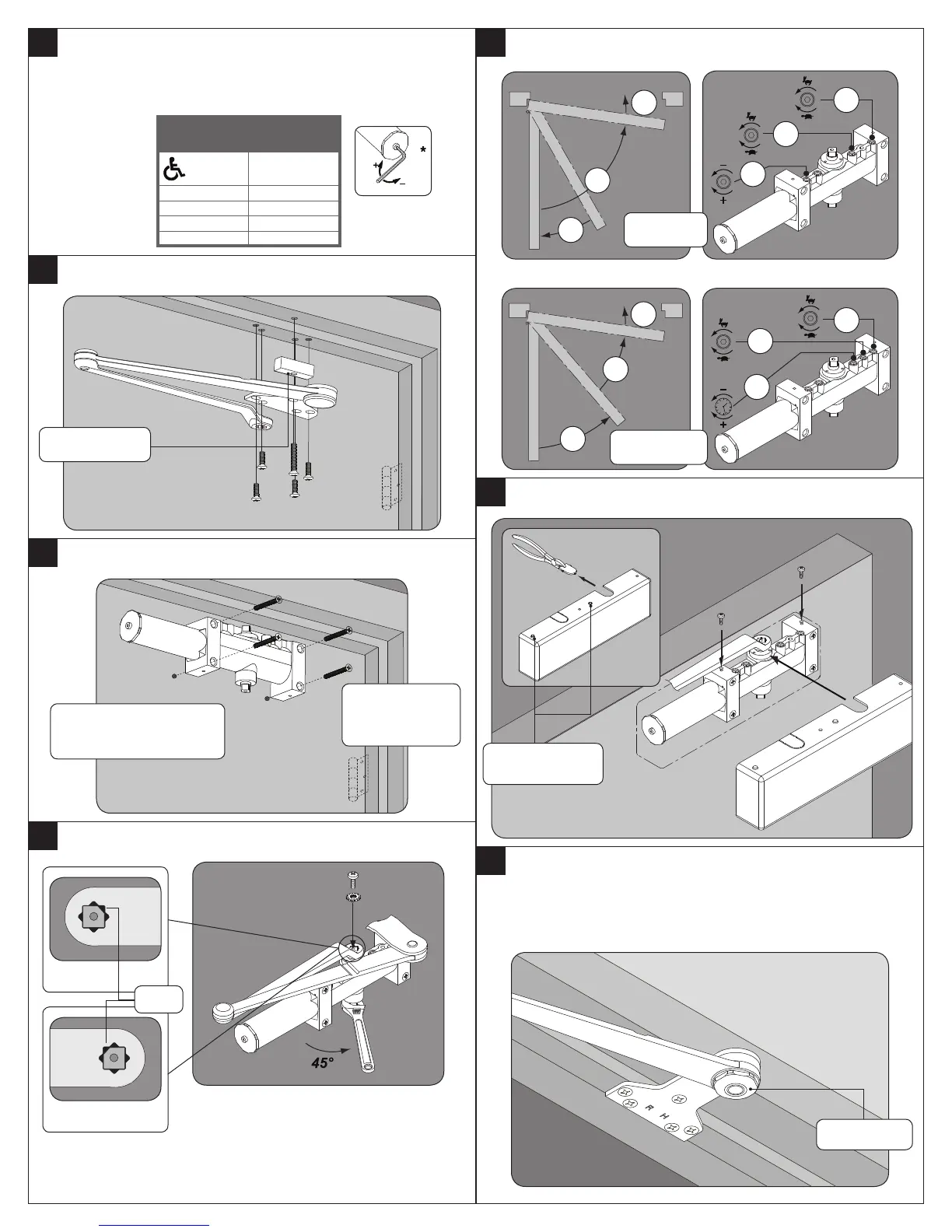
Determine door width, adjust spring power to match
chart.
* Door closer is shipped with +9 turns.
Door
Width
Power
Adjustment
0
32" (815 mm) +5
36" (915 mm) +9
42" (1050 mm) +15
48" (1220 mm) +21
3
Install arm & shoe assembly onto frame.
4
Install closer onto door.
5
Attach main arm to closer.
Fifth Hole Spacer
Valves UP for Right hand
door (shown). Valves DOWN
for Left hand door.
Spring tube faces
away from hinge
edge.
RH
LH
Flat
6
Adjustment Instructions.
— — — — — OR — — — — —
7
Attach cover with screws.
8
To adjust optional handed hold-open arm:
A. Loosen hold-open nut.
B. Open door 5° less than desired position and tighten hold-open
nut securely.
SC71
SC71 DEL
Hold-open nut
Insert cover plugs
(RH Shown)


 To Next Page