28
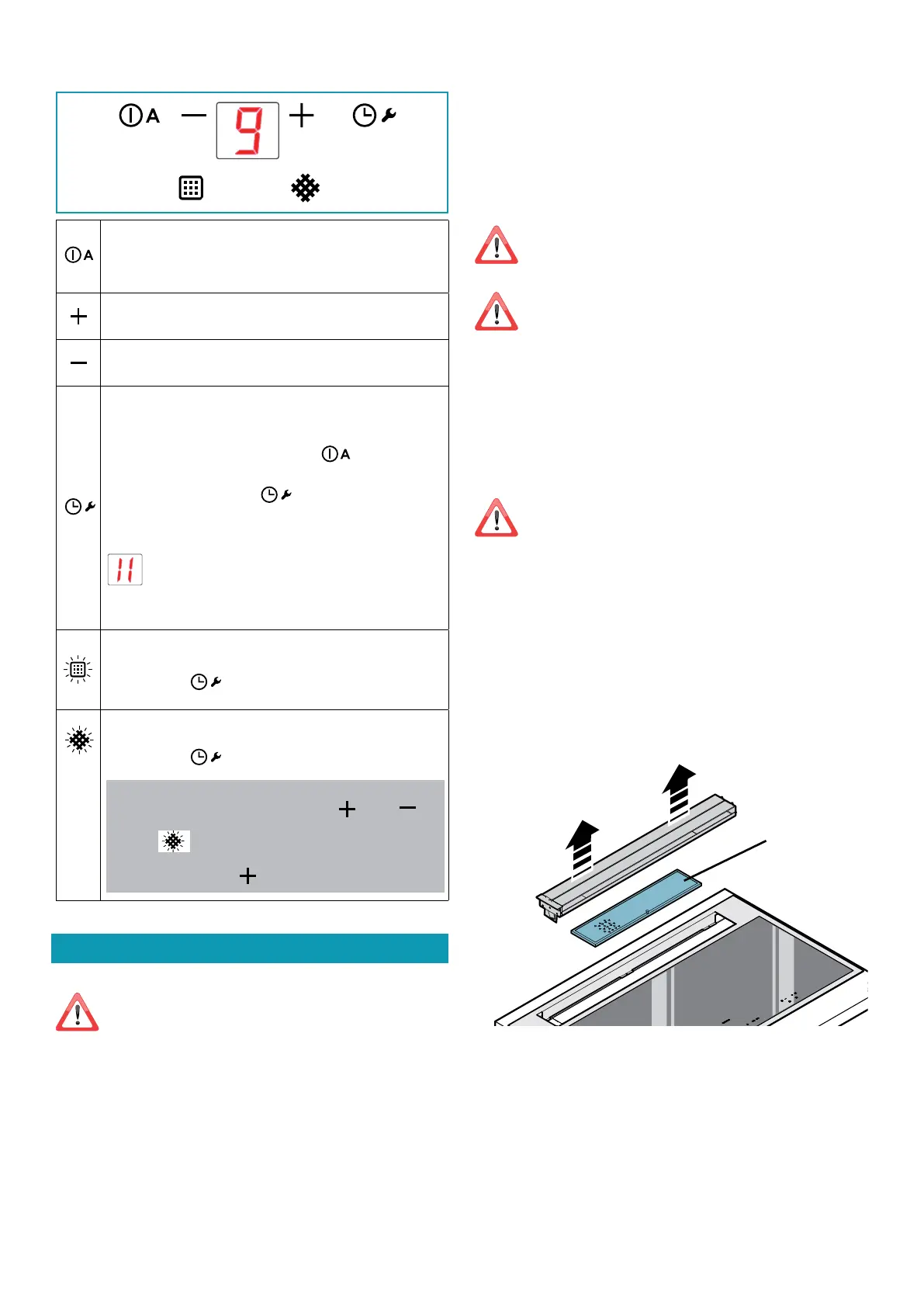
TOUCH PUSHBUTTON PANEL
ON/OFF
Short pulse: Hood switch ON/OFF
Long pulse: Hood operation automatic cycle activation (A)
according to plate power.
Speed increase from 1 to…9 (up to “P”).
Speed “P”: active only for a few minutes, then speed 9.
Speed decrease from P to 1.
With hood active (short pulse): TIMER (ashing red LED)
Automatic switch-o after 15 min.
The function is disabled (red LED OFF) if:
- The motor is switched o (button
).
- Press the TIMER button
again .
With the hood OFF (long pulse 4s):
opening the ns for hood and metal lter maintenance
.
Hold down the key for 4 seconds to exit maintenance mode.
FAT METAL FILTER ALARM
Maintenance after about 30 hours’ use.
Press button
for 5 seconds to reset the counter.
CARBON.ZEO FILTER ALARM
Maintenance after about 2000 hours’ use.
Press button
for 5 seconds to reset the counter.
To activate the alarm:
With the hood OFF, press the buttons and for
3 seconds.
The LED lights up.
Conrm with button
MAINTENANCE
Before cleaning or carrying out maintenance operations,
disconnect the equipment by removing the plug or
switching o the main switch.
Do not use detergents containing abrasive, acidic or corrosive
substances or abrasive cloths.
Regular maintenance guarantees proper operation and performance
over time.
Special attention is to be paid to the metal anti-grease lters : fre-
quent cleaning of the lters and their supports ensures that no amma-
ble grease is accumulated.
CLEANING OF EXTERNAL SURFACES
You are advised to clean the external surfaces of the hood at least once
every 15 days to prevent oily substances and grease from sticking to
them. To clean the brushed stainless steel hood, the Manufacturer rec-
ommends using "Magic Steel" wipes.
Alternatively and for all the other types of surfaces, it can be cleaned
using a damp cloth, slightly moistened with mild, liquid detergent or
denatured alcohol.
Complete cleaning by rinsing well and drying with soft cloths.
Do not use too much moisture or water around the push
button control panel and lighting devices in order to pre-
vent humidity from reaching electronic parts.
Do not wash the aps in a dishwasher.
The glass panels can only be cleaned with specic, non-corrosive or
non-abrasive detergents using a soft cloth.
The Manufacturer declines all responsibility for failure to comply with
these instructions.
CLEANING OF INTERNAL SURFACES
Do not clean electrical parts, or parts related to the motor
inside the hood, with liquids or solvents.
For the internal metal parts, see the previous paragraph.
METAL ANTI-GREASE FILTERS
It is advised to frequently wash the metal lters (F) (at least once a
month) leaving them to soak in boiling water and cleaning solution for
1 hour, taking care not to bend them.
Do not use corrosive, acid or alkaline detergents.
Rinse them well and wait for them to be completely dry before reas-
sembling them.
Washing in a dishwasher is permitted, however, it may cause the lter
material to darken: to reduce the possibility of this problem from hap-
pening, use low-temperature washes (55°C max.).
To extract and insert the metal anti-grease lters see the assembly in-
structions.
(F)
CARBON-ZEO FILTERS
Under normal conditions, they should be regenerated every 18 months
and replaced after 3 years. To regenerate the lter, follow the following
procedure:
- Remove the lter as described in the instructions (Fig. 12).
- Insert lters A, B and C (if any) in a domestic oven at 200°C for about 2
hours.
- When the lter has cooled down, ret the 4 lters onto the metal
structure of the lter.


 To Next Page