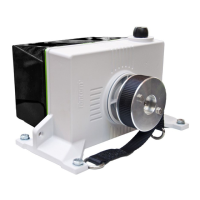
For an additional signaling of the alarm, it is possible to connect an external alarm led.
If you are using the iM.60 with Fantura air inlets, set the rotary switch to the correct position (see "Set the inlet
type" page 8). In order to make the air capacity linear the iM.60 compensates the characteristic of a Fantura air
inlet.
With Fantura inlets, adjust the CLOSE position not to completely closed but to the Fantura
configuration. See page 15 for more information.
To restore the settings, perform the following steps:
1. Switch off the power from the iM.60.
2. Set all the DIP-switches to ON, except DIP 6.
3. Set the manual switch to an OFF (O) position.
4. Switch on the power.
5. Press the pushbutton, within 30 seconds, until F appears in the display and then release the pushbutton.
After a few seconds, an A0 alarm appears in the display.
6. Switch off the power.
7. Make the correct DIP-switch settings.
8. Switch on the power. Now the settings are back to default. Adjust the iM.60 (see page 11) or reverse the
direction of rotation (see page 19).


 To Next Page
 Loading...