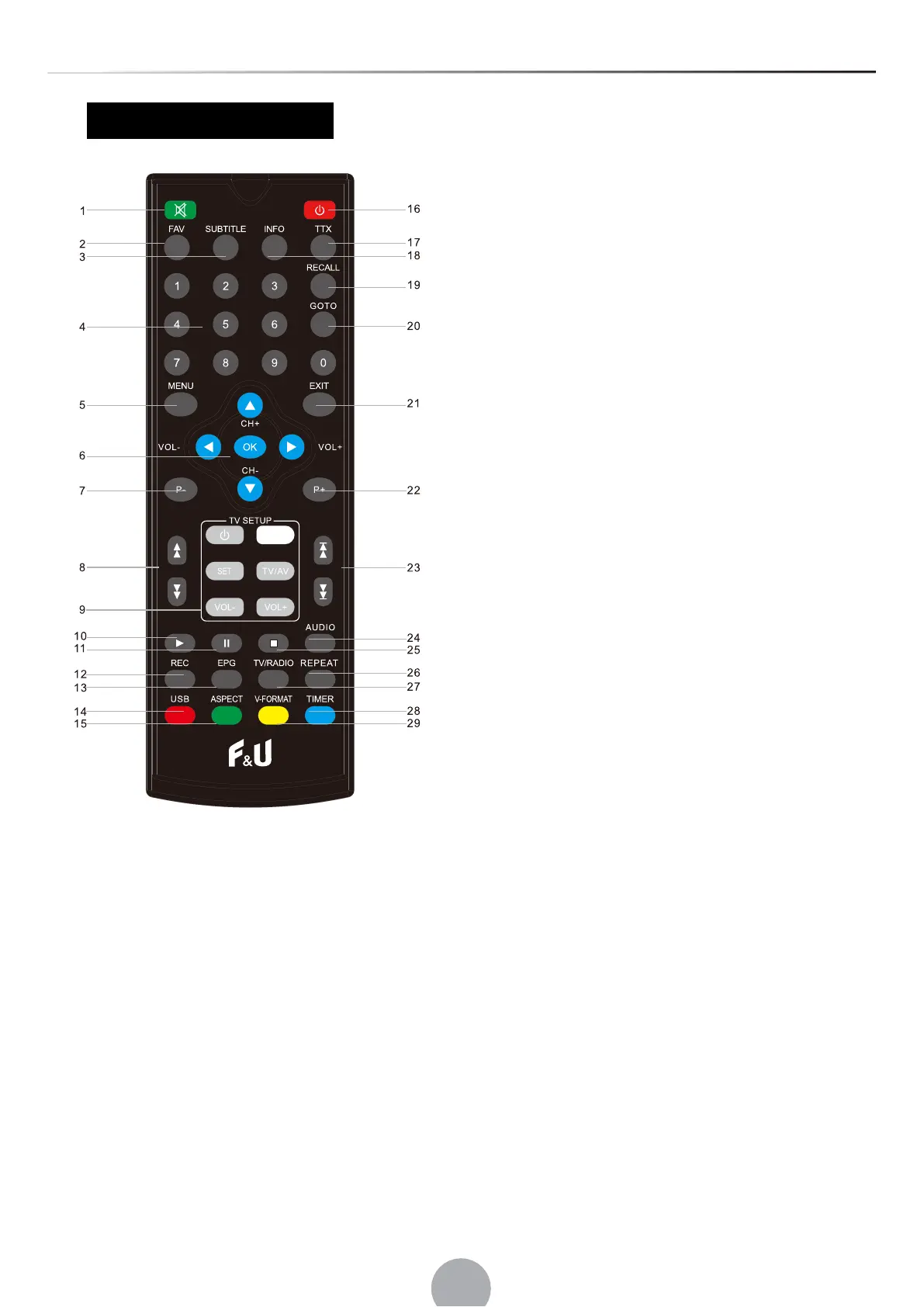
1.MUTE
2.FAV
3.SUBTITLE
4.<0>-<9>
5.MENU
6.OK/CH+/CH-/VOL-/VOL+
7.PAGE-
8.REW/FWD
9.TV SETUP:POWER/SET/TV/AV/VOL-/VOL+
10.PLAY
11.PAUSE
12.RECORD
13.EPG
14.USB
15.ASPECT
16.POWER
17.TTX
18.INFO
19.RECALL
20.GOTO
21.EXIT
22.PAGE+
23.PREV/NEXT
24.AUDIO
25.STOP
26.REPEAT
27.TV/RADIO
28.TIMER
29.V-FORMAT
Programming the remote control
The decoder's remote control has 4 programmable keys via learning mode.
For each of these keys, you can copy the funcons in some buons on the TV remote control.
1. Close the TV remote control to duplicate by aligning the IR transmiers about 3 cm away.
2. Press and hold the SET buon (TV SETUP secon), the remote control LED will turn red intensely,
indicang the
inpu
t in the learning mode.
3. Press the POWER buon in the TV CONTROL secon, the red LED will start blinking.
4. Press the POWER buon on the TV remote control within 3 seconds, the LED flashes twice to confirm
its programming.
5. Repeat steps 3 and 4 for the other keys to duplicate (TV / AV, VOL-, VOL +)
Press SET to exit the learning mode.
Cauon: Some funcons are required to enter a password. The factory default password is ‘000000’.


 To Next Page