The Fantom Drives VENOM8 is a hyper-performance M.2 PCIe Gen4 x4 Solid State Drive (SSD) designed for both primary and secondary storage applications, including upgrading internal drives in compatible computers and expanding storage on the PlayStation 5. This product manual provides comprehensive instructions for installation, system requirements, and warranty information.
Function Description:
The VENOM8 SSD serves as a high-speed storage solution, leveraging the PCIe Gen4 x4 interface for rapid data transfer. It can be used as a primary boot drive to enhance system responsiveness and application loading times, or as a secondary drive for additional storage capacity. Its compatibility with the PlayStation 5 allows users to expand their console's storage for games and other media. The drive is designed to offer significant performance improvements over older storage technologies, making it suitable for demanding tasks such as gaming, video editing, and large file transfers.
Important Technical Specifications:
The VENOM8 is an M.2 2280 NVMe SSD, indicating its form factor and interface type. It utilizes the PCIe Gen4 x4 standard, which provides a substantial increase in bandwidth compared to previous generations of PCIe.
- Form Factor: M.2 2280 NVMe (requires a compatible M.2 2280 NVMe socket slot on the motherboard).
- Interface: PCIe Gen4 x4.
- Capacities: The VENOM8 is available in multiple capacities:
- VM8X10: 1TB
- VM8X20: 2TB
- VM8X40: 4TB
- VM8X80: 8TB
- System Requirements (for PC):
- PCIe NVMe storage-capable hardware motherboard.
- System BIOS that supports UEFI 2.3.1 or later with NVMe support.
- Operating Systems: Microsoft Windows 7, 8, 10, 11 or newer.
- Heatsink Requirement: M.2 NVMe SSDs, including the VENOM8, generate significant heat due to their high storage density and speeds. A heatsink is explicitly required to maintain optimal operating temperature, which is crucial for extending the drive's lifespan and ensuring consistent performance. Fantom Drives recommends their VENOM8 Heatsink if the motherboard does not come with one.
Usage Features:
The VENOM8 SSD offers versatile usage scenarios:
-
PlayStation 5 Installation: The manual directs users to a video tutorial for installing the VENOM8 on a PlayStation 5, indicating its suitability as a storage expansion for the console.
-
Installation on Motherboard (PC):
- Primary Boot Drive: For new installations, users can install the VENOM8 and then use their OS boot media to install the operating system, selecting VENOM8 as the destination.
- Upgrading from an Older Drive (Primary): If upgrading, users can clone their existing boot drive to the VENOM8 using Fantom Drives' free FD cloning software (available at www.fantomdrives.com/venom8). After cloning, the computer should be rebooted, and the BIOS setup entered to select the VENOM8 SSD as the new boot device.
- Secondary Drive: For use as a secondary storage drive, after physical installation and booting into Windows, the drive needs to be initialized and formatted. This involves:
- Accessing "Disk Management" (right-click Windows icon).
- Right-clicking the correct uninitialized disk and selecting "Initialize Disk."
- Ensuring "GPT (GUID Partition Table)" is selected for the partition style.
- Going back to Disk Management, right-clicking the disk, and selecting "New Simple Volume."
- Following the "New Simple Volume Wizard" and setting the File System Type to NTFS.
- Optionally, setting a Volume label (e.g., "FANTOM DRIVES").
- Performing a quick format.
-
Mac Compatibility: For Mac users, compatibility varies by model. It is recommended to consult a Mac specialist or the owner's manual to determine if an M.2 2280 NVMe SSD can be used to upgrade the internal drive.
Maintenance Features:
While SSDs generally require less maintenance than traditional hard drives, the manual highlights a critical aspect for the VENOM8:
- Thermal Management: Due to the high heat dissipation of M.2 NVMe SSDs, a heatsink is mandatory to maintain the drive at its optimal temperature. This is essential for increasing the longevity and performance of the VENOM8. Users whose motherboards do not include an M.2 heatsink are advised to purchase the Fantom Drives VENOM8 Heatsink.
Important Considerations:
- Professional Installation: Installation by a computer technician is highly recommended, especially for motherboard installations.
- Data Backup: Users are strongly advised to always back up their data to another storage device before installing any new component to prevent data loss.
- Static Discharge: Before handling the SSD, users should ground themselves to remove any static charges from their body, with an anti-static mat being a recommended tool.
- Warranty:
- A 1-year warranty is provided without product registration.
- A 5-year warranty is available if the product is registered within 90 days of purchase at https://www.fantomdrives.com/register.
- The warranty covers hardware components but excludes software, consumables, cosmetic damage, data loss, improper installation/operation, power issues, or unauthorized repairs. It is also void if factory stickers (including serial numbers) are altered or removed.

 Need help?
 General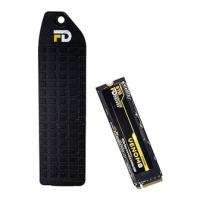

 To Next Page