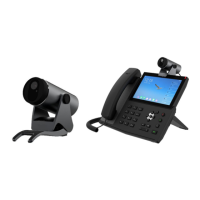
The Fanvil CM60 is a high-definition USB video camera designed to enhance communication experiences, particularly when paired with Fanvil's high-end IP phones. This device offers a straightforward and user-friendly approach to video communication, making it suitable for various professional settings. Its primary function is to provide clear and high-quality video capture, supporting resolutions up to 1080P at 30 frames per second.
Function Description
The CM60 serves as an external video camera that can be easily integrated into existing communication setups. It is specifically designed to be compatible with Fanvil's advanced IP phones, extending their capabilities to include video calls. Beyond its primary role in video conferencing, the CM60 also supports other multimedia functions such as taking photos and recording videos, which can be particularly useful for documentation or sharing visual information. The camera's plug-and-play nature means it does not require additional driver software installation, simplifying the setup process for users. This ease of installation allows for quick deployment across different environments, whether on a desktop, mounted on an IP phone, or attached to an LCD monitor. The inclusion of a privacy shutter switch is a key feature, offering users an immediate and physical way to ensure privacy when the camera is not in use, thereby enhancing security and peace of mind during video communications.
Usage Features
The CM60 is designed for flexible deployment and ease of use. It can be connected directly to a device's USB port, making it highly versatile. Users have several options for placement: it can be positioned on a desktop, clipped onto an IP phone, or mounted on an LCD monitor. This adaptability ensures that the camera can be set up to suit various workspace configurations and user preferences. The camera's angle is adjustable, allowing users to fine-tune the field of view for optimal framing during video calls or recordings. This flexibility ensures that users can achieve the best possible image capture regardless of their seating position or the camera's mounting location.
When used with Fanvil high-end phones, the CM60 seamlessly integrates into the phone's interface. For video calls, simply plugging the camera into the USB port of a compatible Fanvil device enables video functionality. Users can then initiate or answer video calls directly from their phone, entering a dedicated video call interface. The camera's support for third-party applications on high-end products further expands its utility, allowing other software to leverage its video capabilities.
Beyond video calls, the CM60 facilitates photo taking and video recording. On compatible devices like the Fanvil X7A, users can access a "Camera" application from the device's application list. Within this application, they can switch between photo and video modes. Taking a photo is as simple as clicking an icon, and captured images are saved to the phone's album. For video recording, users select the video mode, click a record icon to start, and a stop icon to end the recording. Recorded videos can then be reviewed directly on the device or accessed from the phone's album. The camera's status indicator, a dual-color LED light, provides visual cues about its current operating mode, such as standby (steady green), working (steady red for video calls, photo taking, or recording), or during an upgrade (red and green flashing alternately). This visual feedback helps users understand the camera's status at a glance.
Maintenance Features
Maintaining the CM60 involves simple, routine care to ensure its longevity and optimal performance. The device is designed for indoor use and should be protected from extreme environmental conditions. This includes avoiding direct sunlight, high temperatures, temperatures below 0°C, and high humidity, as these can affect its internal components and overall functionality. It is also crucial to keep the unit dry and prevent any liquid from coming into contact with it.
For cleaning, harsh chemicals, cleaning solvents, or strong detergents should not be used. Instead, the CM60 should be wiped with a soft cloth that has been slightly dampened in a mild soap and water solution. This gentle cleaning method helps preserve the device's exterior without damaging its sensitive parts.
Users are advised against attempting to open the device, as non-expert handling can lead to damage, electric shock, or fire. In case of any issues or malfunctions, it is recommended to consult an authorized dealer for assistance. The device's robust design is intended to withstand normal use, but rough handling, such as dropping, knocking, or shaking, should be avoided to prevent damage to internal circuit boards.
The power supply is another critical aspect of maintenance. Only the external power supply included in the package should be used, as other power supplies may cause damage or introduce noise. Before connecting the power supply, users should verify that the home power voltage is accurate to prevent fire or damage. The power cord itself should be handled with care; if it or the plug is impaired, it should not be used to avoid risks of fire or electric shock.
In terms of troubleshooting, common issues like the camera not displaying images can often be resolved by checking simple connections and indicators. Users should ensure the USB interface is securely connected, confirm that the camera's cover is not obstructing the lens, and check if the prompt light is green and steady, indicating normal operation. These basic checks can help identify and resolve minor connectivity or obstruction problems, ensuring the device continues to function reliably.


 To Next Page
 General