5
HOW TO USE FAQ
™
202
In order to use your mask, you MUST first UNLOCK IT. You can do this automatically by registering your mask via the
FAQ
™
Swiss app for the first time.
1. Start with a clean and dry face, and apply your FAQ
™
primer, if desired. Then place your FAQ
™
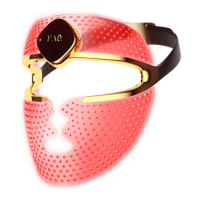
202 Silicone LED
Face Mask over your face, and secure in place with the headband.
2. Press the universal power button to turn on your mask. You can change the LED colors by quick-pressing the button
again. Or you can access pre-programmed treatments and more settings via the FAQ
™
Swiss app. Simply download
the app and follow the instructions.
3. Enjoy your LED facial treatment for up to 15 mins, while you continue with your day - for multitasking at its best.
Once finished, press the universal power button for 3 seconds to turn off your mask.
RECOMMENDED USE: 5-15 mins, 3-5 times per week.
CAUTION: Do not pull the headband too tight, or you may damage the silicone mask.
CLEANING YOUR FAQ
™
202
Always clean your FAQ
™
LED Mask thoroughly after use. For optimal results, we recommend spraying the mask
with FAQ
™
Silicone Cleaning Spray. Then wet a lint-free cloth or towel with warm water, and thoroughly wipe off all
remaining residue.
NOTE: Never use cleaning products containing alcohol, petrol or acetone, as they may irritate the skin and damage
the silicone.
TROUBLESHOOTING
Precautions to be taken in the event of changes in the performance of FAQ
™
:
If FAQ
™
202 is not activated when pressing the universal button:
• Battery is empty. Recharge using the USB charging cable for up to 2 hours until fully charged, and then restart your
device by pressing the universal button.
If FAQ
™
202 cannot be switched off and/or the universal button does not respond:
• Microprocessor is temporarily malfunctioning. Press and hold the universal button to restart the device.
If FAQ
™
202 won’t sync to the FAQ
™
Swiss app:
• Switch your Bluetooth off and then on again to try reconnecting.
• Close the FAQ
™
Swiss app and then reopen it to start the process over.
• Check to see if the app needs to be updated in your mobile device’s app store.


 To Next Page
 Loading...