ENGLISH
GB-16
7. Multi-stage cooking
A maximum of two stages can be set. If one stage is defrosting, it should be the rst
stage. e buzzer will sound once after each stage and the next stage will begin.
Note: Auto menu cannot be set as one of the multi-stages.
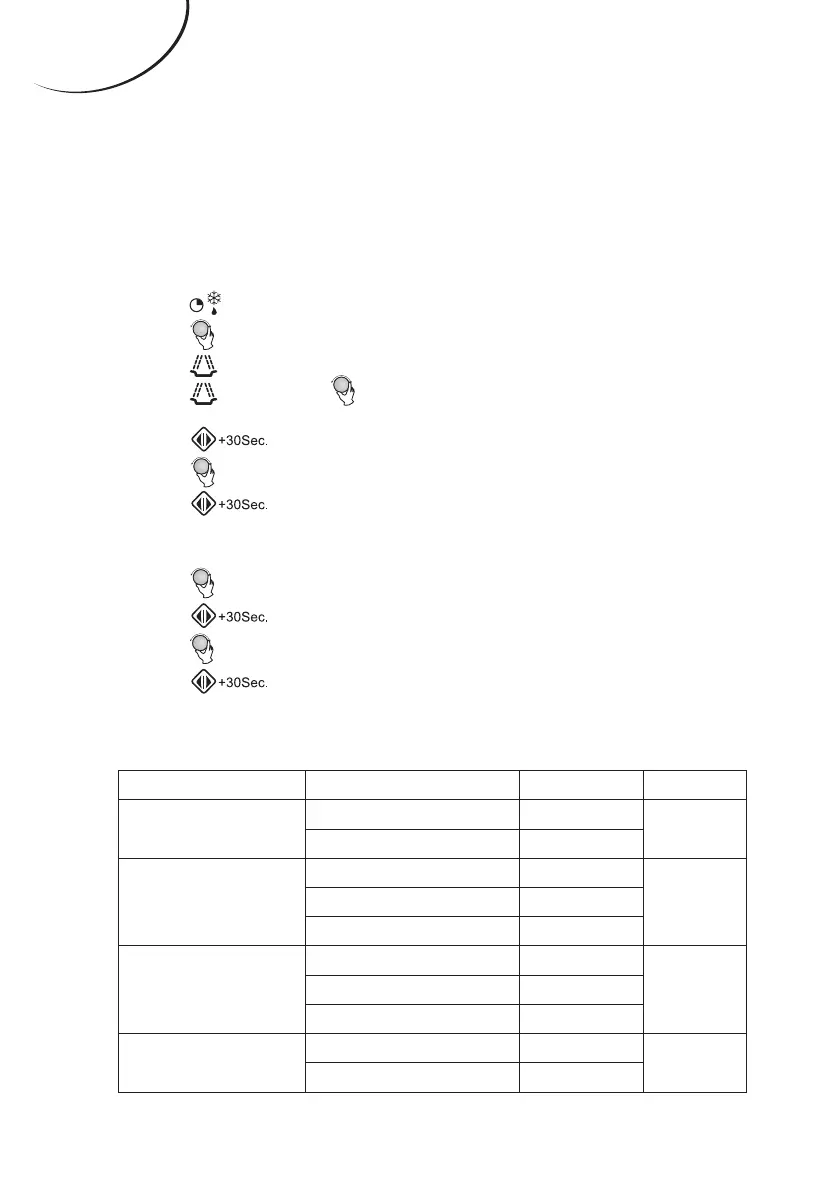
For example: you want to defrost the food for 5 minutes, then cook on 80%
microwave power for 7 minutes. e steps are as follows:
(1).
Press “ ” once; the screen will display “dEF2”.
(2). Turn “ ” to adjust the 5-minute defrost time.
(3). Press “ ” once.
(4). Press “ ” again or turn “ ” to choose 80% microwave power, until the display
reads “P80”.
(5). Press “ ” to conrm.
(6). Turn “ ” to adjust the cooking time of 7 minutes.
(7). Press “ ” to start cooking.
8. Auto menu
(1). Turn “ ” right to choose the menu from “A-1” to “A-8”.
(2). Press “ ” to conrm your selected menu.
(3). Turn “ ” to choose the food weight.
(4). Press “ ” to start cooking.
(5). e buzzer sounds ve times when cooking is nished.
Menu Weight (g) Display Power
A-1
Pizza
200 200
100%
400 400
A-2
Meat
250 250
100%350 350
450 450
A-3
Vegetables
200 200
100%300 300
400 400
A-4
Pasta
50 (with water 450 g) 50
80%
100 (with water 800 g) 100
Auto Menu



 To Next Page