ENGLISHENGLISH
GB
-11GB-10
C
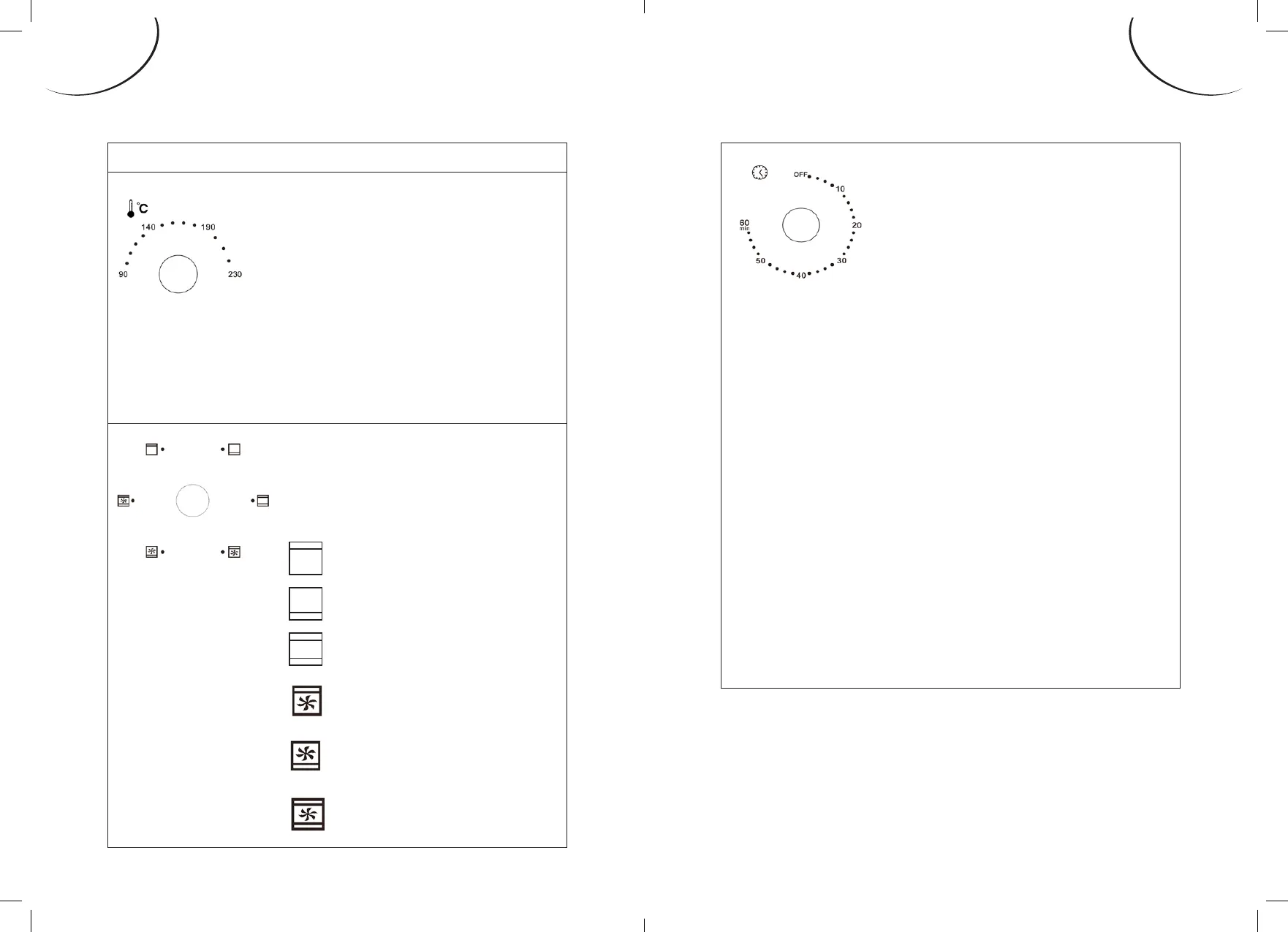
ontrol buttons
T
emperature control
Adjust the cooking
temperature by turning
the temperature dial in
a clockwise direction
depending on the dish
you want to cook. (e
temperature can be set to
between 90°C and 230°C).
M
ode dial
Select the heating elements
appropriate to the dishes you
are cooking.
T
op burner
B
ottom burner
T
op + Bottom burners
T
op burner + Fan
assisted
B
ottom burner + Fan
assisted
T
op + Bottom burners
+ Fan assisted
T
imer
*e front indicator light lets
you know if the oven is on or
not.
1
.
A
djust the cooking time by positioning
the arrow on the timer button to the
appropriate number (minutes) according to
the dishes you want to cook.
2
.
S
et the timer by turning the dial clockwise.
e oven turns o automatically and rings
at the end of the set time.
• T
o set the timer button to a time of less
than 5 minutes, turn to a time to greater
than 6 minutes, and then turn it back in the
opposite direction to the desired duration.
3
.
e o
ven can be turned o manually during
cooking by turning the timer counter-
clockwise to the OFF position.


 To Next Page