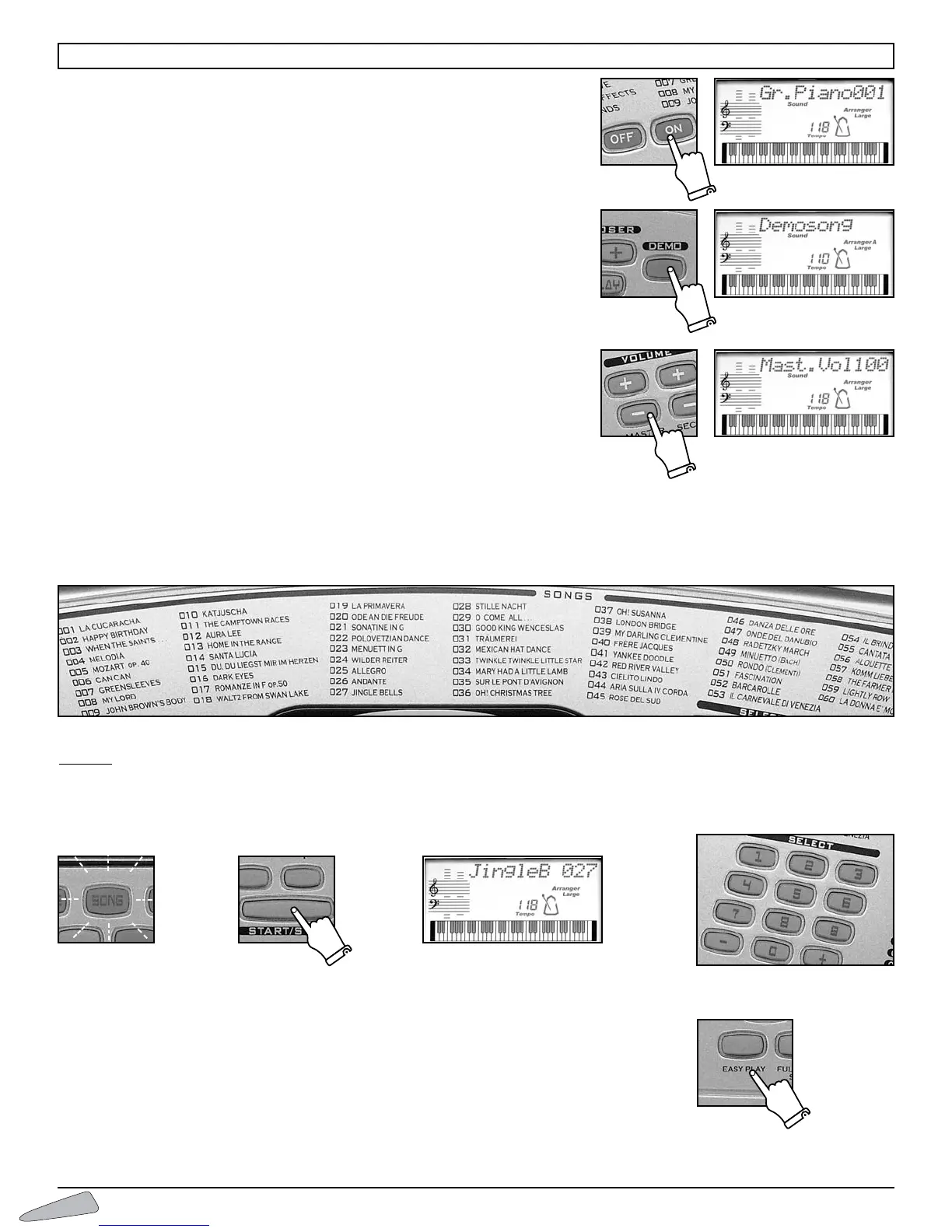
SWITCH ON AND SWITCH OFF
The instrument can be turned on and off by using the ON/OFF button.When tur-
ned on, the keyboard is set to operate with the GR. PIANO sound, the 8 Beat 1
rhythm and the song La Cucaracha.
DEMO – Chosen excerpt
Switching on the DEMO button, a melody that will emphasise the characteristics of
the keyboard will play. To turn off the melody press the DEMO button.
VOLUMES
To r egulate the volume of the instrument you must use buttons MASTER VOLU-
ME + (to turn up) or MASTER VOLUME – (to turn down). By holding the but-
ton pressed down, the variation becomes continuous.
To r estore the standard volume press both MASTER VOLUME + and MASTER
VOLUME – buttons together.
SONGS
The instrument contains 60 classic repertoire songs.
To select the songs, enter a three digit number according to the SONGS list.
Example
:for song 027 Jingle Bells,
• press the SONG button (light on);
• enter SELECT,0,2,7 on the numerical keyboard;
• press the START/STOP button to start or stop the musical performance.
When a song is being played, you can immediately listen to other songs by entering the number of
the song you have chosen or by using the SELECT “– / +” buttons.
The EASY PLAY control sets the melody of the song and the standard TEMPO on the keyboard.
6
HOW TO USE THE KEYBOARD



 To Next Page