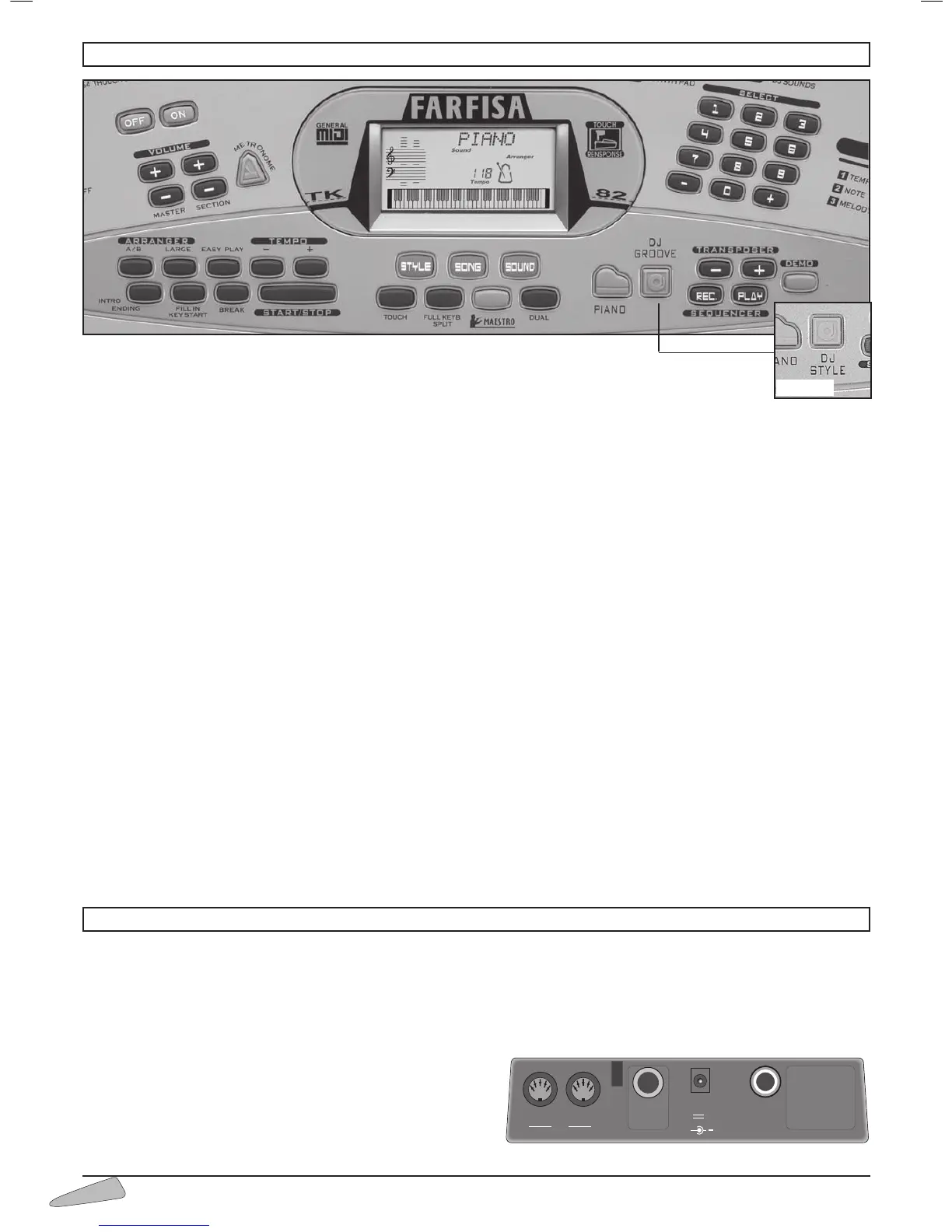
STYLE – Selects the rhythm styles.
SONG – Selects the pre-recorded
songs.
SOUND – Selects the right-hand sound or two sounds to
mix together.
TOUCH – Turns the touch sensitivity on keys on and off
(Dynamics).
FULL KEYB. / SPLIT – Splits the keyboard between two
sounds or to set just one.
MAESTRO – Enters the 5 levels learning mode.
DUAL – Allows mixing and the selection of two sounds.
PIANO – Enables PIANO tone and identification of chords
across the whole keyboard.
DJ GROOVE
(TK 82) - Enable Drum Machine effects on
keyboard.
DJ STYLE
(TK 78) - Enables the DJ STYLE rhythm with dedi-
cated sound and effects on the right-hand side of the keybo-
ard.
TRANSPOSER +/– - Allows pitch of notes to be changed.
SEQUENCER REC – Records what is being played.
SEQUENCER PLAY – Plays what has been recorded.
DEMO – Plays the demo song.
SELECT 0-9 and +/– - Selects functions, rhythms, songs and
sounds.
ON/OFF – Turns the instrument on and off.
VOLUME MASTER – Selects the master volume.
VOLUME SECTION – Selects the sections volume.
METRONOME – Switches on and off the metronome
beat.
ARRANGER A/B – Selects the automatic accompaniment
with A and B rhythms.
ARRANGER LARGE – Selects the automatic accompani-
ment with Large rhythms.
EASY PLAY – Depending on the style, selects right-hand
and left-hand tone, the best tempo for the performance and
sets the FREE CHORD setting on the keyboard. In the 60
songs, it selects the sound and the tempo connected to the
songs.
TEMPO +/– - Sets the tempo for style performance, songs
or metronome.
INTRO/ENDING – Prepares a musical intro or plays an
ending when the rhythm is on.
FILL IN/KEY START – Allows rhythm to be enabled by
pressing one or more keys or enables changes while rhythm
is on.
BREAK – Prepares a temporary variation of the rhythm style
or a short intro.
START/STOP – Starts/Stops a rhythm style or a song.
3. CONTROL PANEL
4. SOCKETS
INPUT DC 12 V - Switches the instrument on with an AC/
DC adapter.
PHONES / AUX-OUT – Socket for headphones and Hi-Fi;
output impedance 150 Ohm – To play without disturbing and/
or being disturbed, you can use a stereo headphone. When the
cable is inserted the speaker is automatically excluded and all
sections of the keyboard can be heard in the headphone. The
socket also allows an additional stereo amplifier, a recorder, etc.
to be connected.
Warning: only connect stereo cables to the “PHONES/ AUX-
OUT” socket.



 To Next Page