EasyManua.ls Logo

Fat Shark Shark Byte RX5.1 - User Manual

Fat Shark Shark Byte RX5.1
16 pages
Print Icon
To Next Page IconTo Next Page
Loading...
WARNING: Always operate this product in a safe and responsible manner and observe local laws.
WARNING: The Shark Byte by Fat Shark is not a toy. This product contains small parts and is intended to be
operated by adults. Not for children under 14 years old.
WARNING: The Shark Byte by Fat Shark requires soldering for assembly and is not recommended for beginners.
Assemble at your risk, damage to the product from incorrect assembly is not covered under warranty.
S
hark Byte
Shark Byte User Manual
Rev. 121220(DDMMYY)
For more product information, please visit:
www.fatshark.com
All Rights Reserved
THIS MANUAL COVERS NOT INCLUDED, REQUIRED
Video Goggles (Fat Shark Dominator Series)
(1) 5.8GHz antenna with MMCX connector, to be mounted on your drone (TX5M.1)
(1) 5.8GHz antenna with u.FL connector, to be mounted on your drone (TX5S.1)
(2) 5.8GHz antenna(s) with SMA connectors, to be mounted on the vrx (
RX5.1)
Batteries
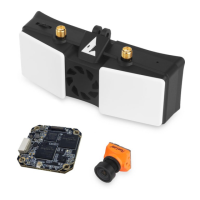
FSV2476 Shark Byte Video Receiver RX5.1
FSV2477 Runcam Nano HD Camera
FSV2478 Shark Byte Video Transmitter TX5M.1
FSV2480 Shark Byte Video Transmitter TX5S.1

Questions and Answers

Summary

TX5 M.1 Circuit Board Assembly

Assembling the TX5 M.1 Circuit Boards

Instructions for physically connecting the two circuit boards of the TX5M.1 transmitter.

Disassembling the TX5 M.1 Circuit Boards

Procedure for safely separating the two circuit boards of the TX5M.1 transmitter.

TX5 M.1 Installation and Connection

TX5 M.1 Connection Diagram

Diagram illustrating how to mount and connect the TX5M.1 air unit to an airframe.

TX5 M.1 Installation Guidelines

Recommendations for installing the TX5M.1 VTX for proper ventilation and heat dissipation.

TX5 M.1 Specifications

Operating Frequencies and Power

Details operating frequencies, transmitting power levels, and power consumption for TX5M.1.

IO Interface, Input Power, and Temperature

Specifies IO interfaces, input voltage range, and operating temperature for TX5M.1.

Supported Flight Control Systems

Lists compatible flight control systems and versions for the TX5M.1.

TX5 S.1 Installation and Connection

TX5 S.1 Connection Diagram

Diagram showing how to connect the TX5S.1 air unit to the aircraft's airframe.

TX5 S.1 Installation Guidelines

Installation instructions for the TX5S.1, including power, antenna, and cooling considerations.

TX5 S.1 Specifications

Weight, Dimensions, and Mounting

Provides weight, dimensions, mounting pattern, and IO interfaces for TX5S.1.

Operating Frequencies and Power

Details operating frequencies, transmitting power, and power consumption for TX5S.1.

Input Power and Temperature

Specifies input power range and operating temperature for TX5S.1.

Supported Flight Control Systems

Lists compatible flight control systems and versions for the TX5S.1.

Keypad Control for VTX and Camera

Camera Settings Adjustment

Using the 5-way joystick to adjust camera settings like picture, white balance, and day/night.

VTX Parameter Adjustment

Using the select button and LED display to change VTX channel, power, and LP mode.

RC Controller Configuration

VTX and PID Menu Navigation

Guide on navigating VTX and PID menus using RC controller inputs and key definitions.

VTX Parameter Adjustments

Details how to adjust VTX channel, power, and LP mode using the RC controller.

Camera Parameter Adjustments

Explains how to access and adjust camera settings via the RC controller.

RC Camera Setup Menu

Connecting to Camera Setup

Procedure to connect and access the camera setup menu via RC transmitter.

RC Control Key Definitions

Defines the RC controller inputs for navigating the camera setup menu.

Exiting Camera Setup

Steps for exiting the camera setup menu and returning to normal operation.

50 FPS;60 FPS Frame Rate Switching

Accessing Frame Rate Settings

Procedure to connect to camera and navigate to system settings for frame rate selection.

Selecting 50 fps or 60 fps

How to change the video frame rate (50fps/60fps) via the system menu using RC controls.

Exiting Frame Rate Menu

Steps for exiting the frame rate selection menu and returning to normal operation.

Betaflight OSD and Receiver Setup

Configure VTX Port and Baud Rate

Set up the UART port and baud rate (115200) in Betaflight for VTX communication.

Configure OSD Elements

Open the OSD tab, select and position desired display elements.

Map Receiver Channels

Configure receiver settings and map AUX channels for RSSI and other data.

Save Betaflight Settings

Save all applied configuration changes in Betaflight.

Shark Byte Goggle Module Operation

Goggle Module Introduction

Overview of the VRX module, its features, and compatibility with Fat Shark headsets.

Connecting VRX to Headset

Details on connecting the VRX module to a Fat Shark headset using HDMI.

VRX Power and Operation

Information on DC cable input, power requirements, and battery recommendations.

VRX Key Navigation

Explains how to use the 3-way button for navigation and mode switching.

VRX Auto Recording Feature

Information on automatic video recording, SD card requirements, and file naming.

Aspect Ratio Handling

Video Output Aspect Ratios

Explains how the VRX handles 16:9 and 4:3 aspect ratios, including cropping and scaling.

Firmware Update Procedures

Firmware File Contents

Lists the firmware files included in the SharkByte.zip archive for updates.

Update VTX Firmware

Procedure for updating firmware on the TX5M.1 or TX5S.1 video transmitter.

Update Goggle Module Firmware

Procedure for updating firmware on the VRX Goggle module.

Goggle Module Boot Recovery

Recovery procedure for the VRX module if it fails to boot after an update.

VRX Module Specifications and Troubleshooting

VRX Module Specifications

Details weight, dimensions, operating frequencies, input power, and compatible headsets.

Troubleshooting Video Recording

Troubleshooting steps for issues with video recording functionality.

Troubleshooting Poor Reception

Solutions for common problems causing poor video reception.

Troubleshooting Blue LED Status

Troubleshooting steps for when the VRX module's blue LED is not illuminated.

Fat Shark Shark Byte RX5.1 Specifications

General IconGeneral
Resolution720p
Channels8
Antenna ConnectorSMA
Frequency Band5.8 GHz
Output Power25 mW

Related product manuals