EasyManua.ls Logo

Fat Shark Shark Byte TX5S.1 - User Manual

Fat Shark Shark Byte TX5S.1
16 pages
Print Icon
To Next Page IconTo Next Page
Loading...
WARNING: Always operate this product in a safe and responsible manner and observe local laws.
WARNING: The Shark Byte by Fat Shark is not a toy. This product contains small parts and is intended to be
operated by adults. Not for children under 14 years old.
WARNING: The Shark Byte by Fat Shark requires soldering for assembly and is not recommended for beginners.
Assemble at your risk, damage to the product from incorrect assembly is not covered under warranty.
S
hark Byte
Shark Byte User Manual
Rev. 121220(DDMMYY)
For more product information, please visit:
www.fatshark.com
All Rights Reserved
THIS MANUAL COVERS NOT INCLUDED, REQUIRED
Video Goggles (Fat Shark Dominator Series)
(1) 5.8GHz antenna with MMCX connector, to be mounted on your drone (TX5M.1)
(1) 5.8GHz antenna with u.FL connector, to be mounted on your drone (TX5S.1)
(2) 5.8GHz antenna(s) with SMA connectors, to be mounted on the vrx (
RX5.1)
Batteries
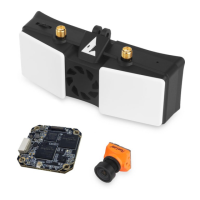
FSV2476 Shark Byte Video Receiver RX5.1
FSV2477 Runcam Nano HD Camera
FSV2478 Shark Byte Video Transmitter TX5M.1
FSV2480 Shark Byte Video Transmitter TX5S.1

Questions and Answers

Summary

Shark Byte Video Transmitter TX5 M.1

Assembly and Disassembly

Instructions for connecting and separating the TX5M.1 VTX circuit boards.

TX5 M.1 Connection Diagram and Installation

Visual guide for connecting the TX5M.1 air unit and installation recommendations for cooling.

TX5 M.1 Specifications

Details on weight, dimensions, operating frequencies, power, and interfaces for the TX5M.1.

Shark Byte Video Transmitter TX5 S.1

TX5 S.1 Connection Diagram

Diagram illustrating how to connect the Shark Byte TX5S.1 air unit to the drone.

TX5 S.1 Specifications

Technical details including weight, dimensions, frequencies, power, and interfaces for the TX5S.1.

Keypad Configuration

Using the keypad to adjust VTX parameters like channel and power, and camera settings.

VTX;PID Configuration by RC Controller

VTX and PID Menu Navigation

Guide to navigating VTX and PID menus using RC controller inputs.

VTX Parameter Adjustments

Explanation of available VTX parameters like Channel, Power, and LP mode.

Camera Parameters via RC

Accessing Camera Setup Menu

Steps to connect with the camera and enter the setup menu using the RC transmitter.

Camera Menu Key Definitions

Explanation of RC controller inputs for navigating camera settings.

50 FPS;60 FPS Switching

System Menu for Frame Rate

Procedure to access the system menu and switch between 50fps and 60fps.

OSD Setup (Betaflight)

Configuration and Port Settings

Setting up UART ports and configuring Betaflight for OSD.

OSD Element Selection

Choosing and arranging OSD elements on the screen via Betaflight.

Receiver and Save Settings

Selecting the active receiver and saving the Betaflight configuration.

Shark Byte Goggle Module

Connecting to Headset

Instructions for connecting the VRX module to a compatible Fat Shark headset.

Operation and Navigation

Powering the VRX, basic operation, and using the 3-way button for navigation.

Automatic Recording

Details on the VRX module's auto-recording feature based on video signal.

Aspect Ratio

Video Output Aspect Ratios

Explanation of how the goggle module handles 16:9 and 4:3 aspect ratios from the VTX.

Firmware Update

VTX Firmware Update

Procedure to update firmware on the TX5M.1 or TX5S.1 video transmitters.

Goggle Module Firmware Update

Steps to update firmware on the Shark Byte VRX goggle module.

Goggle Module Recovery Flash

Procedure to recover the goggle module if it fails to boot.

VRX Module Specifications and Troubleshooting

VRX Module Specifications

Details on VRX module weight, dimensions, frequencies, power input, and operating temperature.

Troubleshooting Common Issues

Solutions for problems like video recording failure, poor reception, and LED status.

Overview

The Fat Shark Shark Byte is a digital HD 720p 60fps video transmission system designed for use with FPV (First Person View) drones and compatible Fat Shark Dominator series video goggles. It comprises a video transmitter (VTX), a Runcam Nano HD camera, and a goggle module (VRX) that functions as a digital HD receiver with DVR capabilities. The system is designed for adults and requires soldering for assembly, making it unsuitable for beginners.

Function Description:

The Shark Byte system transmits digital HD video from a drone-mounted VTX and camera to a VRX module connected to Fat Shark Dominator series goggles. This allows pilots to experience high-quality, low-latency FPV video. The system supports remote control (RC) adjustment of VTX and camera parameters, as well as OSD (On-Screen Display) integration with Betaflight flight controllers. The VRX module also features built-in DVR for recording flight footage onto a Micro SD card.

Important Technical Specifications:

Video Transmitter (VTX) - TX5M.1 (Double Stacked PCB):

  • Video Quality: Digital HD 720p 60fps
  • Transmitting Power: Up to 500mW on 5.8GHz (25mW, 200mW, 500mW selectable)
  • Power Consumption: 25mW: 5.7W, 200mW: 8.2W, 500mW: 10.4W
  • Input Power: 7V - 26V (2S-6S LiPo). Requires a 330µF capacitor in parallel with the power input.
  • Dimensions: VTX: 25 x 32 x 12 mm; Camera: 14 x 14mm (with 19 x 19mm adaptor)
  • Weight: 15.4g (including camera and cable, without antenna); 10.0g (VTX only)
  • Antenna Connector: MMCX
  • IO Interface: MMCX, UART (3.3V), 7-pin SH 1.0 Update Port
  • Mounting Pattern: 20 x 20mm, M2
  • Operating Frequencies (FCC/CE): 5.8GHz band (e.g., CH1: 5660MHz/5735MHz, CH4: 5770MHz/5839MHz)
  • Operating Temperature: 0°-40°C (32°-104°F)
  • Supported Flight Control System: BetaFlight 4.1+ (MultiWii API 1.41+), iNav 2.3+

Video Transmitter (VTX) - TX5S.1 (Single PCB):

  • Video Quality: Digital HD 720p 60fps
  • Transmitting Power: Up to 200mW on 5.8GHz (25mW, 200mW selectable)
  • Power Consumption: 25mW: 5.1W, 200mW: 6.7W
  • Input Power: 7V - 26V (2S-6S LiPo). Requires a 330µF capacitor in parallel with the power input.
  • Dimensions: VTX: 32.5 x 32.5 x 5 mm; Camera: 14 x 14mm (with 19 x 19mm adaptor)
  • Weight: 10.3g (including camera and cable, without antenna); 5.2g (VTX only)
  • Antenna Connector: u.FL
  • IO Interface: u.FL, UART (3.3V), 7-pin SH 1.0 Update Port
  • Mounting Pattern: 20 x 20mm, M2
  • Operating Frequencies (FCC/CE): 5.8GHz band (e.g., CH1: 5660MHz/5735MHz, CH4: 5770MHz/5839MHz)
  • Operating Temperature: 0°-40°C (32°-104°F)
  • Supported Flight Control System: BetaFlight 4.1+ (MultiWii API 1.41+), iNav 2.3+

Runcam Nano HD Camera:

  • Resolution: 720p
  • Frame Rate: 60fps (switchable to 50fps)
  • Connection: MIPI Connector

Shark Byte Goggle Module (VRX) - RX5.1:

  • Function: Digital HD receiver with DVR
  • Compatibility: Fat Shark Dominator series headsets
  • Antennas: Two built-in patch antennas, two external SMA connectors for additional antennas (not included)
  • Input Power: 8-16V (5.5mm barrel connector, center pin positive). Recommended 3S-4S LiPo battery.
  • Output: Mini HDMI
  • Dimensions: 105 x 21 x 39mm
  • Weight: 80.3g
  • Operating Frequencies: 5.725-5.850GHz
  • Operating Temperature: 0°-40°C (32°-104°F)
  • DVR: Records to Micro SD card (up to 200MB free space required to start recording, FAT32 format)

Usage Features:

  • Assembly: The TX5M.1 VTX requires assembling two circuit boards (RF board and BB board) and a Runcam Nano HD camera. The TX5S.1 VTX is a single PCB design. Both require soldering for connections.
  • Power Input: Both VTX models require a 7V-26V (2S-6S) power input with a 330µF capacitor to prevent voltage spikes. The VRX module accepts 8-16V (3S-4S) power.
  • Antenna Connection: The TX5M.1 uses an MMCX antenna connector, while the TX5S.1 uses a u.FL connector. The VRX module uses SMA connectors for external antennas. It is crucial to never power on the VTX without an antenna connected to avoid permanent damage.
  • VTX/Camera Parameter Adjustment:
    • Keypad: A dedicated keypad (5-way joystick for camera, select button for VTX) can be attached to adjust VTX parameters (channel, power level, LP mode) and camera settings (e.g., picture adjust, white balance, day/night, language, reset).
    • RC Controller: VTX parameters (channel, power, LP mode) and PID values (from the flight controller) can be adjusted via the RC controller. Camera parameters cannot be accessed via RC if the keypad is attached.
  • OSD Setup (Betaflight): The system supports OSD integration with Betaflight 4.1+ flight controllers. Users can select a UART port for VTX connection, set the baud rate to 115200, and configure various OSD elements like RSSI, battery voltage, timers, GPS data, and warnings.
  • VRX Operation:
    • Connecting to Headset: The VRX module connects to Fat Shark Dominator series goggles via a Mini HDMI cable.
    • Navigation: A 3-way button on the VRX (L, M, R keys) is used for navigation. Long pressing the L key switches between Video mode (live video output) and Setup mode (settings screen).
    • Auto Recording: In Video mode, recording automatically starts when a solid video signal is received. Recording stops if the SD card is full or when switching to Setup mode.
    • Aspect Ratio: The VRX receives 1280x720 HD video. In 4:3 mode, it outputs 960x720 video by cropping both sides or by adding a scaler.
  • Low Power (LP) Mode: When enabled, the VTX outputs 25mW when the drone is disarmed and the specified RF power when armed. When disabled, the VTX always outputs the specified RF power unless it enters overheat protection mode.

Maintenance Features:

  • Cooling: The VTX generates significant heat. Proper cooling airflow is essential during operation, especially in stationary applications or bench testing, where a small fan is recommended. Overheating can lead to reduced range performance and trigger overheat protection mode.
  • Firmware Update: Firmware for the VTX and VRX module can be updated via a Micro SD card. The firmware files (SharkByte_UserManual_ddmmyy.pdf, TX5M.1.zip, TX5S.1.zip, RX5.zip) must be placed in the root directory of the SD card.
    • VTX Update: Unzip the VTX firmware to the SD card, insert it into the VRX module, connect the VRX to the VTX, power on the VRX, and wait for "Success."
    • Goggle Module Update: Disconnect the VTX, unzip the RX firmware to the SD card, insert it into the VRX module, power on the VRX, and wait for "Success." Do not power off the module during an update.
    • Emergency Goggle Module Flash: If the VRX fails to boot, power it off, unzip the RX firmware to the SD card, insert it, move a switch to the bottom position (using a tweezer), power on, wait for the red LED to turn off (approx. 4 minutes), power off, move the switch back to the top, and re-power.
  • Troubleshooting: The manual provides a troubleshooting guide for common issues like video recording not working (SD card format, free space, signal), poor reception (antenna type, placement, connection, VTX overheating), and the blue LED not lighting up (MMCX/MIPI cable connection).
  • Battery Management: Always check the charge status of batteries before flying, as the VRX and goggles do not have a low voltage alarm. An in-line battery alarm is recommended. Avoid using 5S or 6S batteries with the VRX to prevent damage.
  • Physical Handling: Always press and pull on the actual connectors during assembly or disassembly, never pull on the wires. Use caution when separating circuit boards with a knife.

Fat Shark Shark Byte TX5S.1 Specifications

General IconGeneral
BrandFat Shark
ModelShark Byte TX5S.1
CategoryTransmitter
LanguageEnglish

Related product manuals