INSTALLATION & OPERATION MANUAL
MULTI-FLAVOR MERCHANDISERS
20
Dispense Settings Continued
Item Description
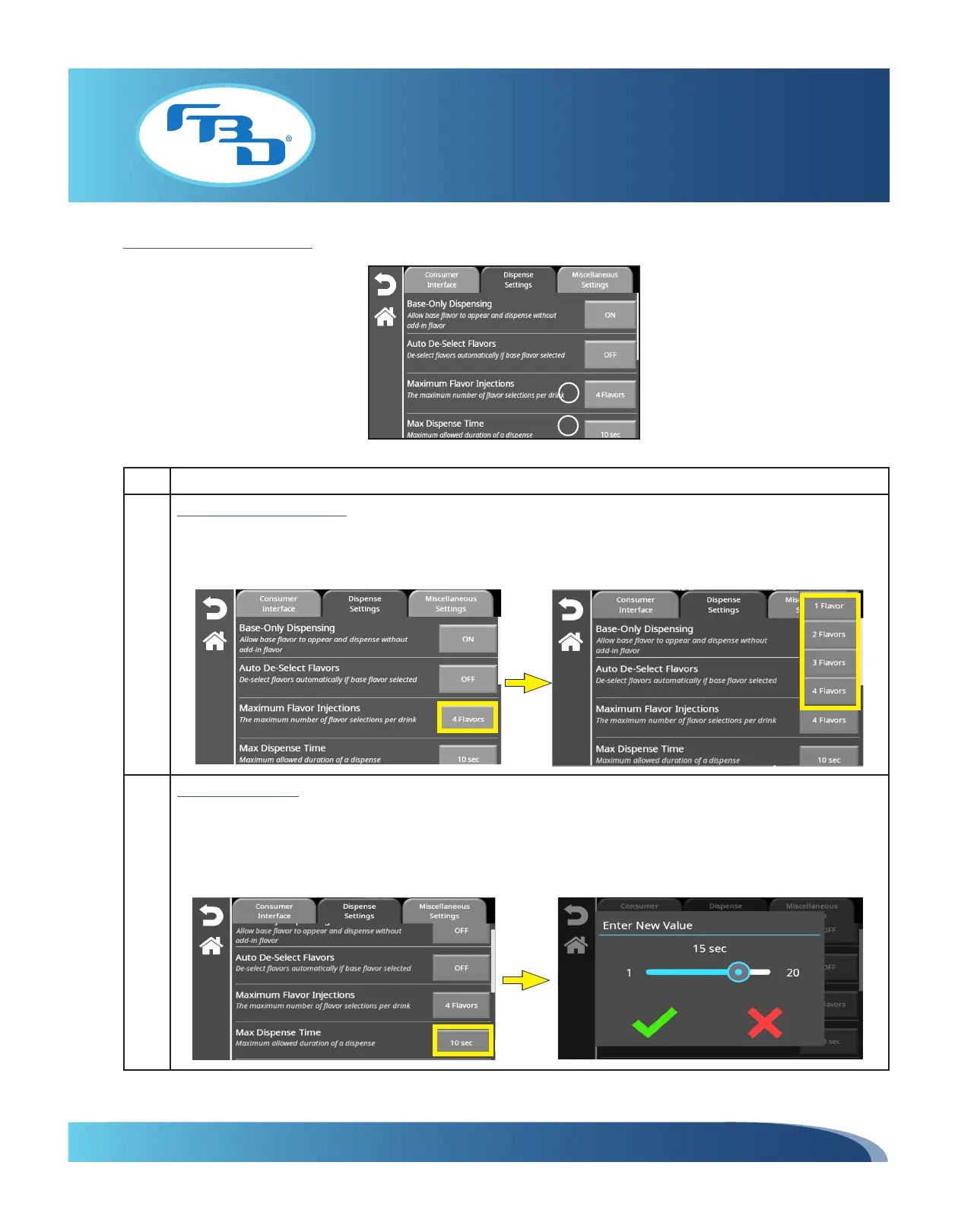
3 Maximum Flavor Injections: Sets the amount of flavor add-ins that can be dispensed with the base flavor. Select
the button next to the option and a drop-down menu will appear that allows the user to choose between 1 to 4
flavors. This is the amount of flavor add-ins that can be selected from the main screen to dispense with the base
flavor.
4 Max Dispense Time: Sets the maximum time that a drink will dispense. Select the button next to the option and a
pop-up window will display a slider bar that allows you to set the time between 1 to 20 seconds. Once a number
has been selected, press the green check mark to confirm the selection. Please note that all drink dispenses will
be based on this number; if the dispense button is pressed longer than the selected time, the dispensing will stop
after the time set up in this option.
3
4



 To Next Page