INR-SI47-1246a
- 3 -
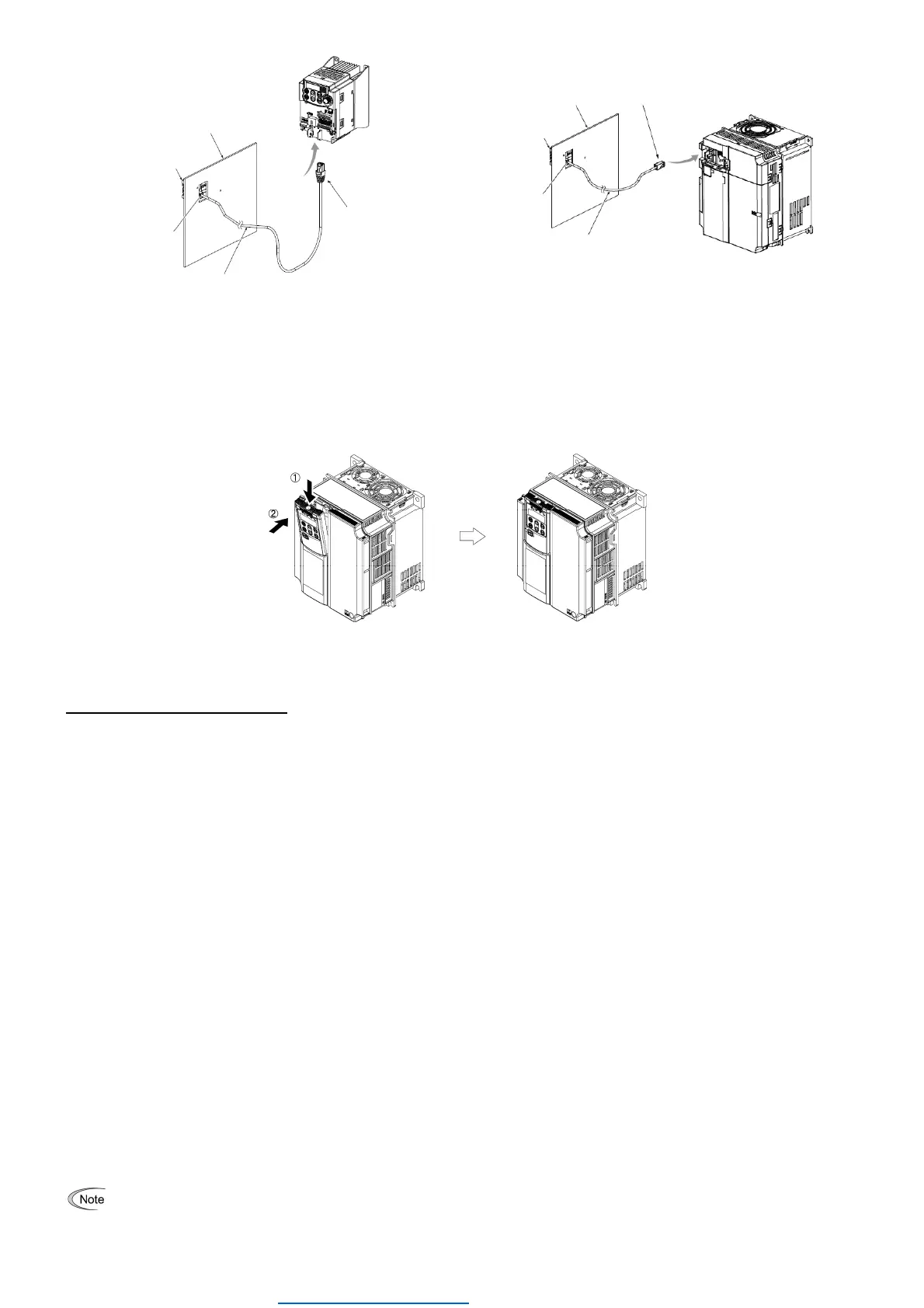
Figure 2.6 Connecting the Remote Keypad to the Inverter
with the Remote Operation Extension Cable or
LAN Cable(In case of FRENIC-Mini series)
Figure 2.7 Connecting the Remote Keypad to the Inverter with
the Remote Operation Extension Cable or LAN
Cable(In case of FRENIC-Ace,VP series)
Mounting the remote keypad on the inverter (Figure 2.8)
Mount the remote keypad on the inverter unit in the direction of arrows and . (In case of FRENIC MEGA series)
Figure 2.8 Mounting the remote keypad on the inverter
(In case of FRENIC-MEGA series)
4. General Specifications
(1) Operating environment
For FRENIC-MEGA or Mini series, refer to their Instruction Manual, Chapter 2, Section 2.1 "Operating Environment."
And for FRENIC-Ace series, refer to its Instruction Manual, Chapter 1, Subsection 1.3.1 "Operating Environment."
(2) Operation method
Refer to the FRENIC-MEGA, Mini, Ace, VP or Lift series Instruction Manual, Chapter 3 "OPERATION USING THE
KEYPAD."
For data copy, refer to the following description.
(3) Copying data -- Menu #7 "Data Copying" --
Menu #7 "Data Copying" is used to read function code data out of an inverter for storing it in the keypad or writing it into
another inverter. It is also used to verify the function code data stored in the keypad with the one configured in the inverter.
The keypad serves as a temporary storage media.
In addition, using Menu #7 allows you to store the running status information in the keypad, detach the keypad from the
inverter, connect it to a PC running FRENIC Loader at an office or off-site place, and check the inverter running status
without removing the inverter itself.
To store the inverter running status information into the keypad, use "Read data" (
read
) or "Read inverter running
information" (
chec
) function. For details on how to connect the keypad to a PC and check the inverter running status
information stored in the keypad, refer to the FRENIC Loader Instruction Manual.
Figure 3 shows the menu transition in Menu #7 "Data Copying." The keypad can hold function code data for a single
inverter.
Table 1 below lists details of the data copying functions.
It is not possible to copy the function code data between different type of inverter (e.g. Mini series and Ace series) .
err
is blinking, if the data is copied between different type of inverter.
RJ-45 connector
(Remote keypad)
RJ-45 connector
(Inverter unit)
Panel
Remote operation extension cable
or LAN cable
Remote keypad
RJ-45 connector
(Remote keypad)
RJ-45 connector
(Inverter unit)
Panel
Remote operation extension cable
or LAN cable
Remote keypad
Dealers Industrial Equipment -- Visit https://DealersElectric.com or call (908) 688-1966 for all of your electric motor & VFD needs!



 To Next Page
 Loading...