FSC-DB200 User Guide
Shenzhen Feasycom Technology Co.,Ltd www.feasycom.com
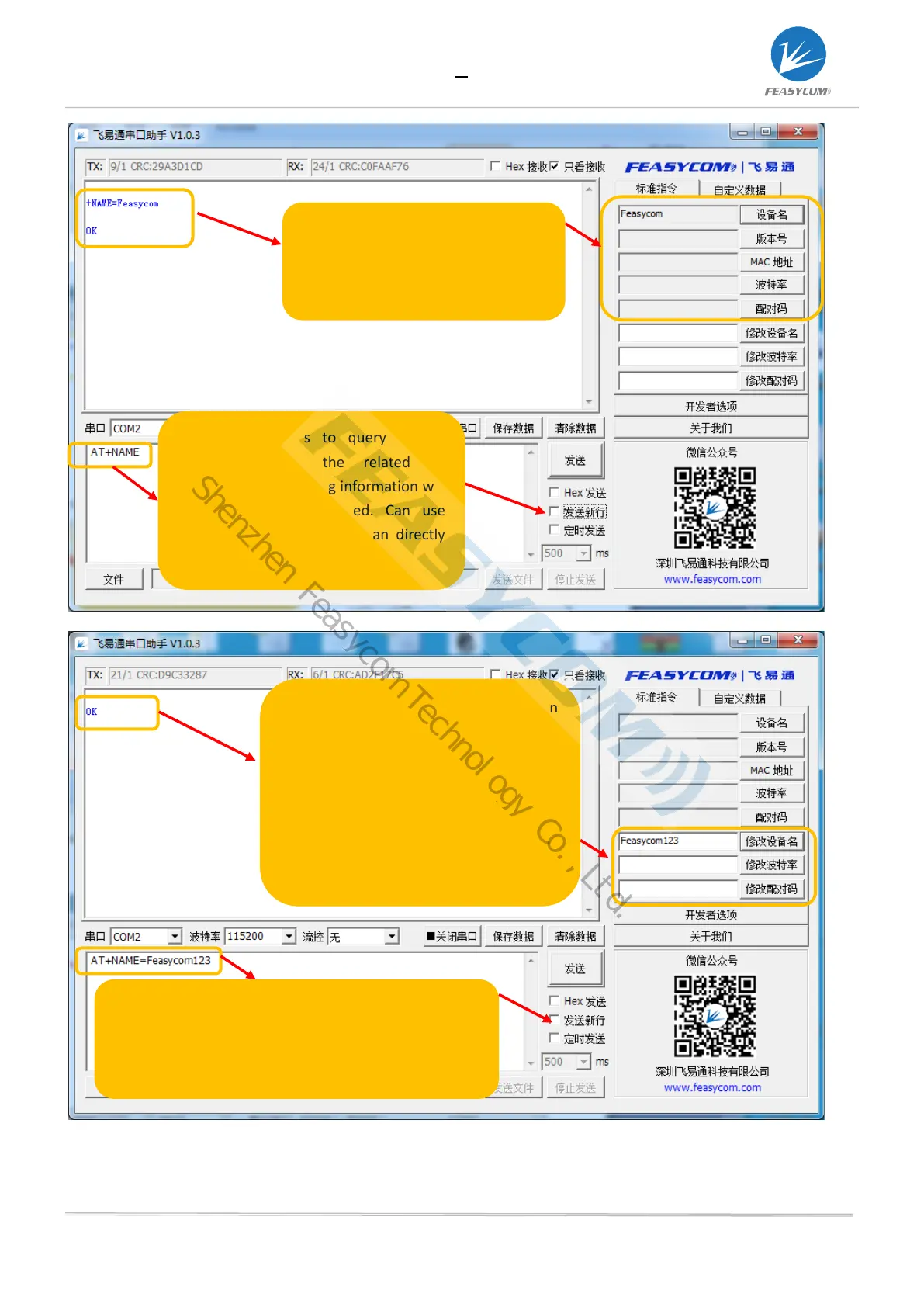
The shortcut keys in the right frame can
modify the basic information of the
module: such as modify the device name,
or directly enter the device name to be
modified in the shortcut box, then click:
modify the device name, and feedback
"ok", indicating that the modification is
successful
Use shortcut keys to modify related information, and the
related AT commands for querying information will be
automatically displayed. Can use shortcut keys to query,
or can directly enter AT commands to query
The shortcut keys in the right frame
can query the basic information of the
module: such as querying the device
name, version, mac address
Use shortcut keys to query related
information, and the related AT
commands for querying information will
be automatically displayed. C
shortcut keys to query, or can directly
enter AT commands to query
Shenzhen Feasycom Technology Co.,Ltd.


 To Next Page